Navy Polygon Business Presentation Template: Dark Banners and Diagram Pages
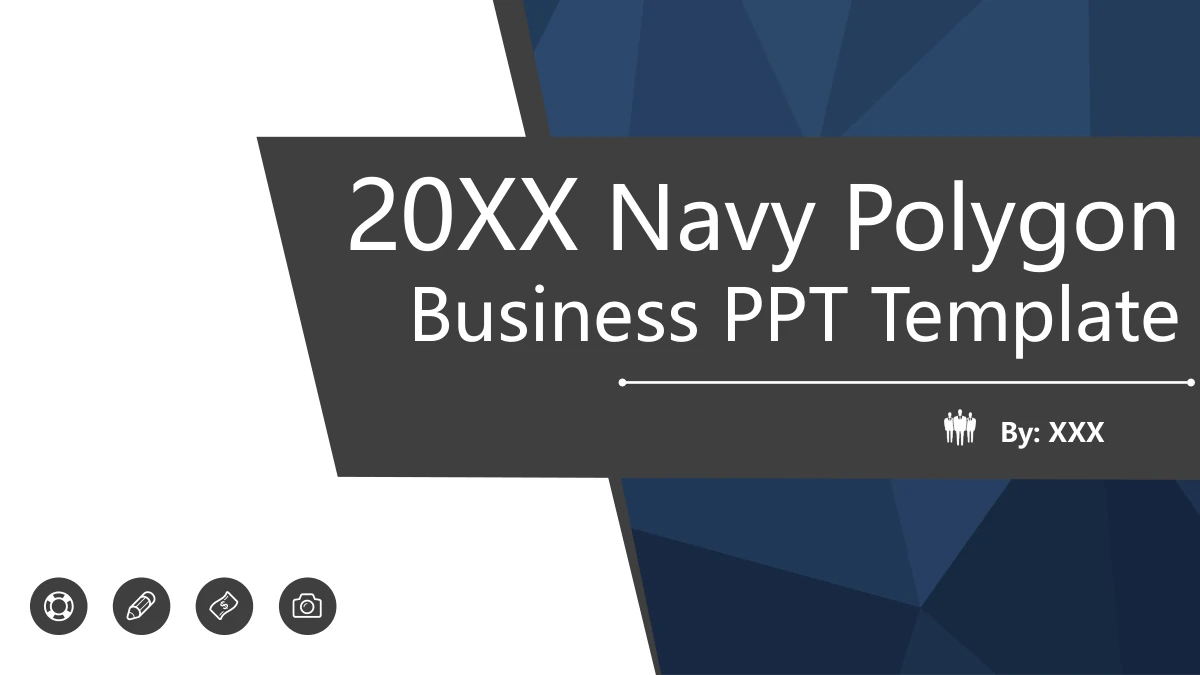
Navy Polygon Business Presentation Template opens with a navy polygon background behind a slanted gray title banner. Four circular icons introduce the agenda, and four matching dividers organize the material. Navy Polygon Business Presentation Template uses white content pages with navy heading strips. Its diagrams include a three-arrow cycle, branching paths, folded ribbons, a puzzle gear and a bulb surrounded by icons. These are layout examples for your explanations, not connected data charts. Navy Polygon Business Presentation Template contains 23 widescreen slides and finishes with a matching Thank You page. Replace the short English title prompts with your own business headings, then choose diagrams that express a clear relationship. The original 20XX year and numbered examples are placeholders. Keep explanations brief around the shapes. The file also includes a business-person silhouette graphic and decorative images; their internal artwork is not a set of separate text boxes.
Key Features of Navy Polygon Business Presentation Template
Navy Polygon Business Presentation Template combines a polygon cover, four section dividers and varied diagram pages for a concise business presentation.
Navy Polygons and Slanted Banners
Navy Polygon Business Presentation Template uses a navy polygon cover with a dark slanted banner. Add a short title and keep the original icon row and white space.
Four Matching Section Dividers
Navy Polygon Business Presentation Template separates four parts with dark banners and circular icons. Match the agenda labels and divider headings to your outline.
Arrow Cycles and Branching Paths
Navy Polygon Business Presentation Template includes recycling arrows and branching paths. Use short labels to show a sequence or a clear relationship.
Puzzle Gears and a Bulb Layout
Navy Polygon Business Presentation Template pairs a four-part puzzle gear with a bulb diagram. Keep each point brief and the central message clear.
Numbered Ribbons and Icon Rows
Navy Polygon Business Presentation Template uses numbered ribbons and linked icon rows. Update the labels together so the order and meaning stay easy to follow.
English Prompts and Original Artwork
Navy Polygon Business Presentation Template has editable English prompts beside original graphics. Replace sample wording and check grouped objects before editing.
How to Use Navy Polygon Business Presentation Template
Preview Navy Polygon Business Presentation Template, select useful diagram pages and replace the English prompts with a clear business outline.
-
Choose Your Diagram Pages
Browse Navy Polygon Business Presentation Template in order. Pick the cycles, branches and icon rows that support your outline, then write one specific message for each selected page.
-
Download a Working Copy
Navy Polygon Business Presentation Template requires an active paid plan to download. Save the English PPTX and edit a copy keeping the original banners and diagram examples for reference.
-
Edit and Share Your Slides
Open Navy Polygon Business Presentation Template in PowerPoint. Replace titles and short prompts, check labels around the diagrams, then save your edited PPTX or export a PDF to share.
Questions about Navy Polygon Business Presentation Template
How do I download Navy Polygon Business Presentation Template?
An active paid plan is required to download Navy Polygon Business Presentation Template. Daily downloads are unlimited, including repeat downloads. Keep an unchanged Navy Polygon Business Presentation Template file and edit a working copy. You can return to the original navy cover, divider icons and diagram labels in Navy Polygon Business Presentation Template when comparing a revision or beginning another business presentation.
How many slides does Navy Polygon Business Presentation Template include?
Navy Polygon Business Presentation Template contains 23 widescreen slides in a 16:9 layout. The four section dividers are on pages 3, 8, 13 and 18; page 23 is Thank You. The gallery of Navy Polygon Business Presentation Template preserves the full sequence. Choose the pages of Navy Polygon Business Presentation Template that fit your outline, keeping only the cycles, branches or comparisons you need.
Can I edit the diagrams in Navy Polygon Business Presentation Template?
The English headings and native shapes in Navy Polygon Business Presentation Template are editable. Its arrow cycles, rings and numbered ribbons are manual diagram layouts, with no data chart or linked workbook. Change shapes and labels together in Navy Polygon Business Presentation Template when your sequence or comparison changes. Original decorative images and the silhouette remain graphics; their internal details are not individual editable text objects. Review grouped objects in Navy Polygon Business Presentation Template before making broad changes.
Can I preview all of Navy Polygon Business Presentation Template before downloading?
The gallery shows all 23 pages of Navy Polygon Business Presentation Template. Enlarge the four-part gear, curved arrow column and bulb layout to check how much explanation each can hold. Compare the numbered ribbons and section icons in Navy Polygon Business Presentation Template with your outline. Review small labels at your intended presentation size; the diagrams in Navy Polygon Business Presentation Template are examples to adapt, not verified business findings.
Will Navy Polygon Business Presentation Template work in another editor?
An editor with PPTX support may import Navy Polygon Business Presentation Template. Compare the slanted cover banner, folded ribbon shadows and curved connectors with the preview. Keep the original Navy Polygon Business Presentation Template file while testing. Review grouped shapes, text wrapping and the silhouette after import, then inspect any PDF exported from your edited Navy Polygon Business Presentation Template presentation.
Which fonts does Navy Polygon Business Presentation Template use?
The rendered English text in Navy Polygon Business Presentation Template uses Microsoft YaHei Regular and Bold, Calibri Regular, Impact, Arial Black, Bauhaus 93 and Arial Rounded MT Bold. Original bullet symbols use Arial Regular. Fonts are not embedded. Keep the original fonts in Navy Polygon Business Presentation Template, or choose replacements and review the layout. If your editor substitutes a font, check the agenda title, numbered ribbons and small labels in Navy Polygon Business Presentation Template for new line breaks.
Does selecting a website language translate Navy Polygon Business Presentation Template?
The language selector translates the website information about Navy Polygon Business Presentation Template. Every language version downloads the same English PPTX. Editable headings and layout prompts in Navy Polygon Business Presentation Template are English, while the original graphics and year examples remain. To translate Navy Polygon Business Presentation Template itself, edit a copy and check the space around short labels and the four section banners.
Can I use Navy Polygon Business Presentation Template commercially?
Check the terms for Navy Polygon Business Presentation Template and the rights to any illustrations or decorative images you retain. Paid access grants no additional third-party rights. Navy Polygon Business Presentation Template includes original polygon artwork, a silhouette and gear imagery. Verify the materials and any replacements before distributing an edited Navy Polygon Business Presentation Template file or using its graphics in a public business presentation.
How do I share Navy Polygon Business Presentation Template?
Use the share buttons on the Navy Polygon Business Presentation Template page or copy its page URL. Recipients can preview Navy Polygon Business Presentation Template; downloading requires their own active paid plan. Share your completed business presentation as an edited PPTX or exported PDF under the applicable terms. A Navy Polygon Business Presentation Template page link shows the original template design.