Orange Diamond Work Summary Presentation Template: Review Work in Four Parts
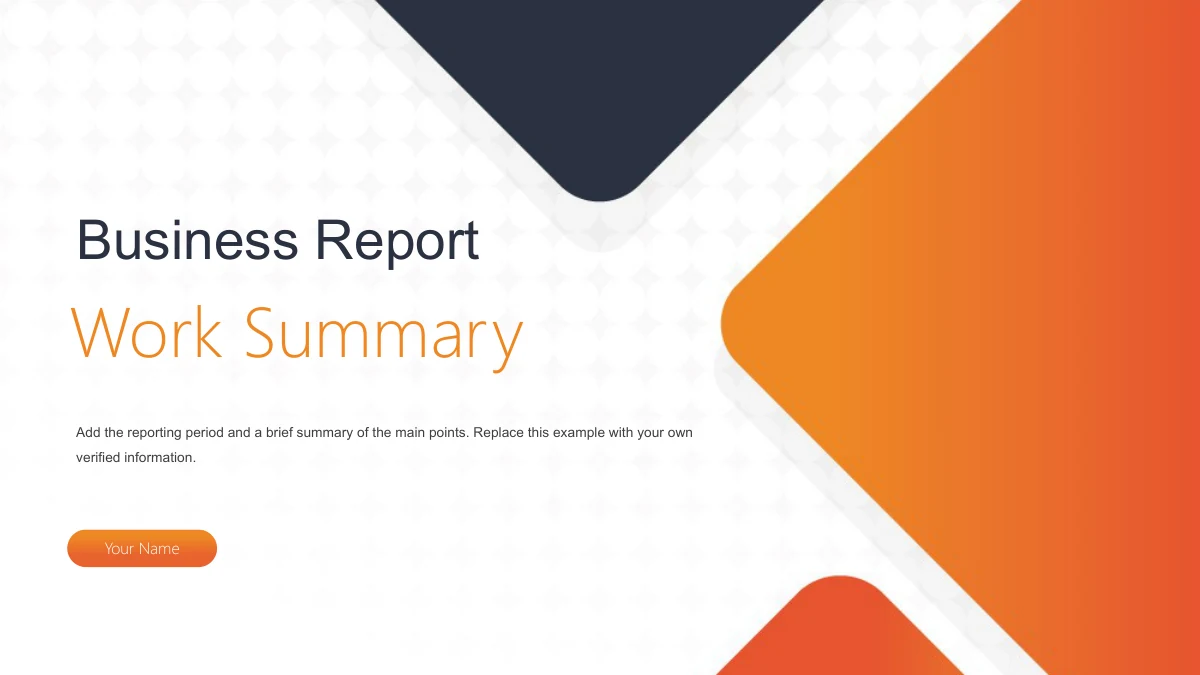
Orange Diamond Work Summary Presentation Template combines rounded orange and navy diamonds with office imagery in a 19-slide, 16:9 file. The Business Report cover introduces Work Summary and a presenter field. Orange Diamond Work Summary Presentation Template then moves through Work Review, Work Data, Work Gaps and Work Plan, with dividers on slides 3, 7, 11 and 15. Inside these sections, photos sit beside icon notes, chevron rows and numbered cards. Four angled panels contain 25%, 15%, 36% and 24%; another photo layout holds an 88% text shape. These are examples to replace with your own verified figures. Orange Diamond Work Summary Presentation Template closes with Thank You. Start by deciding what the reporting period needs to explain, then select the pages that serve that outline. The original office photographs and laptop frame provide context, while your evidence and wording supply the actual review.
Key Features of Orange Diamond Work Summary Presentation Template
Four sections, office photos and editable notes
Orange and Navy Diamonds
Orange Diamond Work Summary Presentation Template uses orange gradients, navy diamonds and a pale circular texture to connect the cover with four chapter dividers.
Four Review Sections
Orange Diamond Work Summary Presentation Template separates review, data, gaps and plans with four dividers. Match the contents to your chapter labels after editing.
Manual Percentage Layouts
Orange Diamond Work Summary Presentation Template has four angled percentage panels and an 88% photo overlay. Edit these manual text shapes using verified figures.
Icon Notes and Arrow Rows
Orange Diamond Work Summary Presentation Template offers six-note grids, chevron rows and numbered cards. Match the icons and short headings to your own evidence.
Office Photos and Device Frame
Orange Diamond Work Summary Presentation Template places desk photos beside notes and a handshake photo in a laptop frame. Check the crop when replacing an image.
Text You Can Adapt
Orange Diamond Work Summary Presentation Template has English example text and presenter fields. Replace the samples, then check headings, spacing and fonts.
How to Use Orange Diamond Work Summary Presentation Template
Preview, download and prepare your own review
-
Preview the 19 Pages
Preview all 19 pages of Orange Diamond Work Summary Presentation Template. Compare the photo crops, arrow rows and numbered cards, then choose layouts that suit your own review.
-
Download the English File
Sign in with an active paid plan to download Orange Diamond Work Summary Presentation Template. Paid members have unlimited daily downloads. Save a separate working copy before editing.
-
Edit, Check and Share
Edit Orange Diamond Work Summary Presentation Template in PowerPoint. Replace the sample text and percentages, review the fonts, then check your PDF export and share the finished version.
Questions About Orange Diamond Work Summary Presentation Template
How do I download Orange Diamond Work Summary Presentation Template?
With an active paid plan, choose Download PPTX on the Orange Diamond Work Summary Presentation Template page. Daily downloads are unlimited, including repeats. Save a working copy of Orange Diamond Work Summary Presentation Template for editing. Keep the original Orange Diamond Work Summary Presentation Template file to compare section order, picture crops and layouts.
How many slides are in Orange Diamond Work Summary Presentation Template?
The Orange Diamond Work Summary Presentation Template file has 19 slides in 16:9. Dividers appear on slides 3, 7, 11 and 15; slide 19 is Thank You. Use fewer pages from Orange Diamond Work Summary Presentation Template or duplicate a layout for additional evidence. The contents of Orange Diamond Work Summary Presentation Template should match your finished sequence.
Can I change the text and colors in Orange Diamond Work Summary Presentation Template?
Edit the text, percentages and native shape colors in Orange Diamond Work Summary Presentation Template using PowerPoint. Orange Diamond Work Summary Presentation Template has manual percentage panels, without workbook charts, so replace each figure yourself. Check contrast against the photos. Printed lettering on photographed objects in Orange Diamond Work Summary Presentation Template belongs to the picture and is not editable slide text.
Can I preview every page of Orange Diamond Work Summary Presentation Template?
The gallery shows all 19 pages of Orange Diamond Work Summary Presentation Template. Use thumbnails and navigation controls to inspect the cover, dividers, percentage layouts and closing page. Compare Orange Diamond Work Summary Presentation Template with your outline, including text space beside photos. The website previews of Orange Diamond Work Summary Presentation Template are static images; they do not demonstrate PPTX animation playback.
Can I edit Orange Diamond Work Summary Presentation Template in another presentation app?
Other PPTX editors may open Orange Diamond Work Summary Presentation Template, but fonts, crops, effects and animation behavior can vary. Test a copy of Orange Diamond Work Summary Presentation Template in your chosen app. Compare the diamonds, laptop frame and small labels with the previews. Keep a PowerPoint copy of Orange Diamond Work Summary Presentation Template and check your PDF export before sharing.
Which fonts does Orange Diamond Work Summary Presentation Template use?
Orange Diamond Work Summary Presentation Template uses Microsoft YaHei Light and Arial. Install matching fonts before opening Orange Diamond Work Summary Presentation Template, then check line breaks and narrow labels. Some text has bold styling while retaining the Microsoft YaHei Light family. Fonts are not embedded in Orange Diamond Work Summary Presentation Template, and substitutes may alter spacing.
Is the slide text in Orange Diamond Work Summary Presentation Template translated?
The editable titles and body copy in Orange Diamond Work Summary Presentation Template are English. Every website language downloads the same English Orange Diamond Work Summary Presentation Template PPTX. Tiny printing on photographed objects remains as photographed; translating this page does not replace those pictures. Adapt the editable examples in Orange Diamond Work Summary Presentation Template to your audience and reporting period.
Can I use Orange Diamond Work Summary Presentation Template commercially?
A paid plan gives download access, without extra rights to every photo, product mark or artwork. Check source-image and added-asset permissions before using Orange Diamond Work Summary Presentation Template commercially. Keep required credits in Orange Diamond Work Summary Presentation Template. Replace any picture whose permission does not cover your intended use of Orange Diamond Work Summary Presentation Template, and verify your finished review.
How do I share Orange Diamond Work Summary Presentation Template?
Use the Share button to copy the Orange Diamond Work Summary Presentation Template page URL for someone who needs the preview or download. Linking to Orange Diamond Work Summary Presentation Template keeps the gallery available without sending the editable file. Share your finished PDF or working copy with permissions that cover the source images in Orange Diamond Work Summary Presentation Template.