Nebulla Presentation Template: Give Your Story a Clear Orbit
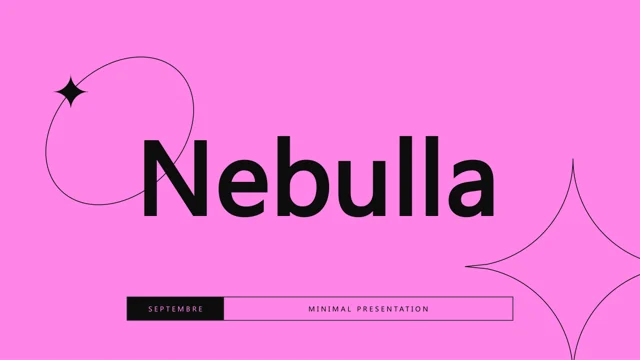
Nebulla Presentation Template offers 35 pink-and-purple abstract slides in a 1.78:1 format. Its index covers company identity, a founder statement, milestones, services, prices and work. Nebulla Presentation Template also includes optional vlogger and podcast examples. Choose a coherent route through these layouts. Replace the sample organization and creator details in Nebulla Presentation Template, update dates and distinguish completed milestones from future plans. The gallery shows the original sequence before your edits.
Key Features of Nebulla Presentation Template
Identity, progress and work in pink and purple.
Editable index
Update chapter references in Nebulla Presentation Template.
Company identity
Nebulla Presentation Template includes mission, vision and values.
Founder statement
Add an approved founder message to Nebulla Presentation Template.
Milestones
Connect dates with outcomes in Nebulla Presentation Template.
Creator layouts
Adapt optional vlogger and podcast pages in Nebulla Presentation Template.
Abstract styling
Nebulla Presentation Template carries pink and purple through 35 slides.
How to Use Nebulla Presentation Template
Choose a clear route in three steps.
-
Plan the story
Pick relevant company or creator pages in Nebulla Presentation Template.
-
Download
Get Nebulla Presentation Template with a paid plan. Daily downloads are unlimited.
-
Update the sequence
Replace names and dates in Nebulla Presentation Template; update the index.
Questions About Nebulla Presentation Template
How can I download Nebulla Presentation Template?
Sign in with an active paid plan to download Nebulla Presentation Template. Downloads have no daily limit; keep the source file separately.
How many slides does Nebulla Presentation Template include?
Nebulla Presentation Template contains 35 slides at 1.78:1. Select the chapters that belong to your story.
Can I edit the index in Nebulla Presentation Template?
Yes. Revise the editable index in Nebulla Presentation Template after moving or removing pages so references match the final sequence.
Can I preview all pages of Nebulla Presentation Template?
Use the thumbnails or arrows to browse every slide in Nebulla Presentation Template. Inspect smaller chapter labels in the enlarged preview.
Which fonts does Nebulla Presentation Template list?
Nebulla Presentation Template uses Poppins, Poppins Medium, 微软雅黑, 等线. Check longer headings after changing fonts.
Must I keep the creator pages in Nebulla Presentation Template?
No. The vlogger and podcast pages in Nebulla Presentation Template are optional examples. Replace their topic, name and supporting copy together.
Are the slide examples in Nebulla Presentation Template translated?
Nebulla Presentation Template keeps the original English examples. Translate your working copy and check repeated labels as well as paragraphs.
Can Nebulla Presentation Template be used commercially?
Read the source license and image permissions before circulating Nebulla Presentation Template commercially. Paid access grants no extra rights.
How do I share Nebulla Presentation Template?
Share the page link to show the original Nebulla Presentation Template previews. Share your own PPTX or PDF to show the revised story.