Holographic Bear Event Planning Presentation Template: Rainbow Characters and Four Event Sections
Holographic Bear Event Planning Presentation Template pairs a rainbow bear with a black question-mark box, wireframe spheres and liquid textures. Grainy pink, lilac and cyan backgrounds alternate with dark panels across 20 widescreen slides. Holographic Bear Event Planning Presentation Template organizes an event overview, planning, interaction and expected outcomes through four numbered dividers. White cards, orbital diagrams and curved paths help separate ideas, activities and responsibilities. Holographic Bear Event Planning Presentation Template also includes manual percentage layouts, triangular compositions and a matching closing page. The bear, metallic surfaces and spheres are pictures rather than editable 3D models. Replace sample figures with your own planning information, keep labels brief and check contrast on dark backgrounds. Choose only the layouts that explain your event clearly, then make the contents, section numbers and final summary agree.
Key Features of Holographic Bear Event Planning Presentation Template
Pastel gradients, dark panels and four clear event sections.
Rainbow Bear Cover
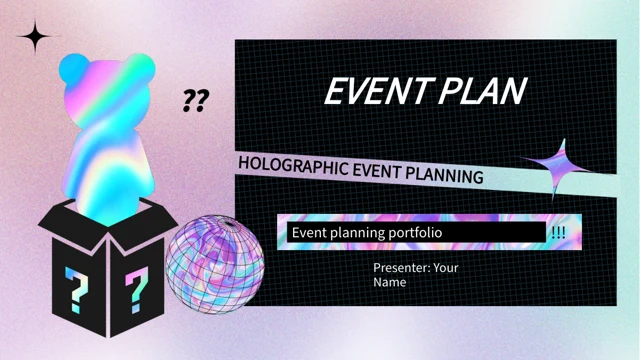
Holographic Bear Event Planning Presentation Template opens with a bear and question-mark box. Keep the picture clear and fit your event title within the dark panels.
Four Event Sections
Holographic Bear Event Planning Presentation Template has four numbered dividers. Connect the overview, planning, interaction and outcomes to your event agenda.
Liquid Textures and Gradients
Holographic Bear Event Planning Presentation Template combines liquid images with grainy pastel fields. Use the dark panels to keep short headings distinct.
Cards and Orbit Layouts
Holographic Bear Event Planning Presentation Template offers numbered cards and orbital diagrams. Assign one activity or responsibility to each labeled area.
Curved Paths and Triangles
Holographic Bear Event Planning Presentation Template includes a curved route and triangular compositions. Explain relationships with concise, connected notes.
Manual Percentage Examples
Holographic Bear Event Planning Presentation Template shows manually arranged percentages. Replace the figures and their labels together; no data chart updates them.
How to Use Holographic Bear Event Planning Presentation Template
Organize the event, update examples and check every label.
-
Arrange the Event Sections
Preview all 20 pages of Holographic Bear Event Planning Presentation Template. Select layouts for the overview, planning, interaction and outcomes, then align the contents with your chosen order.
-
Download and Personalize
Get Holographic Bear Event Planning Presentation Template with an active paid plan; daily and repeat downloads are unlimited. Edit a copy, add your agenda and replace the example figures.
-
Check Labels and Contrast
Review Holographic Bear Event Planning Presentation Template at full size. Check white headings, card numbers and manual percentages, then inspect the exported version before presenting.
Questions About Holographic Bear Event Planning Presentation Template
How do I download Holographic Bear Event Planning Presentation Template?
Sign in with an active paid plan to download Holographic Bear Event Planning Presentation Template. Downloads of Holographic Bear Event Planning Presentation Template are unlimited, and repeat downloads are allowed. Holographic Bear Event Planning Presentation Template is supplied as an editable PowerPoint file. Open your downloaded copy before making changes to Holographic Bear Event Planning Presentation Template, and keep an untouched Holographic Bear Event Planning Presentation Template copy for reference.
What is included in Holographic Bear Event Planning Presentation Template?
Holographic Bear Event Planning Presentation Template contains 20 widescreen slides in a 16:9 format. Holographic Bear Event Planning Presentation Template includes a cover, contents, four section dividers, planning layouts and a closing page. The gallery shows every page of Holographic Bear Event Planning Presentation Template. Select Holographic Bear Event Planning Presentation Template layouts that support your event rather than using every page automatically.
How are the sections in Holographic Bear Event Planning Presentation Template arranged?
Holographic Bear Event Planning Presentation Template uses numbered dividers on pages 3, 8, 11 and 16. These introduce the event overview, planning, interaction and expected outcomes in Holographic Bear Event Planning Presentation Template. Rename Holographic Bear Event Planning Presentation Template sections to match your agenda and keep the Holographic Bear Event Planning Presentation Template contents consistent. You can reorder selected pages of Holographic Bear Event Planning Presentation Template without treating the sample structure as a fixed event schedule.
Are the bear and spheres in Holographic Bear Event Planning Presentation Template editable 3D objects?
The bear, spheres and liquid surfaces in Holographic Bear Event Planning Presentation Template are static pictures, not editable 3D models. You can adjust their size and placement in Holographic Bear Event Planning Presentation Template using ordinary picture controls. Keep picture proportions intact in Holographic Bear Event Planning Presentation Template. Replace an image in Holographic Bear Event Planning Presentation Template only after checking its crop, transparency and relationship to nearby text.
Do the percentage layouts in Holographic Bear Event Planning Presentation Template update automatically?
Holographic Bear Event Planning Presentation Template has no native data charts, tables or embedded workbooks. The 20% and 80% examples, and the 35%, 60% and 55% figures in Holographic Bear Event Planning Presentation Template, are manually arranged content. Update Holographic Bear Event Planning Presentation Template numbers and labels together. Review every figure in Holographic Bear Event Planning Presentation Template against your own information before presenting.
Which layouts in Holographic Bear Event Planning Presentation Template suit activity planning?
Holographic Bear Event Planning Presentation Template offers numbered cards, orbit diagrams, a curved route and triangular arrangements. Use these pages of Holographic Bear Event Planning Presentation Template to group activities, show relationships or assign responsibilities. Holographic Bear Event Planning Presentation Template does not calculate a schedule or track tasks automatically. Keep each Holographic Bear Event Planning Presentation Template label specific and avoid suggesting that decorative connections represent measured data.
Which fonts does Holographic Bear Event Planning Presentation Template use?
Holographic Bear Event Planning Presentation Template uses Source Han Sans SC Regular for its visible text. Holographic Bear Event Planning Presentation Template retains three source DengXian font attachments, but the new Source Han font is not embedded. Install the matching font for Holographic Bear Event Planning Presentation Template if Holographic Bear Event Planning Presentation Template opens with substitutions. Check Holographic Bear Event Planning Presentation Template line breaks and spacing again after exporting, especially inside narrow cards and dark title panels.
Can I change the text and colors in Holographic Bear Event Planning Presentation Template?
Holographic Bear Event Planning Presentation Template provides English sample guidance that you can replace with your own event details. Edit text and shape colors in Holographic Bear Event Planning Presentation Template, while remembering that colors inside pictures are part of those images. Keep enough contrast in Holographic Bear Event Planning Presentation Template between labels and their backgrounds. Review Holographic Bear Event Planning Presentation Template after any font, color or image change so the information remains legible.
What should I review before presenting Holographic Bear Event Planning Presentation Template?
Check the contents, four section numbers, activity labels and closing message in Holographic Bear Event Planning Presentation Template. Replace all sample figures in Holographic Bear Event Planning Presentation Template with verified information. Inspect Holographic Bear Event Planning Presentation Template image crops, white text on black panels and small labels at full size. Compare your exported presentation with the editable Holographic Bear Event Planning Presentation Template file before sharing it with your audience.