Neon Designer Portfolio Presentation Template: a bright frame for your design story
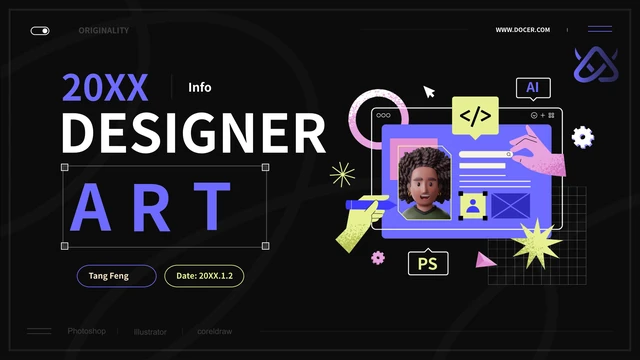
Neon Designer Portfolio Presentation Template combines dark covers and dividers with pale content pages. Purple, pink and fluorescent yellow-green graphics suggest a designer's digital workspace. Neon Designer Portfolio Presentation Template has four chapters for personal details, skills, experience and your approach to a design role. Clipped-corner panels hold short explanations beside bold headings. Neon Designer Portfolio Presentation Template pairs a cartoon portrait with profile fields and places monochrome surreal pictures beside project notes. The portrait remains a static picture. Neon Designer Portfolio Presentation Template includes two doughnut charts and a percent-stacked horizontal bar chart with linked data. Other large figures are separate text examples. Explain your own work with evidence, keep project captions brief and match the contents to the pages you retain. The closing slide returns to the cover's designer illustration.
Key Features of Neon Designer Portfolio Presentation Template
A profile, your projects and evidence for your skills.
Dark and Light Pages
Neon Designer Portfolio Presentation Template alternates dark dividers with pale pages. Keep text readable against each background when introducing your work.
Four Profile Chapters
Neon Designer Portfolio Presentation Template separates profile, skills, experience and roles. Match each section to your work and revise the contents as needed.
Neon Interface Art
Neon Designer Portfolio Presentation Template uses purple and yellow-green UI graphics. Pair these visual accents with brief notes about your design decisions.
Project Note Cards
Neon Designer Portfolio Presentation Template places three cards beside a picture. Give each a project title and short note to explain your contribution.
Editable Charts
Neon Designer Portfolio Presentation Template has two doughnuts and a percent-stacked bar chart. Edit their data, then check nearby figures, which are separate text.
Personal Details
Neon Designer Portfolio Presentation Template pairs a portrait with six profile fields. Add relevant facts about yourself while retaining source attribution.
How to Use Neon Designer Portfolio Presentation Template
Choose the pages that explain your work clearly.
-
Review the Sequence
Examine all 15 pages of Neon Designer Portfolio Presentation Template. Decide which profile and project layouts suit your work, then plan the four chapters before replacing sample text.
-
Get Your Working Copy
Sign in with an active paid plan to download Neon Designer Portfolio Presentation Template. Keep the downloaded file and edit a separate copy. Paid members can download it again without a daily limit.
-
Add Your Own Evidence
Adapt Neon Designer Portfolio Presentation Template with your projects and verified data. Recheck chart labels and separate figures, then export a PDF and review every page before sharing.
Questions about Neon Designer Portfolio Presentation Template
How can I download Neon Designer Portfolio Presentation Template?
Start with the complete public gallery of Neon Designer Portfolio Presentation Template to decide whether its layouts suit your work. Choose an active paid plan, sign in and use the download button to obtain Neon Designer Portfolio Presentation Template as an English PowerPoint file. Paid members may download Neon Designer Portfolio Presentation Template repeatedly without a daily limit. Keep the downloaded Neon Designer Portfolio Presentation Template file and edit a separate copy for your projects.
How many pages are in Neon Designer Portfolio Presentation Template?
Neon Designer Portfolio Presentation Template contains 15 widescreen slides in a 16:9 format, including a cover, contents and matching closing page. Four dividers on pages 3, 6, 9 and 12 organize Neon Designer Portfolio Presentation Template around personal information, skills, experience and your approach to a design role. Choose the pages of Neon Designer Portfolio Presentation Template that support your own story, and update the contents if you change their order.
What can I change in Neon Designer Portfolio Presentation Template?
The text boxes, colored panels and three native charts in Neon Designer Portfolio Presentation Template remain editable, so you can add your own headings, explanations and chart data. Neon Designer Portfolio Presentation Template keeps the portrait and surreal pictures as images, and lettering inside a picture does not become a separate text box. When editing Neon Designer Portfolio Presentation Template, review the linked chart data and separately typed figures, replace example personal details with relevant facts and preserve source attribution.
Can I view every slide of Neon Designer Portfolio Presentation Template?
All 15 pages of Neon Designer Portfolio Presentation Template are available in the public preview without purchasing a paid plan. Move through the gallery to see how Neon Designer Portfolio Presentation Template switches between dark dividers and light content pages, then enlarge any layout whose text or chart you want to inspect. The full preview of Neon Designer Portfolio Presentation Template lets you compare the profile panel, three project cards and chart layouts before choosing the downloadable file.
Does Neon Designer Portfolio Presentation Template work in other editors?
Neon Designer Portfolio Presentation Template comes as a PPTX file, which another presentation editor may import when it supports that format. Before relying on an imported Neon Designer Portfolio Presentation Template, check each page for font changes, picture crops, clipped-corner panels and chart behavior. Keep a PowerPoint copy of Neon Designer Portfolio Presentation Template as a reference, and compare an exported PDF with the slide view before sending your work to someone else.
Which fonts appear in Neon Designer Portfolio Presentation Template?
Neon Designer Portfolio Presentation Template uses Source Han Sans CN Bold and Normal, with Arial also appearing in the source layout; the file additionally contains the Medium face. Neon Designer Portfolio Presentation Template retains the original three embedded font resources with their font notices: Normal and Medium use OFL 1.1, while Bold uses Apache 2.0. These permissions concern the fonts rather than the complete design or images, so check line breaks if your editor substitutes a face when opening Neon Designer Portfolio Presentation Template.
What language is the file for Neon Designer Portfolio Presentation Template?
The slide headings, sample body text and example chart labels in Neon Designer Portfolio Presentation Template are in English. Each translated website page describes that same English Neon Designer Portfolio Presentation Template, rather than a separate PPTX for every site language. Neon Designer Portfolio Presentation Template retains source names such as Tang Feng and Docer, font names and original lettering inside pictures, so you can translate your own editable project notes while keeping the source information intact.
Can I use Neon Designer Portfolio Presentation Template commercially?
Downloading Neon Designer Portfolio Presentation Template with a paid plan does not grant additional rights to its design, illustrations or other third-party material. The complete design and image permissions for Neon Designer Portfolio Presentation Template have not been independently confirmed, and the embedded font licences apply only to the fonts. Before using Neon Designer Portfolio Presentation Template for client or commercial work, verify permission for the material you retain, preserve applicable attribution and licences, and use your own authorized project images where appropriate.
How do I share Neon Designer Portfolio Presentation Template?
Use this page’s share controls or copy its canonical URL to show someone the complete public preview of Neon Designer Portfolio Presentation Template. Anyone downloading Neon Designer Portfolio Presentation Template needs their own signed-in account with an active paid plan. For your finished version of Neon Designer Portfolio Presentation Template, export a PDF after checking the charts and captions, retain required source attribution and licences, and confirm that you may share the project images and other material you included.