Olive Photography Portfolio Presentation Template: portraits and plant details in warm rectangular panels
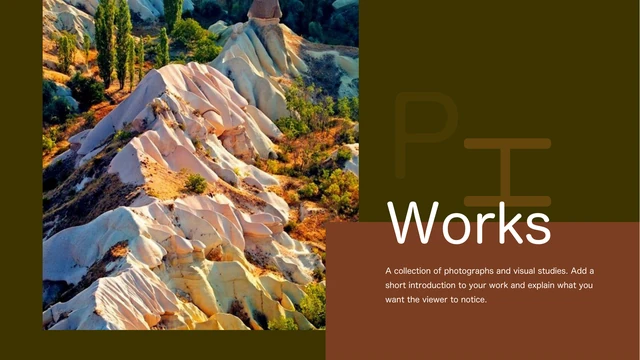
Olive Photography Portfolio Presentation Template opens with a tall rock photograph beside olive and brown panels. Its 15 widescreen slides move from a cover and introduction into four numbered series. Olive Photography Portfolio Presentation Template repeats a rock-photo band above the dividers, then varies each project’s picture and note positions. A street portrait has text on both sides, while a three-photo row compares flowers and leaf textures. Olive Photography Portfolio Presentation Template also pairs a portrait with a flower-painting image, combines hands with a floral arrangement, and places swans beside a palette and brush. The final page layers purple flowers with a translucent brown panel instead of a thanks slide. Olive Photography Portfolio Presentation Template retains English guidance in native text boxes and independent picture objects. Replace the captions with your own project facts, choose authorized images and check their crops before sharing.
Key Features of Olive Photography Portfolio Presentation Template
A varied picture sequence with space for observations.
Olive and Brown
Olive Photography Portfolio Presentation Template combines olive and brown panels with pale text. Keep contrast clear when replacing pictures or changing colors.
Four Series
Olive Photography Portfolio Presentation Template repeats a rock-photo band above four 01–04 dividers. Keep contents labels aligned with the following series.
Portrait Layouts
Olive Photography Portfolio Presentation Template places tall portraits beside titles and note areas. Use short captions to explain your choice of framing.
Three-Picture Row
Olive Photography Portfolio Presentation Template lines up three plant photos with numbered notes. Compare light or texture and link each note to its picture.
Paired Studies
Olive Photography Portfolio Presentation Template pairs hands, flowers and views of color. Select images that explain a meaningful link in your photographic work.
Layered Finale
Olive Photography Portfolio Presentation Template ends with purple flowers and a translucent brown panel. Check contrast before adding a closing observation.
How to Use Olive Photography Portfolio Presentation Template
Select your pictures and explain how they connect.
-
Review the Sequence
View all 15 pages of Olive Photography Portfolio Presentation Template. Follow the four series and compare portrait, three-picture and paired layouts, then choose pages that fit your work.
-
Download the File
Get Olive Photography Portfolio Presentation Template with an eligible active paid membership. Daily and repeat downloads are unlimited. Save an unchanged copy before replacing the sample content.
-
Replace and Review
Add your pictures and notes to Olive Photography Portfolio Presentation Template. Check crops and text, export and reopen a PDF, then share the page URL. Keep the editable PPTX for revisions.
Olive Photography Portfolio Presentation Template FAQs
How can I download Olive Photography Portfolio Presentation Template?
Sign in and select Download with an eligible active paid membership. Olive Photography Portfolio Presentation Template allows unlimited daily downloads and repeat downloads of the same file. Visitors must sign in first. Save an unchanged Olive Photography Portfolio Presentation Template copy before editing. Each language page provides the same English Olive Photography Portfolio Presentation Template file, with matching layouts.
How many slides does Olive Photography Portfolio Presentation Template contain?
Olive Photography Portfolio Presentation Template contains 15 original slides in a 16:9 format. The cover, introduction and four-item contents lead into four series. Olive Photography Portfolio Presentation Template uses pages 4, 7, 10 and 13 for 01–04 dividers, with the source stacked number arrangement preserved. Olive Photography Portfolio Presentation Template finishes with a purple-flower page rather than a dedicated thanks page. Adapt the ending to your sequence.
What can I change in Olive Photography Portfolio Presentation Template?
You can edit the native titles, short guidance and colored shapes in Olive Photography Portfolio Presentation Template. Edit a text box or fill beside the picture. Olive Photography Portfolio Presentation Template retains independent image objects and their original crops, so you can replace a photo and adjust its framing. Lettering inside an image in Olive Photography Portfolio Presentation Template is part of the pixels rather than a text box. Check narrow captions and translucent areas.
Can I inspect all of Olive Photography Portfolio Presentation Template before paying?
Yes. The public gallery displays every one of the 15 slides in Olive Photography Portfolio Presentation Template without purchasing a membership. Enlarge a thumbnail to inspect the portrait and detail layouts. Olive Photography Portfolio Presentation Template changes its picture placement between series, so review more than the cover. The gallery follows the final English Olive Photography Portfolio Presentation Template file offered for download. No membership purchase is required for gallery viewing.
Can another editor open Olive Photography Portfolio Presentation Template?
PowerPoint is the intended editor for Olive Photography Portfolio Presentation Template. Other editors can change effects, rotated text or fonts. Test each Olive Photography Portfolio Presentation Template page in your editor. The previews of Olive Photography Portfolio Presentation Template use existing local substitute fonts where a declared family is unavailable. Reopen an exported PDF before sending. Keep a working PPTX.
Which fonts are referenced in Olive Photography Portfolio Presentation Template?
Olive Photography Portfolio Presentation Template preserves 思源宋体 CN ExtraLight, 思源宋体 CN, 思源宋体 CN Heavy, 思源宋体 CN SemiBold, 思源宋体 CN Light, 汉仪秦川飞影W, 华文中宋, Kozuka Gothic Pr6N R, Bahnschrift SemiLight, Impact and Segoe Script. Theme references also include Calibri Light, Calibri, 等线 and 等线 Light. There are no embedded fonts in Olive Photography Portfolio Presentation Template. Availability and substitution depend on your computer. Inspect the large initials, numbers and small notes in Olive Photography Portfolio Presentation Template if fonts change, and obtain fonts from a permitted source.
Is the text in Olive Photography Portfolio Presentation Template English?
Editable text in Olive Photography Portfolio Presentation Template uses English series labels and brief instructions for describing photographs. The repeated source biography becomes project guidance, while the decorative photography lettering becomes short P/H initials in the existing objects. Olive Photography Portfolio Presentation Template is a portfolio layout, not a verified biography or attribution for every pictured work. Original image pixels and genuine source creator metadata stay intact in Olive Photography Portfolio Presentation Template. All 15 localized website versions download the same English PPTX.
Does Olive Photography Portfolio Presentation Template include commercial permission?
Commercial and redistribution rights for the complete Olive Photography Portfolio Presentation Template design, photographs, portraits and pictured artwork have not been verified. Paid download access does not grant those additional rights. Olive Photography Portfolio Presentation Template retains source creator 孔 融, without proving permission for each asset. Confirm authorization for your planned use of Olive Photography Portfolio Presentation Template, including image and portrait rights, or use permitted replacement material. Preserve any credits required by the rights holder.
How should I share Olive Photography Portfolio Presentation Template?
Use this page’s share controls or copy its public URL to send the Olive Photography Portfolio Presentation Template page. Each recipient must satisfy their own download eligibility. To send edited work made with Olive Photography Portfolio Presentation Template, export a PDF and reopen it to inspect every page before sending. Keep your editable PPTX. Check redistribution permissions before sharing Olive Photography Portfolio Presentation Template files or photographs. A page link does not grant permission to redistribute the assets.