Brushstroke Presentation Template: Painted Edges for Clear Ideas
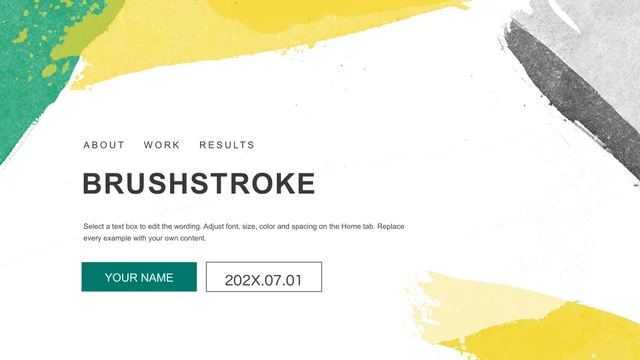
Brushstroke Presentation Template puts textured paint around a mostly white canvas. Teal and yellow strokes frame the cover of Brushstroke Presentation Template, while charcoal corners recur inside. The diamond contents page in Brushstroke Presentation Template leads to four numbered section breaks. Brushstroke Presentation Template combines percentage circles, gears, SWOT petals, an orbit diagram and a four-point timeline. On the data page of Brushstroke Presentation Template, a native pie chart sits beside a five-column chart; both keep their embedded workbooks. Laptop frames in Brushstroke Presentation Template hold the original photographs. The 25-page sequence of Brushstroke Presentation Template ends with the painted cover again. English placeholders replace the Chinese examples in Brushstroke Presentation Template, and the creator label has been removed. Select the layouts that suit your material, then replace sample dates, percentages and chart values in Brushstroke Presentation Template with verified information.
Key Features of Brushstroke Presentation Template
Paint textures, white space and teal details.
Painted edges
Teal, yellow and charcoal brush marks frame a white canvas. Decoration stays near the corners.
Four section breaks
Brushstroke Presentation Template separates sections with framed title pages.
SWOT petals
Four overlapping petals hold the SWOT letters and supporting text. Use one clear point beside each petal.
Native data charts
A pie chart and column chart retain their embedded workbooks. Replace the sample figures with your own data.
Diagram choices
Brushstroke Presentation Template includes gears, circles and a timeline.
Laptop frames
Original photographs sit inside laptop frames beside short text blocks.
How to Use Brushstroke Presentation Template
Choose a layout and make the examples your own.
-
Preview Brushstroke Presentation Template
Compare all 25 pages with your outline before selecting a sequence.
-
Download Brushstroke Presentation Template
Sign in with an active paid membership. Repeat downloads have no daily limit.
-
Edit Brushstroke Presentation Template
Update labels and chart data. Check spacing and the slide show before sharing.
Questions about Brushstroke Presentation Template
How do I download Brushstroke Presentation Template?
Use the download button after signing in with a valid paid membership. Brushstroke Presentation Template is supplied as a PPTX through a temporary download link. Paid members can download Brushstroke Presentation Template repeatedly without a daily cap. Save a working copy and keep the original file separate.
How many slides are in Brushstroke Presentation Template?
There are 25 slides in Brushstroke Presentation Template, all in a 16:9 format. They include the cover, diamond contents, four section dividers, diagrams, charts and closing page. You can remove pages from Brushstroke Presentation Template to fit your outline; update the contents and section numbering if you change the sequence.
Can I change text and colors in Brushstroke Presentation Template?
Text boxes and shape colors in Brushstroke Presentation Template can be edited directly. Painted textures and photographs are image assets, so details inside them require image replacement or editing. When recoloring Brushstroke Presentation Template, keep the contrast between teal, charcoal and the light canvas clear enough for small labels.
Can I preview every slide in Brushstroke Presentation Template?
The gallery shows all 25 pages of Brushstroke Presentation Template in the same order as the download. Select a thumbnail or use the arrows to inspect the next page. In Brushstroke Presentation Template, compare the diagram labels and the small chart legends at full size before choosing a layout for detailed information.
Can another app edit Brushstroke Presentation Template?
An app that supports PPTX may open Brushstroke Presentation Template. Chart rendering, fonts and grouped shapes can vary between editors, so compare the imported result with the preview. Check the two native charts in Brushstroke Presentation Template especially carefully. Keep a PowerPoint copy when exchanging the file with another app.
Which fonts does Brushstroke Presentation Template use?
Brushstroke Presentation Template includes Arial, Calibri, Calibri Light, Gill Sans, Montserrat Light and SemiBold, plus Source Han Sans CN, Microsoft YaHei, SimSun and DengXian font definitions. English labels use Arial where a local fit repair was needed. After substituting a font in Brushstroke Presentation Template, check the narrow labels and large numbered steps.
Is the text in Brushstroke Presentation Template translated?
The downloadable Brushstroke Presentation Template uses English examples. Chinese instructions, headings and the pie chart series label have been translated, and creator labels and promotional notes have been cleared. Website language changes translate this detail page for Brushstroke Presentation Template; they do not produce a separate PPTX for each language.
Can I use Brushstroke Presentation Template commercially?
Downloading Brushstroke Presentation Template with a paid membership gives access to this file. It does not confirm that every source photograph, icon or font is cleared for your commercial project. Check the applicable permissions and replace material you cannot authorize. Review those rights before sending an edited Brushstroke Presentation Template to clients.
How do I share Brushstroke Presentation Template?
Use the share control to copy the public page link for Brushstroke Presentation Template or select a supported social option. Recipients can inspect the preview; downloading the file requires their own active paid membership. Before sharing an edited Brushstroke Presentation Template, review the example data, exported pages and permissions for any retained assets.