Ocean Wave Portfolio Presentation Template: Ocean Images, Photo Collages and Icon Pages
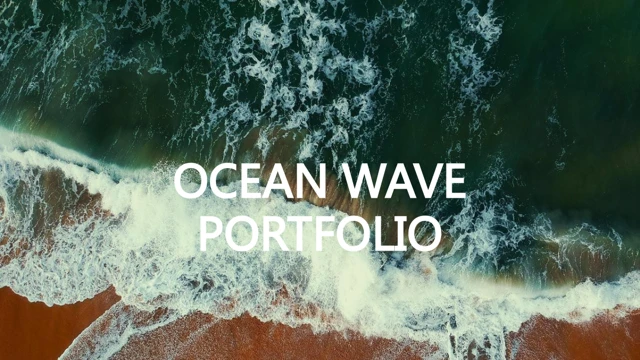
Ocean Wave Portfolio Presentation Template opens with an overhead photograph of waves breaking onto a sandy shore. White foam, teal water and brown sand establish the palette of Ocean Wave Portfolio Presentation Template. Muted green and brown panels carry that palette through the content pages. Ocean Wave Portfolio Presentation Template retains all 24 original widescreen slides, including the icon pages at the end. Photography leads Ocean Wave Portfolio Presentation Template. A city banner sits above five icon captions, while fashion portraits form vertical strips and three-picture layouts. Other Ocean Wave Portfolio Presentation Template pages combine a pug photograph, a lakeside portrait and a scooter scene. Tablet and laptop frames provide a different setting for images. Ocean Wave Portfolio Presentation Template also includes a wide autumn-road photograph and a camera beside a typewriter. Two native doughnut charts appear in Ocean Wave Portfolio Presentation Template. The original text labels show 2017 with 55% and 2018 with 35%; these labels are separate from the chart values and do not calculate their shares. Ocean Wave Portfolio Presentation Template keeps both chart caches, their two embedded workbooks and every source number. Review both the charts and the independent labels when entering your own data. The main sequence of Ocean Wave Portfolio Presentation Template ends with an ocean-wave Thanks page. Eight red pages of white vector icons follow in Ocean Wave Portfolio Presentation Template. Chinese editing instructions are translated into concise English, and source studio promotion is removed. Ocean Wave Portfolio Presentation Template retains the photographs, shapes and positions. Replace the sample text, review the crops and check your exported presentation.
Key Features of Ocean Wave Portfolio Presentation Template
Ocean photos and icon boards.
An ocean-wave cover
Ocean Wave Portfolio Presentation Template starts with teal waves and brown sand.
Muted panels
Ocean Wave Portfolio Presentation Template uses green and brown for caption blocks.
Photo collages
Ocean Wave Portfolio Presentation Template pairs portraits, streets and travel images.
Device image frames
Ocean Wave Portfolio Presentation Template presents pictures in tablet and laptop frames.
Two native doughnuts
Ocean Wave Portfolio Presentation Template keeps both charts and their workbooks.
Eight icon boards
Ocean Wave Portfolio Presentation Template ends with eight vector icon pages.
How to Use Ocean Wave Portfolio Presentation Template
Choose, download and edit.
-
Browse the complete file
Preview Ocean Wave Portfolio Presentation Template and check the final icon pages.
-
Get the original PPTX
Download Ocean Wave Portfolio Presentation Template with active paid membership.
-
Edit text and data
Update Ocean Wave Portfolio Presentation Template and check charts, labels and exports.
Questions about Ocean Wave Portfolio Presentation Template
How do I download Ocean Wave Portfolio Presentation Template?
Sign in with an active paid membership, then use the download button. Paid members can download Ocean Wave Portfolio Presentation Template without a daily limit, including repeat downloads. The private link for Ocean Wave Portfolio Presentation Template expires after a short period. Return to this page for a fresh link if the previous address has expired.
How many pages are in Ocean Wave Portfolio Presentation Template?
Ocean Wave Portfolio Presentation Template contains 24 widescreen pages in the original order. The main photo-led sequence ends on page 16 with an ocean-wave Thanks slide. Ocean Wave Portfolio Presentation Template then includes eight red icon boards. These are part of the original file, rather than extra pages added during processing.
Can I edit the charts in Ocean Wave Portfolio Presentation Template?
Ocean Wave Portfolio Presentation Template contains two native doughnut charts and two embedded Excel workbooks. The original text labels 55% for 2017 and 35% for 2018 are independent text boxes; they are not calculated shares of the chart values. Ocean Wave Portfolio Presentation Template preserves the original caches, workbook numbers and formulas. Update the data and check each label yourself.
Can I preview every page of Ocean Wave Portfolio Presentation Template?
Yes. The gallery shows all 24 pages of Ocean Wave Portfolio Presentation Template, including the closing photo and eight icon boards. Open the thumbnails to inspect picture crops, small captions and the two doughnuts. The preview corresponds to the final English file of Ocean Wave Portfolio Presentation Template that members download.
Will Ocean Wave Portfolio Presentation Template work in another editor?
The download is a PowerPoint .pptx file with native shapes, pictures, charts and embedded workbooks. Another application may import Ocean Wave Portfolio Presentation Template, but fonts, masks, icons and chart rendering can vary. Test the complete file before presenting and compare the charts in Ocean Wave Portfolio Presentation Template with the original preview.
Which fonts does Ocean Wave Portfolio Presentation Template use?
Source text references in Ocean Wave Portfolio Presentation Template include Gill Sans, Roboto Light, Calibri, Arial and Microsoft YaHei, alongside theme fonts such as Calibri Light. Ocean Wave Portfolio Presentation Template retains those font references; no font files are embedded. Install suitable fonts or choose replacements, then review line breaks, narrow captions and alignment.
Has the slide text in Ocean Wave Portfolio Presentation Template been translated?
Yes. Chinese editing instructions in Ocean Wave Portfolio Presentation Template are translated into concise English, and the original studio promotion and notes are removed. Chart series labels and workbook table names are also translated. Source photographs, icon shapes, numeric labels, chart values and geometry in Ocean Wave Portfolio Presentation Template remain unchanged.
Can I use Ocean Wave Portfolio Presentation Template commercially?
A paid download does not establish a separate reuse license for source photographs, icons or fonts. Check the rights that apply before distributing or selling work based on Ocean Wave Portfolio Presentation Template. The sample people, years and figures in Ocean Wave Portfolio Presentation Template are examples; replace them with material you are entitled to use.
How should I share Ocean Wave Portfolio Presentation Template?
Share the page address so others can preview Ocean Wave Portfolio Presentation Template and download through their own eligible account. Keep the editable copy for your project and share an export of your finished presentation when appropriate. Do not circulate the temporary private download address for Ocean Wave Portfolio Presentation Template; it expires.