Peach Navy Work Report Presentation Template: office photos and a clear work review
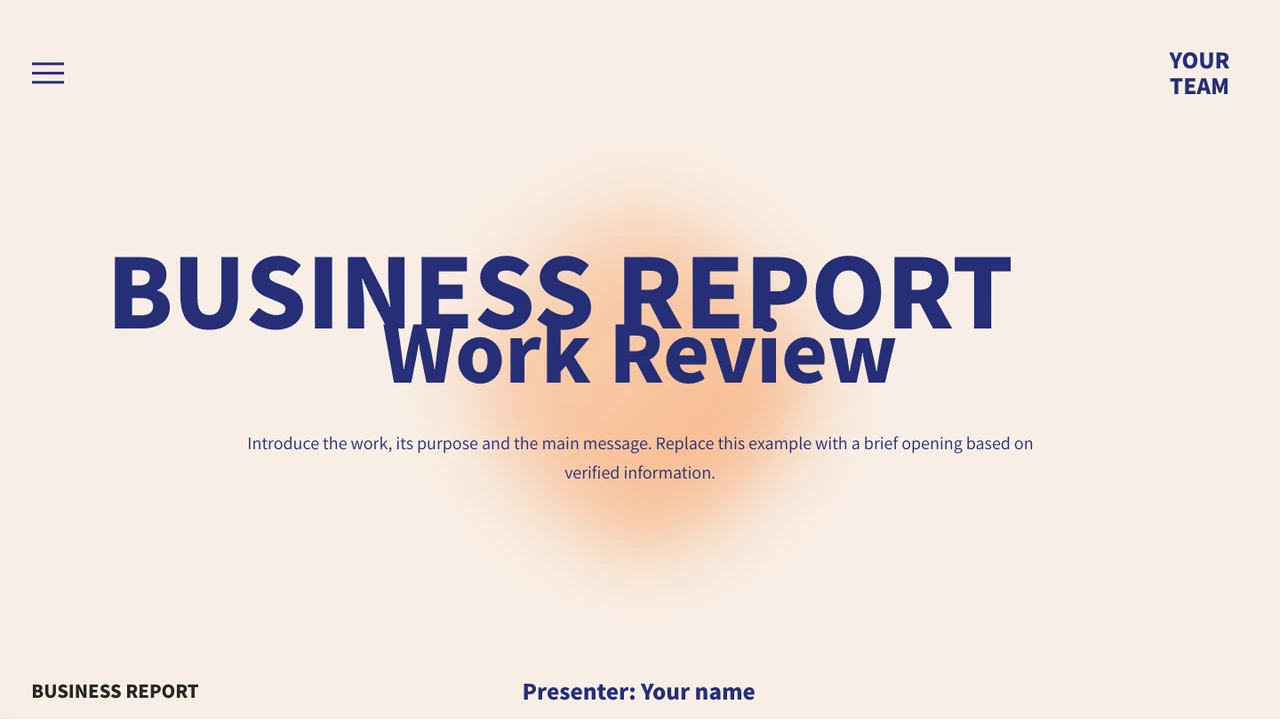
Peach Navy Work Report Presentation Template combines a pale peach background with deep navy headings, orange accents and grey side panels. Office photographs show desks, small meetings and a speaker, giving the 18 widescreen slides a magazine-like rhythm. Peach Navy Work Report Presentation Template introduces four topics: reviewing work, delivery, lessons and the next plan. Large section titles and repeated dividers separate photos from data pages. Peach Navy Work Report Presentation Template includes a monthly line chart, paired columns and two ring charts, plus separate count and rate boxes. A six-step dotted path helps set out the actions that follow. Replace the example values, labels and presenter details with information you have checked. Keep new titles short, pair each picture with a clear point and confirm the reporting period and units. Review the whole sequence before presenting; the original pages provide layouts and sample guidance, not verified business results.
Key Features of Peach Navy Work Report Presentation Template
Peach panels, office photos and editable data views.
Peach and Navy Palette
Peach Navy Work Report Presentation Template uses soft peach panels, deep navy headlines and grey blocks. Check contrast before adding your own emphasis.
Office Photographs
Peach Navy Work Report Presentation Template pairs desk and meeting photos with short notes. Choose pictures that support your point and review the crops.
Four Report Topics
Peach Navy Work Report Presentation Template separates review, delivery, lessons and the next plan. Rename these topics to follow your own reporting outline.
Four Native Charts
Peach Navy Work Report Presentation Template includes a monthly line, paired columns and two ring charts. Update the linked data and check the labels.
Separate Metric Boxes
Peach Navy Work Report Presentation Template places count and rate examples beside the charts. Update these separate text boxes as well as the chart values.
Six-Step Action Path
Peach Navy Work Report Presentation Template uses six numbered circles along a dotted path. Give each stage an owner, a purpose and a clear next action.
How to Use Peach Navy Work Report Presentation Template
Choose your evidence, edit and check.
-
Preview the Layouts
Preview all 18 pages of Peach Navy Work Report Presentation Template. Choose photo and chart layouts before adapting Peach Navy Work Report Presentation Template to your outline.
-
Save a Working Copy
Download Peach Navy Work Report Presentation Template with an active paid plan; daily and repeat downloads are unlimited. Keep an intact Peach Navy Work Report Presentation Template before editing.
-
Update and Review
Edit the data and labels in Peach Navy Work Report Presentation Template; check fonts and crops. Export Peach Navy Work Report Presentation Template to PDF and review every page before sharing.
Questions about Peach Navy Work Report Presentation Template
How do I download Peach Navy Work Report Presentation Template?
Sign in with an active paid plan and use the download button for Peach Navy Work Report Presentation Template. Paid members have unlimited daily downloads and may download Peach Navy Work Report Presentation Template again. Save the .pptx file before opening it and keep an untouched copy of Peach Navy Work Report Presentation Template alongside your working file. Download access to Peach Navy Work Report Presentation Template concerns the file; it does not verify the business examples or grant separate rights to photographs or fonts. Replace presenter details before using the deck.
How many slides are in Peach Navy Work Report Presentation Template?
Peach Navy Work Report Presentation Template contains 18 slides in a 16:9 widescreen format. The contents page of Peach Navy Work Report Presentation Template lists review, delivery, lessons and the next plan. Four dividers appear within the original sequence, alongside photographs, data pages and a six-step action path. Peach Navy Work Report Presentation Template has four native charts and four linked embedded Excel workbooks. Select the pages that suit your message; Peach Navy Work Report Presentation Template does not require you to use every layout or preserve every example in your own presentation.
Can I edit Peach Navy Work Report Presentation Template?
Text, native shapes and four charts in Peach Navy Work Report Presentation Template are editable in PowerPoint. Use Edit Data to replace the examples linked to the charts in Peach Navy Work Report Presentation Template, then check their labels, reporting period and units. The count, rate and ring-centre labels in Peach Navy Work Report Presentation Template are separate text objects, so update them as well. Photos are pictures, including lettering inside them. Review each crop when replacing an image in Peach Navy Work Report Presentation Template; a person or screen in a source photograph is not evidence about your own team.
Can I preview all of Peach Navy Work Report Presentation Template before downloading?
Yes. The gallery shows every page of Peach Navy Work Report Presentation Template, including the office photographs, all four charts and numbered path. Browse Peach Navy Work Report Presentation Template with the thumbnails or arrow controls, and enlarge pages to check narrow labels and the contrast of text on coloured panels. The preview of Peach Navy Work Report Presentation Template is static; it cannot demonstrate editing the linked workbooks. Compare the layouts of Peach Navy Work Report Presentation Template with your outline before choosing the pages needed for the final review.
Will Peach Navy Work Report Presentation Template work in another presentation editor?
Peach Navy Work Report Presentation Template is delivered as a PowerPoint (.pptx) file. Another editor may open Peach Navy Work Report Presentation Template, but font substitution, picture crops and chart rendering can differ. Compare a copy of Peach Navy Work Report Presentation Template page by page with the gallery before using that editor. Test whether its data editor preserves the four linked workbooks and the line, column and ring charts. After exporting Peach Navy Work Report Presentation Template, open the result and check that labels, values and coloured panels remain readable.
Which fonts does Peach Navy Work Report Presentation Template use?
Visible source references in Peach Navy Work Report Presentation Template include 思源黑体 CN Normal, 思源黑体 CN Heavy, 汉仪旗黑-50S, 等线, Oswald, Aharoni, Arial and theme references. Peach Navy Work Report Presentation Template retains two original embedded font parts for Source Han Sans CN Normal and Heavy. The previews of Peach Navy Work Report Presentation Template load matching official Adobe CN fonts, version 2.004, in an isolated renderer; the actual PDF faces are SourceHanSansCN-Normal and SourceHanSansCN-Heavy. This does not guarantee that Peach Navy Work Report Presentation Template displays identically in every editor. Check local font availability and line breaks and obtain appropriate font rights for your use.
Are the slides of Peach Navy Work Report Presentation Template translated into my language?
All language versions of this page describe the same English PowerPoint file for Peach Navy Work Report Presentation Template. Editable Chinese text and placeholder guidance in Peach Navy Work Report Presentation Template have been translated into concise English, including chart categories and workbook headers. Original photo lettering and genuine source credit in Peach Navy Work Report Presentation Template remain unchanged. Download Peach Navy Work Report Presentation Template and translate editable text into your language if needed. Keep headings short and review every chart label, line break and caption after making changes.
Can I use Peach Navy Work Report Presentation Template commercially?
Commercial and redistribution permissions for Peach Navy Work Report Presentation Template have not been independently verified. An active paid plan gives download access to Peach Navy Work Report Presentation Template, not a general licence for source photographs, fonts or other retained assets. The original creator credit 哒哒 熊猫 remains in Peach Navy Work Report Presentation Template; visible image brands and credits are not endorsements of your work. Check the applicable terms before publishing, selling or redistributing an adapted Peach Navy Work Report Presentation Template. Preserve genuine attribution and replace any asset for which your intended use lacks permission.
How do I share my finished Peach Navy Work Report Presentation Template?
Finish your edits in PowerPoint and save a working copy of Peach Navy Work Report Presentation Template. Review all pages of Peach Navy Work Report Presentation Template, especially the example chart data, separate count and percentage labels, presenter field and final page. Export your edited Peach Navy Work Report Presentation Template to PDF, open that PDF and inspect its layout before sending it. If recipients need editable charts, test the PPTX and confirm the relevant sharing rights first. Send the finished file or an approved storage link and keep your editable Peach Navy Work Report Presentation Template for later revisions.