Vintage Album Presentation Template: teal waves around old objects and quiet rooms
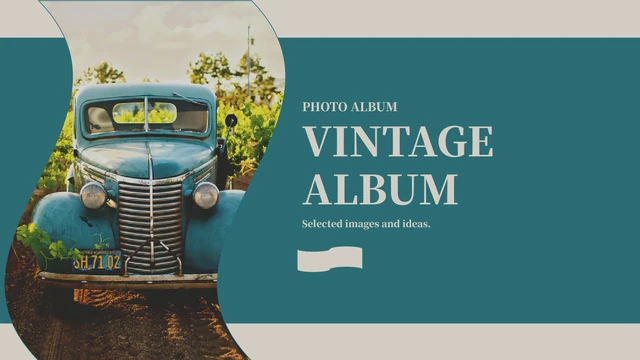
Vintage Album Presentation Template opens with an old blue vehicle inside a tall curved picture fill. Teal fields, warm pale-grey panels and dusty-pink flags continue through 15 widescreen pages. Vintage Album Presentation Template has three contents entries and matching breaks for Items, Views and Home. Vintage Album Presentation Template pairs a toy bus, paper records, a telephone receiver and a pocket watch with short notes. Other pages show curved architecture, a silhouette at a window, a snowy road and wood-furnished interiors. Vintage Album Presentation Template combines overlapping pictures, a pink pointed panel, small flag motifs, two icon notes and three dotted guide rows. English prompts can be replaced with your own story. Keep important subjects inside the curved frames, check pale text against teal and use accurate dates. No charts or linked workbooks are included. Lettering on photographed paper, books, signs and vehicle details stays within the original images.
Key Features of Vintage Album Presentation Template
Connect objects, places and small details with a clear visual story.
Wave-Shaped Panels
Vintage Album Presentation Template repeats teal waves, pale curved panels and flag shapes. After changing a photo fill, check the subject near each curved edge.
Three Chapter Breaks
Vintage Album Presentation Template groups Items, Views and Home around a three-entry contents page. Use the repeated road-photo breaks to guide your page sequence.
Objects and Small Scenes
Vintage Album Presentation Template brings together old vehicles, a toy bus, paper records and a telephone receiver. Choose details and write your own captions.
Overlapping Pictures
Vintage Album Presentation Template layers paper and pocket-watch photographs beside notes. Keep the two subjects visible when replacing pictures or reviewing crops.
Icons and Guide Rows
Vintage Album Presentation Template sets two icon notes beside an interior photograph and uses three dotted guide rows. Add related points rather than data charts.
Editable English Notes
Vintage Album Presentation Template provides English captions and date examples. Replace them with project facts; photographed lettering remains image pixels.
How to Use Vintage Album Presentation Template
Select a sequence, replace the examples and inspect the final file.
-
Review the Visual Sequence
Explore all 15 pages of Vintage Album Presentation Template. Compare the chapter breaks, curved photo fills, overlapping pair and room notes. Choose an order that links your objects and places.
-
Download and Keep a Copy
Download Vintage Album Presentation Template with an eligible active paid membership. Daily and repeat downloads are unlimited. Keep an unchanged copy before editing captions, pictures and dates.
-
Replace, Check and Share
Add your facts and permitted photos to Vintage Album Presentation Template. Check wave-shaped crops, fonts and dates. Export and reopen a PDF, share this page’s URL, and keep the editable PPTX.
Vintage Album Presentation Template FAQs
How can I download Vintage Album Presentation Template?
To obtain Vintage Album Presentation Template, log into your account and select Download. Access requires an eligible paid membership that is currently active. Vintage Album Presentation Template can be downloaded repeatedly, with no daily quota. Work from a separate copy so the original arrangement remains available. Whichever of the 15 website languages you choose, the download is one English Vintage Album Presentation Template PPTX, not a different translated deck.
How many slides does Vintage Album Presentation Template contain?
Vintage Album Presentation Template contains 15 slides in 16:9. Its contents introduces Items, Views and Home, with road-photo chapter breaks on pages 3, 7 and 11. Vintage Album Presentation Template moves from vehicles and small objects to building views, a window silhouette, a snowy road and interiors. A thank-you page closes Vintage Album Presentation Template. Example dates and pictured records are not a verified timeline.
What can I edit in Vintage Album Presentation Template?
Native headings, captions, wave shapes, flags, arrows and date labels in Vintage Album Presentation Template remain editable. Some photos are picture fills inside curved shapes; others are image objects. Use the appropriate picture or shape-fill controls in Vintage Album Presentation Template, then check every crop. There are no native data charts or linked workbooks. Lettering photographed on paper, books, road signs or vehicle details is image content in Vintage Album Presentation Template, not an editable text box.
Can I preview all of Vintage Album Presentation Template before buying?
Yes. The public gallery shows all 15 pages of Vintage Album Presentation Template without purchasing a membership. Open each thumbnail to compare the curved vehicle cover, three chapter breaks, telephone page, overlapping paper-and-watch pair and interior notes. The gallery for Vintage Album Presentation Template corresponds to the final English downloadable file. Preview the whole Vintage Album Presentation Template before choosing pages.
Can I use Vintage Album Presentation Template outside PowerPoint?
PowerPoint is the intended editor for Vintage Album Presentation Template. Other applications may alter fonts, text wrapping, custom wave shapes, picture fills or image crops. Test Vintage Album Presentation Template in your own editor, including the curved cover and overlapping photographs. Export and reopen a PDF made from Vintage Album Presentation Template before delivery; keep the editable PPTX for changes.
Which fonts are used in Vintage Album Presentation Template?
Vintage Album Presentation Template retains original references to 思源宋体 Heavy and 庞门正道粗书体. Theme and supporting references include Calibri, Calibri Light, Arial, Sitka Heading, 宋体 and 微软雅黑. No fonts are embedded in Vintage Album Presentation Template. Previews use official OFL Source Han Serif SC Heavy, with existing local Arial Narrow substituting for Pangmen and Arial for supporting text. The font declarations inside Vintage Album Presentation Template remain unchanged. Check availability and obtain fonts from authorized sources; preview substitutions do not grant a font redistribution licence.
Is the editable content of Vintage Album Presentation Template in English?
The Chinese editable subtitle and master prompts in Vintage Album Presentation Template, along with Latin filler, are now brief English labels and guidance. The main Vintage Album title, chapter numbering and date values remain; slashes replace Chinese date units. Vintage Album Presentation Template keeps all original pictures, including their printed and handwritten lettering. Replace prompts with accurate project information. All 15 localized website versions download the same English Vintage Album Presentation Template with the same 15 pages.
Does Vintage Album Presentation Template grant commercial or redistribution rights?
Downloading Vintage Album Presentation Template does not confirm permission to use or redistribute its design, object photographs or icons commercially. These permissions remain unverified. There is no creator recorded in the source metadata of Vintage Album Presentation Template; an empty field is not a licence or evidence of public-domain status. Check the rights covering each item you retain from Vintage Album Presentation Template and use authorised replacements where needed. Keep necessary attribution, including credits inside photographs. Visible product brands do not endorse your presentation.
How should I share Vintage Album Presentation Template?
Recommend Vintage Album Presentation Template by sending the page URL or using its share buttons. A recipient’s own membership determines file-download eligibility. If you have edited Vintage Album Presentation Template for a project, inspect a reopened PDF before sending that finished version and keep your working PPTX. Before distributing Vintage Album Presentation Template or its pictures, establish that your permissions cover redistribution. Access to a page link does not confer rights to pass on the design, photography, icons or font files.