Photo Collections Presentation Template: portraits, warm panels and contrasting photo layouts
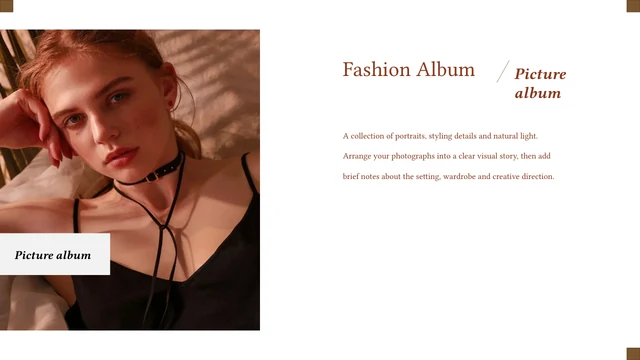
Photo Collections Presentation Template combines dark portraits with white space and warm brown rectangles across 12 widescreen slides. A half-lit face appears on the opening and closing pages, while thin lines and a small vertical block frame the large headings. Later pages alternate white and brown backgrounds. Photo Collections Presentation Template includes paired photographs, a small image collage and a tall forest scene. Some captions sit over a picture; others occupy a separate panel or narrow column. These shifts in scale give Photo Collections Presentation Template a sequence for a short photo album or personal picture collection. The English love-themed passages in Photo Collections Presentation Template are sample wording. Replace them with your own captions, keep the photographs you are entitled to use, and check that text remains readable over light and dark areas. There is no chapter index to maintain, so choose an order that suits the pictures you want to show.
Key Features of Photo Collections Presentation Template
Dark portraits, brown blocks and varied image arrangements.
A Repeated Portrait
Photo Collections Presentation Template uses the same half-lit face on its cover and closing page. A brown rectangle and two thin rules frame the white headings.
Warm Brown Panels
Photo Collections Presentation Template alternates white and warm brown pages. Dark blocks frame pictures, while lighter panels leave room for captions.
Paired Photographs
Photo Collections Presentation Template pairs pictures of different sizes, with overlapping or separate edges. Check the crop when adding a portrait or detail shot.
A Small Image Collage
Photo Collections Presentation Template places small crops beside one tall portrait. The collage shows different views, with one picture larger than the others.
A Forest Composition
Photo Collections Presentation Template places a tall forest picture beside short text columns. Brown blocks connect it with the other portrait compositions.
Editable Caption Areas
Photo Collections Presentation Template provides native heading and caption boxes. Replace the English sample passages with your own short, relevant wording.
How to Use Photo Collections Presentation Template
Select your pictures, then replace the sample captions.
-
Compare the Photo Layouts
Review all 12 pages of Photo Collections Presentation Template. Compare tall pictures, pairs and small crops, then choose a sequence that supports your images without repeating one arrangement.
-
Download a Working Copy
Download Photo Collections Presentation Template with an active paid plan. Daily downloads are unlimited, including repeats. Save a working copy and check the rights for pictures you retain.
-
Replace and Review
Edit Photo Collections Presentation Template in PowerPoint. Add pictures and short captions, check text over light and dark areas, then inspect each crop and the exported PDF before sharing.

Questions about Photo Collections Presentation Template
How do I download Photo Collections Presentation Template?
Sign in with an active paid plan and use the download button for Photo Collections Presentation Template. The file is a PowerPoint (.pptx) containing all 12 slides. Paid members can download Photo Collections Presentation Template repeatedly without a daily limit. Keep an untouched copy, then work separately so you can return to the original layouts when using Photo Collections Presentation Template.
How many pages does Photo Collections Presentation Template include?
Photo Collections Presentation Template contains 12 slides in 16:9, including a cover and closing page. Later pages vary portraits, photo pairs, caption panels and a forest scene. There is no chapter contents page. You can remove or duplicate layouts from Photo Collections Presentation Template, and check that the opening and closing connect with your chosen pictures in Photo Collections Presentation Template.
Can I change the captions and colours in Photo Collections Presentation Template?
The headings, caption boxes and brown geometric blocks in Photo Collections Presentation Template are native PowerPoint elements. Replace the English examples with your own brief wording and adjust colours to suit your images. Photographs are separate objects. In Photo Collections Presentation Template, some captions overlap a picture, so check contrast after changing a crop or background rather than assuming white text stays readable in Photo Collections Presentation Template.
Can I preview every page of Photo Collections Presentation Template?
The gallery shows the complete Photo Collections Presentation Template before downloading. Use thumbnails or arrows to compare portraits, photo pairs, collage and forest page. Enlarge Photo Collections Presentation Template to examine the smaller captions and image edges. The previews show the supplied English file; replacement pictures, wording and fonts can change how an edited Photo Collections Presentation Template looks.
Will Photo Collections Presentation Template work in other presentation editors?
Photo Collections Presentation Template is supplied in the PowerPoint .pptx format. Another editor may import it, but text widths, cropped images and objects that overlap can shift. Test Photo Collections Presentation Template in your editor and compare all 12 pages with the gallery. Keep an editable copy, and inspect the PDF before you send it when sharing Photo Collections Presentation Template.
Which fonts does Photo Collections Presentation Template use?
The downloadable Photo Collections Presentation Template uses Arial for the adapted English headings and captions, with larger titles in bold. The original font files remain embedded, but the English text has been adapted to Arial. If you choose another font for Photo Collections Presentation Template, check every heading and narrow caption column: letter widths can affect an overlay or line break in Photo Collections Presentation Template.
Are the examples in Photo Collections Presentation Template translated?
The downloadable Photo Collections Presentation Template contains English love-themed sample passages. Website translations cover the description and guidance, not a separate translated PPTX. Replace the original examples with wording appropriate to your pictures. When editing Photo Collections Presentation Template in another language, check large headings, narrow panels and captions over photographs.
Can I use Photo Collections Presentation Template commercially?
Independent commercial and redistribution rights for the original design and photographs in Photo Collections Presentation Template have not been verified. A paid download does not establish picture rights for your use. Before using Photo Collections Presentation Template commercially, confirm the permissions for the material you keep or replace it with your own licensed pictures. Do not assume access grants permission to resell Photo Collections Presentation Template.
How should I share Photo Collections Presentation Template?
Share the page link when someone wants to preview or download Photo Collections Presentation Template. For your finished album, share a PDF or presentation export after checking captions and crops. Keep an editable copy separately. Photo Collections Presentation Template contains original photographs and sample wording, so replace unsuitable material and check permissions before sharing your finished presentation or source file.