Red Frame Photo Portfolio Presentation Template: monochrome photographs and red framed layouts
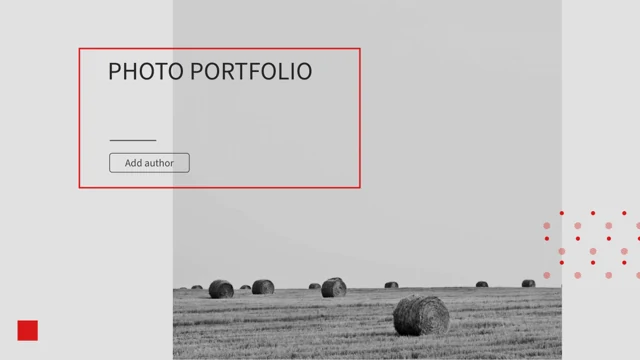
Red Frame Photo Portfolio Presentation Template pairs grey photographs with thin red frames, blocks and patterned accents. Its 25 slides use a 16:9 canvas, from a hay-bale cover to paired landscapes and close-up studies. Red Frame Photo Portfolio Presentation Template has a four-entry index and numbered breaks on pages 4, 9, 14 and 19. Silhouettes, flowers, deer, birds, bridges and architectural details appear in narrow portraits and wide panels. Red Frame Photo Portfolio Presentation Template places captions beside photographs, with one native column chart on page 18. Its examples are separate from your own verified data. Red Frame Photo Portfolio Presentation Template keeps the supplied music, a Thanks page on page 24 and font and colour references on page 25. Ordinary text offers independent English guidance; original wording remains in same-slide reference notes. Picture lettering and source information stay with the photographs rather than identifying the creator of your new work.
Key Features of Red Frame Photo Portfolio Presentation Template
Grey photographs, red frames, four chapter breaks and one native chart.
Red Frames and Patterned Accents
Red Frame Photo Portfolio Presentation Template uses red outlines, blocks and dotted accents. Review text contrast and picture balance when adapting the pages.
Monochrome Photographic Studies
Red Frame Photo Portfolio Presentation Template pairs grey photographs with open space. Describe visible details and check each crop after changing a picture.
Paired Views and Wide Panels
Red Frame Photo Portfolio Presentation Template compares landscapes, birds and buildings. Use concise captions to explain differences in scale and framing.
Four Numbered Chapter Breaks
Red Frame Photo Portfolio Presentation Template has four breaks and an index. Match the contents labels to your section order while keeping headings brief.
Native Column Chart
Red Frame Photo Portfolio Presentation Template includes one column chart with a workbook. Replace sample data carefully and check the labels beside the plot.
Font and Colour References
Red Frame Photo Portfolio Presentation Template finishes with font notes and five colour circles. Compare text contrast and sample colours before sharing.
How to Use Red Frame Photo Portfolio Presentation Template
Choose a picture sequence, add supported captions and review the saved file.
-
Choose a Picture Sequence
Review all 25 pages of Red Frame Photo Portfolio Presentation Template. Select chapter breaks and photographs that fit your subject, then plan short headings and captions for the chosen pages.
-
Download and Add Your Content
Download Red Frame Photo Portfolio Presentation Template with an active paid plan. Keep an unchanged copy, replace ordinary sample text and add captions and chart values you can support.
-
Review Pictures, Data and Audio
Check Red Frame Photo Portfolio Presentation Template in your editor. Review image crops, small labels, chart data and the audio setting, then inspect a saved or exported copy before sharing.
Questions about Red Frame Photo Portfolio Presentation Template
What is included in Red Frame Photo Portfolio Presentation Template?
Red Frame Photo Portfolio Presentation Template contains 25 PowerPoint slides in a 16:9 widescreen format. Red Frame Photo Portfolio Presentation Template combines grey photographs, red frames, patterned accents and short writing areas. Red Frame Photo Portfolio Presentation Template includes an index, four numbered chapter breaks and one native column chart with an embedded workbook. Red Frame Photo Portfolio Presentation Template shows a Thanks page on page 24, followed by font and colour references on page 25. Browse Red Frame Photo Portfolio Presentation Template before choosing a sequence. The supplied photographs and captions are starting material, not proof of your travel, authorship, employment or completed projects; add information supported by your own selected work.
How are the chapters arranged in Red Frame Photo Portfolio Presentation Template?
Red Frame Photo Portfolio Presentation Template lists four entries numbered 01–04 on page 3. Red Frame Photo Portfolio Presentation Template introduces the parts on pages 4, 9, 14 and 19, using large red numerals with photographs and brief captions. Red Frame Photo Portfolio Presentation Template follows each break with picture studies, paired views or writing panels. Adapt the index of Red Frame Photo Portfolio Presentation Template together with your section headings, checking the order against your outline. Choose only useful pages from Red Frame Photo Portfolio Presentation Template instead of treating every photograph as part of your story. The chapter arrangement provides a flexible sequence; it does not establish a company structure or verified project history.
Which photographs appear in Red Frame Photo Portfolio Presentation Template?
Red Frame Photo Portfolio Presentation Template includes hay bales, a silhouette with a guitar, flowers, deer and birds. Red Frame Photo Portfolio Presentation Template also shows bridges, a fence in mist, building details, pineapples, an aircraft and coastal views. Red Frame Photo Portfolio Presentation Template uses monochrome compositions, while original colour variants remain in the file. Compare wide panels and narrow portraits in Red Frame Photo Portfolio Presentation Template before choosing your captions. Add supported descriptions to Red Frame Photo Portfolio Presentation Template without guessing the photographer, place or pictured person's identity. After replacing a picture, check its crop and adjacent text so the caption describes the visible scene and relevant source information stays clear.
What can I edit in Red Frame Photo Portfolio Presentation Template?
Red Frame Photo Portfolio Presentation Template contains editable ordinary headings, captions, chapter labels and layout shapes. Red Frame Photo Portfolio Presentation Template uses red frames, lines and blocks that support the picture composition; keep nearby labels readable after changes. Photographs in Red Frame Photo Portfolio Presentation Template remain image assets, and lettering baked into a picture is separate from a text box. Red Frame Photo Portfolio Presentation Template has manual numbered sections and colour-reference circles, not additional linked data charts. Adapt Red Frame Photo Portfolio Presentation Template with your own supported text, checking the contrast of smaller captions and the space around each image. Changing a heading does not identify the pictured people or make the source photographs your own creations.
Which native chart does Red Frame Photo Portfolio Presentation Template include?
Red Frame Photo Portfolio Presentation Template has one native clustered column chart on page 18. Red Frame Photo Portfolio Presentation Template retains three series across four categories and one embedded workbook for the supplied examples. The year labels in Red Frame Photo Portfolio Presentation Template are source examples, not a report of current performance. Review chart data in Red Frame Photo Portfolio Presentation Template before replacing values, and update the legend, categories and nearby caption together. Keep the five colour-reference circles in Red Frame Photo Portfolio Presentation Template distinct from that chart; they are manual shapes with sample colour labels. Use data you can support and inspect the result in your editor before presenting, especially if its chart import behaves differently.
Which fonts does Red Frame Photo Portfolio Presentation Template use?
Red Frame Photo Portfolio Presentation Template uses Source Han Sans SC Regular for ordinary editable text. No font files are embedded in Red Frame Photo Portfolio Presentation Template. Install a suitable font or choose an alternative in your presentation editor, then review the title and narrow captions. Red Frame Photo Portfolio Presentation Template uses oversized chapter numerals, small body text and a font-reference page, so a substitute can change spacing or line breaks. Compare Red Frame Photo Portfolio Presentation Template with its previews after export. Reopen Red Frame Photo Portfolio Presentation Template to check missing characters and alignment, keeping lettering inside photographs separate from ordinary editable text. Check contrast on both pale panels and red caption areas.
Is the entire file of Red Frame Photo Portfolio Presentation Template in English?
Red Frame Photo Portfolio Presentation Template supplies independent English editing guidance for ordinary titles and captions. Red Frame Photo Portfolio Presentation Template keeps original visible wording in same-slide reference notes, separate from the new guidance. Photographs and their source information remain in Red Frame Photo Portfolio Presentation Template, so picture lettering is not rewritten as ordinary text. All website languages describe the same Red Frame Photo Portfolio Presentation Template, rather than separate files translating every photograph or sound. Adapt Red Frame Photo Portfolio Presentation Template to your audience with supported captions and clear source references. The supplied photographs, original text and blank author field do not establish who created your new presentation or prove a personal travel story.
Does Red Frame Photo Portfolio Presentation Template include music or extra permissions?
Red Frame Photo Portfolio Presentation Template retains the supplied music and playback arrangement. Including the recording in Red Frame Photo Portfolio Presentation Template does not create a new licence for that track or all third-party photographs. Membership access to Red Frame Photo Portfolio Presentation Template is separate from permissions for source material. Check the audio setting in Red Frame Photo Portfolio Presentation Template before presenting and decide whether the music suits your audience. When sharing a version of Red Frame Photo Portfolio Presentation Template, use material you are entitled to include, keep relevant source credits and explain your contribution. Photographs and audio metadata do not verify a creator's identity, a travel history or permission for every publication context.
How do I download and share Red Frame Photo Portfolio Presentation Template?
Download Red Frame Photo Portfolio Presentation Template with an active paid membership. Active paid members can download Red Frame Photo Portfolio Presentation Template repeatedly without a daily count limit. Browse all 25 previews and keep an unchanged Red Frame Photo Portfolio Presentation Template beside your working copy. Replace ordinary examples with supported captions, choosing a page sequence suitable for your subject. Check Red Frame Photo Portfolio Presentation Template in your presentation app, since picture crops, typography, charts and audio may differ across editors. Share your edited Red Frame Photo Portfolio Presentation Template in a format the recipient can open. Retain an editable copy, inspect exported pages for readable text and test audio separately when sharing a static PDF.