Spring Work Review Presentation Template: a gentle floral work review
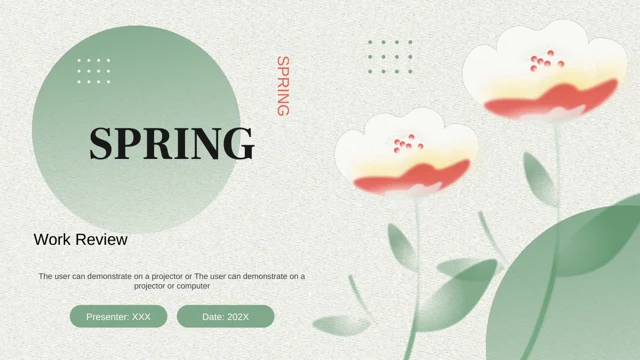
Spring Work Review Presentation Template pairs soft green leaves and pale blossoms with coral accents on a lightly textured background. The 20-slide sequence starts with a presenter and date, then divides a work review into an overview, results, areas to improve and a plan. Spring Work Review Presentation Template alternates text cards, team photographs, numbered points and circular diagrams, giving the same report several ways to show evidence. A closing cover echoes the opening rather than adding a separate visual style. Spring Work Review Presentation Template works best when each box carries a short message: choose useful layouts, replace the example copy and explain what changed during the reporting period. Keep the green and coral contrast consistent across the four sections, and check narrow headings before presenting. The previews show the complete English release; the examples still need your verified information.
Key Features of Spring Work Review Presentation Template
Green leaves, coral accents and clear sections.
Soft Floral Cover
Spring Work Review Presentation Template pairs pale blossoms and green leaves with a light texture. Coral accents connect the opening and closing pages.
Four Review Sections
Spring Work Review Presentation Template has four dividers for an overview, results, improvements and plans. Rename the chapters to suit your report.
Team Photographs
Spring Work Review Presentation Template includes writing, teamwork and meeting photos. Link each image to a result or use pictures of your own team.
Numbered Text Cards
Spring Work Review Presentation Template groups short points in numbered cards. Give each area one message and keep headings brief to leave room for detail.
Circular Diagrams
Spring Work Review Presentation Template uses editable circles, lines and icons for related ideas. Label the connections; the shapes are not data charts.
Planning Timeline
Spring Work Review Presentation Template ends with dated planning milestones. Replace dates, assign an action to each point and check the reporting period.
How to Use Spring Work Review Presentation Template
Preview, download and make it your own.
-
Preview the review
Browse all 20 pages of Spring Work Review Presentation Template. Compare its four sections, team photographs, numbered cards and planning timeline with your report before selecting layouts.
-
Download your copy
Sign in with an active paid plan to download Spring Work Review Presentation Template as a PPTX. Daily downloads are unlimited. Save a separate working copy before testing a shorter report.
-
Replace and check
Edit Spring Work Review Presentation Template in PowerPoint: add results, replace photos and update dates. Keep green and coral accents consistent, then check text wrapping and image crops.
Questions about Spring Work Review Presentation Template
How do I download Spring Work Review Presentation Template?
Sign in with an active paid plan and select Download PPTX. Paid members can download Spring Work Review Presentation Template repeatedly with unlimited daily downloads. Preview the four review sections in Spring Work Review Presentation Template first, then save an untouched copy of Spring Work Review Presentation Template before editing your report.
How many slides are in Spring Work Review Presentation Template?
Spring Work Review Presentation Template contains 20 slides in 16:9 format. The sequence in Spring Work Review Presentation Template includes a cover, contents page, four review sections and a matching closing page. You can shorten Spring Work Review Presentation Template by choosing only the layouts needed for your reporting period.
Can I change the text and colours in Spring Work Review Presentation Template?
Editable text and shapes in Spring Work Review Presentation Template can be changed in PowerPoint. Replace sample headings, team photos and timeline dates; keep text within its boxes. A picture in Spring Work Review Presentation Template must be replaced as an image when its artwork is stored in one bitmap.
Can I preview every page of Spring Work Review Presentation Template?
The gallery shows all 20 pages of Spring Work Review Presentation Template. Use thumbnails and the enlarged view to check cards, circle diagrams and the timeline. Compare Spring Work Review Presentation Template with your outline and intended display size, particularly where the supporting captions are small.
Will Spring Work Review Presentation Template work in another editor?
Other editors may import the PPTX, but fonts, photograph crops and icon alignment can change. Compare an imported Spring Work Review Presentation Template with the gallery before relying on its layout. Keep a PowerPoint working copy of Spring Work Review Presentation Template and inspect any exported PDF.
Which fonts does Spring Work Review Presentation Template use?
The English release of Spring Work Review Presentation Template uses Arial-compatible bindings for translated Chinese text, alongside the original Latin theme references. Spring Work Review Presentation Template contains no embedded font files. If your device substitutes a font in Spring Work Review Presentation Template, check card headings and section titles before sharing.
Is the slide text in Spring Work Review Presentation Template English?
Yes. The supplied release of Spring Work Review Presentation Template has English headings and editing instructions, including the former Chinese spring title artwork. These are examples for your own content. Website language choices translate the page about Spring Work Review Presentation Template; they do not change the download into another language.
Can I use Spring Work Review Presentation Template commercially?
Use Spring Work Review Presentation Template only within the rights you hold for the source, photographs and other artwork. A paid download does not establish a separate commercial licence. Check permissions and replace unsuitable assets in Spring Work Review Presentation Template before client delivery or redistribution.
How can I share Spring Work Review Presentation Template?
Share this page so colleagues can preview Spring Work Review Presentation Template and download through their own accounts. Share your edited Spring Work Review Presentation Template as PPTX or PDF only where your asset permissions allow. Before sharing Spring Work Review Presentation Template, replace sample dates and text, verify the report and check fonts and photographs.