Make nano banana slides with clear captions and room for pictures and meaning.
Professional
Creative
Standard
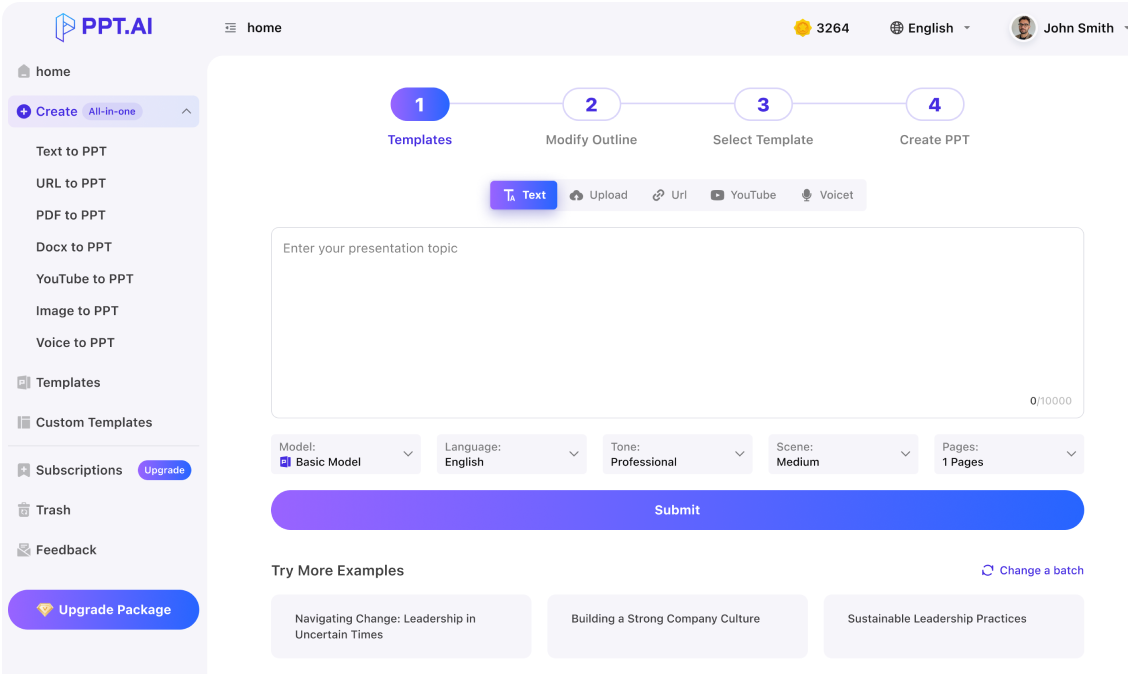
Text
Upload
Url
YouTube
Image
Basic Model
English
简体中文
繁體中文
日本語
한국어
Français
Русский
العربية
Deutsch
Español
Italiano
Português
ภาษาไทย
Bahasa Melayu
Tiếng Việt
Türkçe
Bahasa Indonesia
General Scene
Teaching Materials
Work Summary
Work Plan
Project Report
Solution
Research Report
Meeting Materials
Product Introduction
Company Introduction
Business Plan
Science Popularization
Public Speaking
Public
Students
Teachers
Superiors
Subordinates
Interviewer
Colleagues
Professional
Friendly
Technical
Persuasive
Academic
Inspirational
Educational
Humorous
Concise
Medium
Short
Long
Submit
Drag and drop a file to create a PPT
Supports DOC, DOCX, PDF, PPT, PPTX, TXT, MD, XLS, XLSX, CSV, HTML, EPUB, MOBI, XMIND, and MM files under 10MB
Choose a File
Basic Model
English
简体中文
繁體中文
日本語
한국어
Français
Русский
العربية
Deutsch
Español
Italiano
Português
ภาษาไทย
Bahasa Melayu
Tiếng Việt
Türkçe
Bahasa Indonesia
General Scene
Teaching Materials
Work Summary
Work Plan
Project Report
Solution
Research Report
Meeting Materials
Product Introduction
Company Introduction
Business Plan
Science Popularization
Public Speaking
Public
Students
Teachers
Superiors
Subordinates
Interviewer
Colleagues
Professional
Friendly
Technical
Persuasive
Academic
Inspirational
Educational
Humorous
Concise
Medium
Short
Long
Basic Model
English
简体中文
繁體中文
日本語
한국어
Français
Русский
العربية
Deutsch
Español
Italiano
Português
ภาษาไทย
Bahasa Melayu
Tiếng Việt
Türkçe
Bahasa Indonesia
General Scene
Teaching Materials
Work Summary
Work Plan
Project Report
Solution
Research Report
Meeting Materials
Product Introduction
Company Introduction
Business Plan
Science Popularization
Public Speaking
Public
Students
Teachers
Superiors
Subordinates
Interviewer
Colleagues
Professional
Friendly
Technical
Persuasive
Academic
Inspirational
Educational
Humorous
Concise
Medium
Short
Long
Submit
Basic Model
English
简体中文
繁體中文
日本語
한국어
Français
Русский
العربية
Deutsch
Español
Italiano
Português
ภาษาไทย
Bahasa Melayu
Tiếng Việt
Türkçe
Bahasa Indonesia
General Scene
Teaching Materials
Work Summary
Work Plan
Project Report
Solution
Research Report
Meeting Materials
Product Introduction
Company Introduction
Business Plan
Science Popularization
Public Speaking
Public
Students
Teachers
Superiors
Subordinates
Interviewer
Colleagues
Professional
Friendly
Technical
Persuasive
Academic
Inspirational
Educational
Humorous
Concise
Medium
Short
Long
Submit
Drag and drop a file to create a PPT
Supports PNG, JPG, JPEG, and BMP files under 5MB
Choose a IMAGE
Basic Model
English
简体中文
繁體中文
日本語
한국어
Français
Русский
العربية
Deutsch
Español
Italiano
Português
ภาษาไทย
Bahasa Melayu
Tiếng Việt
Türkçe
Bahasa Indonesia
General Scene
Teaching Materials
Work Summary
Work Plan
Project Report
Solution
Research Report
Meeting Materials
Product Introduction
Company Introduction
Business Plan
Science Popularization
Public Speaking
Public
Students
Teachers
Superiors
Subordinates
Interviewer
Colleagues
Professional
Friendly
Technical
Persuasive
Academic
Inspirational
Educational
Humorous
Concise
Medium
Short
Long
nano banana slides: Describe a coherent visual world
For nano banana slides, write down the subject, setting, palette and viewpoint before requesting images. Keep those choices available as a reference throughout the project. In nano banana slides, continuity comes from deliberate art direction and review, especially when separate images must feel like parts of the same explanation.
Plan nano banana slides with a quiet area for headings and labels. A detailed picture can establish context, but the reader still needs to know what it means. Keep important wording as editable text where possible, and inspect small lettering inside generated images. Clear nano banana slides balance visual interest with usable information.
Arrange nano banana slides so each visual develops the previous idea. Review the full sequence of nano banana slides for abrupt changes in lighting, subject proportions or illustration style before you share it.
Develop nano banana slides by planning the visual sequence first, then matching each image to the point it needs to explain.
Step 1
Step 2
Step 3
Define the visual brief
Prepare nano banana slides with a list of scenes and the role of each image. Note recurring subjects, image proportions and areas where explanatory text will need to sit.
Prepare the assets
Choose images for nano banana slides from your approved material or your image-generation workflow. Check their dimensions and relevant usage terms before placing them into the presentation you are building.
Assemble and inspect
Review nano banana slides at normal display size. Compare the opening, middle and closing together, correct awkward crops and ensure captions accurately describe the image the audience is seeing.
Use nano banana slides where a picture can clarify a setting, demonstrate an idea or help an audience recognize a change.
Concept explanations
Use nano banana slides to give an unfamiliar idea a concrete visual setting. Pair the illustration with a short explanation of what the image represents and where the analogy ends.
Campaign storyboards
Arrange nano banana slides into a proposed campaign sequence. Show the setting and intended message for each scene so stakeholders can discuss the direction before production begins.
Training scenarios
Let nano banana slides present situations learners need to recognize. Describe the relevant behavior in editable captions and avoid depending on tiny details to carry a safety-critical instruction.
Product mood studies
Explore atmosphere through nano banana slides while keeping product facts distinct from imagined scenes. Label a concept image clearly when it does not show an existing product configuration.
Classroom narratives
Use nano banana slides to connect a sequence of events. Keep characters and environments consistent enough that students can focus on the lesson rather than decoding a changing visual style.
Event introductions
Build nano banana slides around a small set of motifs that support the event topic. Reserve open space for names, dates and session information that may change before the event.
nano banana slides: Questions
Practical guidance on preparing images, separating readable text, preserving continuity and reviewing an image-led presentation.
What are nano banana slides?
The phrase nano banana slides describes a presentation built around imagery from a Nano Banana workflow. Nano Banana is Google's image-generation technology.
Does nano banana slides select a specific model?
Opening this page does not itself select or guarantee an image model. Review the models and inputs available in your actual creation flow.
Can text inside nano banana slides be edited?
Wording rendered into a bitmap remains part of that image. Place important titles and labels in separate editable text objects when you need dependable revisions. Check the exported file to confirm how objects are preserved.
Give nano banana slides a stable reference for appearance, clothing and proportions. Compare each new image with that reference instead of assuming a repeated prompt guarantees continuity. Correct mismatches before they spread across several slides.
What aspect ratio should I use?
Match nano banana slides to the presentation canvas and the intended screen. Leave safe margins around essential subjects and labels.
Can these images show real products?
Review nano banana slides carefully for inaccurate logos, controls, dimensions or packaging. An imagined product view needs a clear label.
How much visual detail is enough?
For nano banana slides, keep detail that supports the main point and simplify competing areas. Fine patterns and distant text often disappear on a projector. Preview at audience viewing size before deciding whether a scene needs further refinement.
What about image permissions?
Before sharing nano banana slides, check the terms covering your image tool, reference material and any recognizable people or protected assets.
How do I review the finished sequence?
Watch nano banana slides as a continuous story, then examine individual pages for legible labels and accurate captions.
Discover More PPT AI Products
Unlock even more with PPT AI suite of intelligent solutions






 Nano Banana Slides:









nano banana slides: Applications