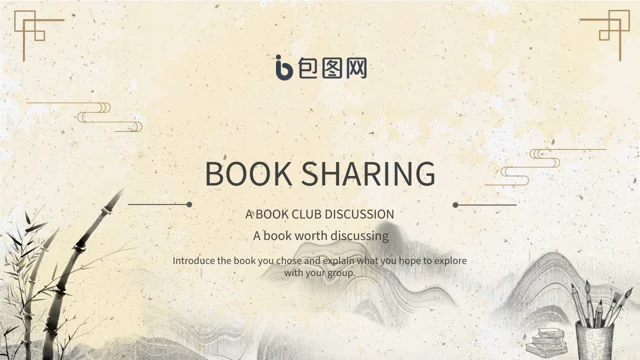
Bamboo Ink Book Sharing Presentation Template: warm paper and bamboo ink art for a reading group
Bamboo Ink Book Sharing Presentation Template pairs warm paper textures with ink bamboo, misty hills and gold-brown corner motifs. Its 25 slides retain the original 16:9 format. Bamboo Ink Book Sharing Presentation Template includes a four-item index and section breaks on pages 3, 8, 13 and 18, covering reasons to read, book types, a reading plan and discussion. Fans, cranes, brushes, blossoms and book pictures provide changing accents beside writing areas. Bamboo Ink Book Sharing Presentation Template mixes vertical panels with horizontal notes, circles and paired picture layouts; these are arranged discussion pages, with no native data charts or workbooks. Ordinary editable text supplies independent English prompts, while original wording remains in same-page notes. Bamboo Ink Book Sharing Presentation Template keeps the artwork, source logo and original audio, and closes with a Thanks page. Choose a book, add supported observations and leave enough space for your group to respond.
Key Features of Bamboo Ink Book Sharing Presentation Template
Warm paper, ink bamboo and varied writing areas for a book discussion.
Warm Paper and Ink Bamboo
Bamboo Ink Book Sharing Presentation Template uses warm paper and ink bamboo. Keep headings clear against the texture and leave space around each illustration.
Four Reading Sections
Bamboo Ink Book Sharing Presentation Template has four sections and an index. Match labels to your book choice, reading plan and the discussion you want to lead.
Vertical Writing Panels
Bamboo Ink Book Sharing Presentation Template includes vertical panels and fine borders. Use brief notes and check text direction after changing a font.
Fans, Cranes and Brushes
Bamboo Ink Book Sharing Presentation Template pairs fans, cranes and brushes with captions. Keep source artwork intact and explain your own reading observations.
Book Pictures and Paired Notes
Bamboo Ink Book Sharing Presentation Template places book pictures beside paired notes. Choose an example from your reading and compare it with another response.
Circles and Discussion Cards
Bamboo Ink Book Sharing Presentation Template offers circles and discussion cards. Arrange short questions within the writing areas and invite different responses.
How to Use Bamboo Ink Book Sharing Presentation Template
Choose a reading sequence, add your notes and review the saved slides.
-
Plan a Reading Discussion
Review all 25 pages of Bamboo Ink Book Sharing Presentation Template. Choose sections that suit your book and group, then decide which observations and questions will help the discussion.
-
Download a Working Copy
Get Bamboo Ink Book Sharing Presentation Template with an active paid plan. Daily downloads are unlimited and can be repeated. Keep the download as a reference while editing a working copy.
-
Edit and Check the Slides
Adapt Bamboo Ink Book Sharing Presentation Template with your reading notes. Check vertical text, crops, fonts and the retained audio, then reopen the saved deck and inspect exported pages.
Questions about Bamboo Ink Book Sharing Presentation Template
How do I download Bamboo Ink Book Sharing Presentation Template?
Bamboo Ink Book Sharing Presentation Template is available to accounts with an active paid plan. Sign into your account and use the download control for Bamboo Ink Book Sharing Presentation Template. Daily downloads of Bamboo Ink Book Sharing Presentation Template are unlimited, and you can download the file again when needed. Preview Bamboo Ink Book Sharing Presentation Template before choosing the pages for your reading group. Keep the downloaded Bamboo Ink Book Sharing Presentation Template as a reference and make your changes in a working copy. Membership access provides the template file without establishing additional rights for each supplied artwork or recording.
How are the pages organised in Bamboo Ink Book Sharing Presentation Template?
Bamboo Ink Book Sharing Presentation Template contains 25 slides in the original 16:9 format. A four-item index in Bamboo Ink Book Sharing Presentation Template introduces reasons to read, book types, a reading plan and discussion. The section breaks in Bamboo Ink Book Sharing Presentation Template appear on pages 3, 8, 13 and 18. Between them, Bamboo Ink Book Sharing Presentation Template uses short notes, paired pictures, vertical panels and small discussion groups. The last page of Bamboo Ink Book Sharing Presentation Template is a Thanks layout. Select useful pages and update the index to match your chosen reading sequence.
What can I edit in Bamboo Ink Book Sharing Presentation Template?
Bamboo Ink Book Sharing Presentation Template contains ordinary editable headings, reading prompts and layout shapes. Use Bamboo Ink Book Sharing Presentation Template to introduce a book and explain your own observations with concise notes. The pictures and ink illustrations in Bamboo Ink Book Sharing Presentation Template remain image assets, separate from the writing areas. In Bamboo Ink Book Sharing Presentation Template, changes to a text box do not translate printed words inside a book picture. Adapt the captions in Bamboo Ink Book Sharing Presentation Template to your subject and check their fit within each original frame. Keep source artwork distinct from quotations or pictures you add yourself.
Are there linked data charts in Bamboo Ink Book Sharing Presentation Template?
Bamboo Ink Book Sharing Presentation Template contains no native data charts, tables or embedded workbooks. Circles and bordered cards in Bamboo Ink Book Sharing Presentation Template organise discussion points rather than connected numerical data. The numbered sequence in Bamboo Ink Book Sharing Presentation Template is a manually arranged reading outline. Use the writing areas of Bamboo Ink Book Sharing Presentation Template to compare ideas from a book, with appropriate page references for quotations. Pictures in Bamboo Ink Book Sharing Presentation Template show books and decorative scenes without establishing measured reading outcomes. Add supported examples that help the group understand your interpretation.
Can I preview all pages of Bamboo Ink Book Sharing Presentation Template?
The gallery for Bamboo Ink Book Sharing Presentation Template shows all 25 final pages. Review Bamboo Ink Book Sharing Presentation Template in order to see how the warm paper, bamboo and changing book illustrations connect. Compare the vertical and horizontal writing areas in Bamboo Ink Book Sharing Presentation Template before deciding how long your notes should be. A static preview of Bamboo Ink Book Sharing Presentation Template shows the composition but does not play the audio. Download Bamboo Ink Book Sharing Presentation Template and check the file in your intended editor before presenting. Inspect the saved slides again after replacing a picture or choosing another font.
Which fonts does Bamboo Ink Book Sharing Presentation Template use?
Bamboo Ink Book Sharing Presentation Template uses Source Han Sans SC Regular for ordinary editable text. Font files are not embedded in Bamboo Ink Book Sharing Presentation Template. Install suitable fonts or choose a replacement in your editor when opening Bamboo Ink Book Sharing Presentation Template. Review the narrow vertical panels and larger headings in Bamboo Ink Book Sharing Presentation Template after changing a font. Printed lettering inside the supplied pictures of Bamboo Ink Book Sharing Presentation Template remains part of those images. Check spacing, missing characters and text fit in the saved file before sharing your reading notes.
Is the entire file of Bamboo Ink Book Sharing Presentation Template in English?
Bamboo Ink Book Sharing Presentation Template provides independent English guidance for ordinary editable headings and notes. Original visible wording in Bamboo Ink Book Sharing Presentation Template remains in same-page reference notes, separate from the new prompts. Source artwork, book lettering and the original provider logo in Bamboo Ink Book Sharing Presentation Template remain intact, so the complete package is not entirely English. All website languages for Bamboo Ink Book Sharing Presentation Template describe the same downloadable presentation. Adapt Bamboo Ink Book Sharing Presentation Template to your readers with your own observations, accurate citations and clear questions. Retained source names do not identify the author of your new reading commentary.
How should I use the artwork and audio in Bamboo Ink Book Sharing Presentation Template?
Bamboo Ink Book Sharing Presentation Template retains the supplied ink illustrations, book pictures, source logo and original audio. Provider marks in Bamboo Ink Book Sharing Presentation Template identify source material without proving who created every illustration. Download access to Bamboo Ink Book Sharing Presentation Template does not add image or music permissions. When adapting Bamboo Ink Book Sharing Presentation Template, keep the relevant source information with the artwork you use and describe your own contribution accurately. Check the permissions relevant to your selected assets and intended use before distributing an edited Bamboo Ink Book Sharing Presentation Template. Test the audio in your editor and decide whether it suits the reading discussion.
How can I share an edited Bamboo Ink Book Sharing Presentation Template?
Add your book choice, reading notes and discussion questions to Bamboo Ink Book Sharing Presentation Template. Review the saved Bamboo Ink Book Sharing Presentation Template for vertical text, narrow headings, changed fonts and picture crops. Keep quotations and their sources clear when using Bamboo Ink Book Sharing Presentation Template to present an interpretation of a book. Export Bamboo Ink Book Sharing Presentation Template to PDF for a static review and retain an editable copy for future discussion. Test the audio separately when sharing Bamboo Ink Book Sharing Presentation Template in a slide format. Choose a format your audience can open and inspect the result before giving your presentation.