Deer Graduation Design Presentation Template: deer drawings and monochrome graduation layouts
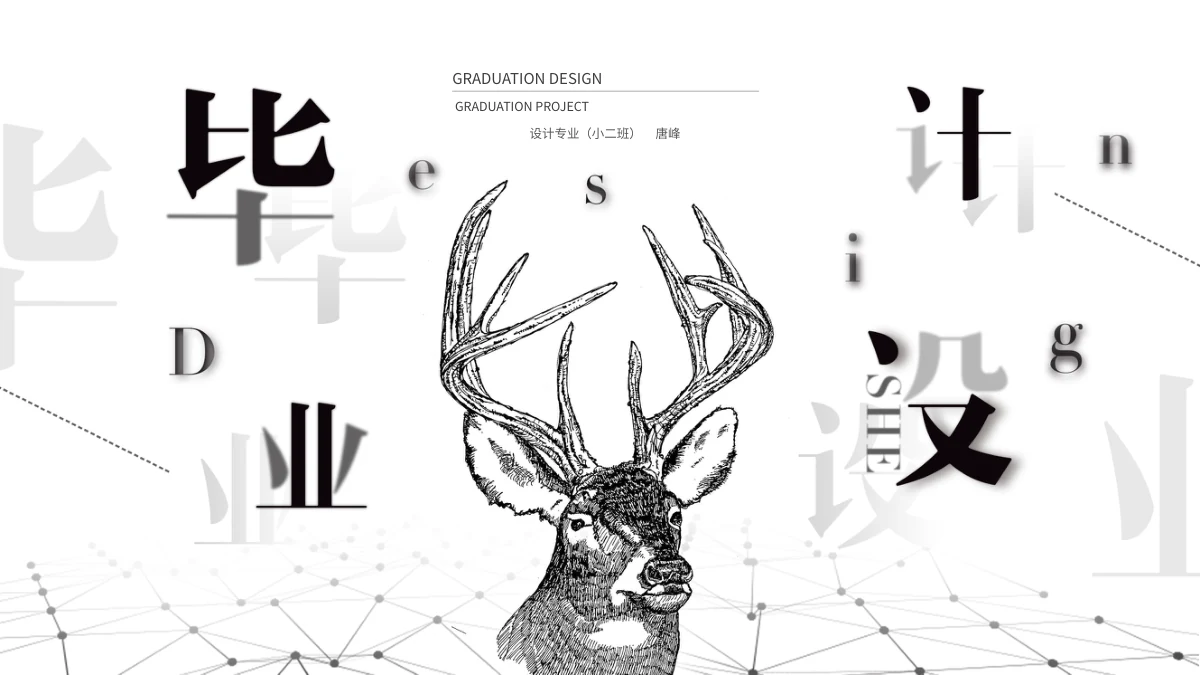
Deer Graduation Design Presentation Template pairs a drawn deer with black, white and grey layouts. Its 31 slides use a 16:9 canvas, title artwork and pale network lines along the bottom. Deer Graduation Design Presentation Template has an A–D index and chapter breaks on pages 3, 10, 17 and 24. Classroom, graduation-cap and waterfront photographs appear in diamonds, circles and wide panels. Deer Graduation Design Presentation Template adds branching diagrams, a lock with eight labels, six raised hexagons, a five-point sequence and manual year timelines. Page 18 holds one native pie chart; page 20 has four native doughnuts. Deer Graduation Design Presentation Template keeps the chart examples and supplied music, then repeats the deer cover on its last page. Ordinary text provides independent English guidance, with original wording in same-slide reference notes. Chinese title artwork, picture lettering, source marks and the design-class name remain separate from your contribution.
Key Features of Deer Graduation Design Presentation Template
A deer cover, grey diagrams, graduation photos and five native charts.
Deer Cover and Title Artwork
Deer Graduation Design Presentation Template opens and ends with a deer sketch and title artwork. Keep these source visuals distinct from your own captions.
Four A–D Chapter Breaks
Deer Graduation Design Presentation Template has an A–D index and four breaks. Use short labels that fit beside the large letters and supporting captions.
Monochrome Graduation Photos
Deer Graduation Design Presentation Template uses graduation photos in diamonds, circles and wide panels. Review each crop and add supported captions.
Branching Diagrams and Connections
Deer Graduation Design Presentation Template has branching shapes, a lock and six hexagons. Use labels to explain connections without implying measured results.
Pie and Doughnut Charts
Deer Graduation Design Presentation Template retains a pie and four doughnuts. Check sample data and the pie’s external reference before using your own values.
Manual Years and Percentages
Deer Graduation Design Presentation Template includes year timelines and percentage bars. Add supported dates and values, checking manual labels beside each shape.
How to Use Deer Graduation Design Presentation Template
Choose pages, add supported content and check the final presentation.
-
Choose a Clear Sequence
Preview all 31 pages of Deer Graduation Design Presentation Template. Choose chapter breaks, photographs and diagrams that support your outline, then plan a concise heading for each section.
-
Download and Add Your Content
Download Deer Graduation Design Presentation Template with an active paid plan. Save a working copy, replace ordinary sample text, and add supported captions and values for your selected layouts.
-
Review Pictures, Data and Playback
Check Deer Graduation Design Presentation Template in your presentation app. Review narrow labels, picture crops, chart data and the audio setting, then inspect an exported copy before sharing.
Questions about Deer Graduation Design Presentation Template
What is included in Deer Graduation Design Presentation Template?
Deer Graduation Design Presentation Template contains 31 PowerPoint slides in a 16:9 widescreen format. Deer Graduation Design Presentation Template combines a deer drawing, grey title artwork, graduation pictures and diagrams. Deer Graduation Design Presentation Template includes an A–D contents page and four chapter breaks, followed by picture panels, manual sequences and five native charts. Deer Graduation Design Presentation Template ends by repeating the deer cover rather than adding a Thanks page or a verified result. Browse Deer Graduation Design Presentation Template before choosing your pages. The photographs, labels and design-class name are supplied source material, not proof that you created the pictured work, attended a school or completed a project.
How are the chapters arranged in Deer Graduation Design Presentation Template?
Deer Graduation Design Presentation Template presents four A–D entries on contents page 2. Deer Graduation Design Presentation Template introduces those parts on pages 3, 10, 17 and 24, placing offset letters beside the deer and title artwork. Deer Graduation Design Presentation Template repeats this chapter layout while later pages switch between pictures, diagrams, chart examples and timelines. Keep chapter labels in Deer Graduation Design Presentation Template short to avoid crowding supporting captions. Rename the contents and headings in Deer Graduation Design Presentation Template together, checking their order against your outline. Choose fewer pages when a layout adds no useful explanation; the sequence is a starting point, not your project history.
Which photographs appear in Deer Graduation Design Presentation Template?
Deer Graduation Design Presentation Template includes a classroom, airborne graduation caps, graduates beside a chalkboard and a group by the water. Deer Graduation Design Presentation Template uses monochrome views, while related colour images remain in the file. Deer Graduation Design Presentation Template places photographs in overlapping diamonds, circles along curved paths and wide panels. Picture lettering and source marks remain in Deer Graduation Design Presentation Template, including the classroom photograph’s visible source mark. Add supported captions to Deer Graduation Design Presentation Template, without guessing a location, photographer or history. When replacing a picture, review its crop and nearby text so the description matches the scene and source information stays clear.
Are the diagrams in Deer Graduation Design Presentation Template data charts?
Deer Graduation Design Presentation Template includes branching shapes, a lock with eight labels, raised hexagons, arrow sequences and manual illustrations. Deer Graduation Design Presentation Template also has a year dial, timelines and percentage bars with ordinary slide labels. These elements in Deer Graduation Design Presentation Template differ from the five native charts on pages 18 and 20. Manual figures in Deer Graduation Design Presentation Template do not establish measured performance, security functions or research results. Use Deer Graduation Design Presentation Template to explain supported points with brief labels. For dataset updates, use appropriate charts and check the data. Decorative shapes and graph-like icons are not linked measurements.
What native charts does Deer Graduation Design Presentation Template include?
Deer Graduation Design Presentation Template has one pie chart on page 18 and four doughnut charts on page 20. Deer Graduation Design Presentation Template retains the pie’s four-category example and two-category doughnuts with four embedded workbooks. The pie in Deer Graduation Design Presentation Template keeps its external data reference, so this is not a set of five self-contained workbooks. Review Deer Graduation Design Presentation Template in your presentation application before changing values, including how it handles that reference. Add supported labels and data to Deer Graduation Design Presentation Template, keeping manual percentage text distinct from chart values. The examples are not verified project results; check your values and captions before presenting.
Which fonts does Deer Graduation Design Presentation Template use?
Deer Graduation Design Presentation Template uses Source Han Sans SC Regular and Bold for editable titles and captions. No font files are embedded in Deer Graduation Design Presentation Template. Install these fonts or alternatives, then check chapter labels and smaller diagram captions. Deer Graduation Design Presentation Template includes narrow headings, tag labels and large offset letters, so another font can change line breaks. Compare Deer Graduation Design Presentation Template with the previews after export. Chinese lettering merged into artwork and photographs remains part of those images. Reopen Deer Graduation Design Presentation Template in your presentation app, checking missing characters and alignment without treating picture lettering as ordinary editable text.
Is every part of Deer Graduation Design Presentation Template translated into English?
Deer Graduation Design Presentation Template uses independent English guidance for editable headings and captions. Deer Graduation Design Presentation Template retains original wording in same-slide source-reference notes, separately from the new prompts. Chinese title artwork, picture lettering, source marks and the design-class name remain in Deer Graduation Design Presentation Template. Those names in Deer Graduation Design Presentation Template do not identify the author of your new guidance or prove a school affiliation. All website languages describe the same Deer Graduation Design Presentation Template, not separate files translating every image or sound. Adapt ordinary text for viewers, distinguish source credits from your contribution and decide whether retained picture wording needs explanation during your presentation.
Does Deer Graduation Design Presentation Template include audio or extra permissions?
Deer Graduation Design Presentation Template retains the supplied music and playback arrangement. Deer Graduation Design Presentation Template does not create a new licence for that recording or every third-party image by including them. A paid download of Deer Graduation Design Presentation Template gives access to the presentation; source-material permissions remain separate from membership. Check the audio setting in Deer Graduation Design Presentation Template before presenting and decide whether background music is needed. When sharing an edited Deer Graduation Design Presentation Template, use material you are entitled to include, retain relevant credits and explain your contribution. Audio metadata, the design-class name and photographs do not verify a creator identity, school affiliation or publication permission.
How do I download and share Deer Graduation Design Presentation Template?
Download Deer Graduation Design Presentation Template with an active paid membership. Active paid members can download Deer Graduation Design Presentation Template repeatedly without a daily count limit. Browse 31 previews and keep an unchanged copy beside your edited Deer Graduation Design Presentation Template. Replace sample text with supported content, reviewing the A–D sequence and repeated closing cover. Check Deer Graduation Design Presentation Template in your presentation app, since editors may display crops, typography, charts or audio differently. Share your edited Deer Graduation Design Presentation Template in a format suitable for the recipient, keeping an editable copy for later changes and inspecting exported pages for readable text and accurate picture descriptions.