Blue Chevron Work Summary Presentation Template: A four-part review with office photographs
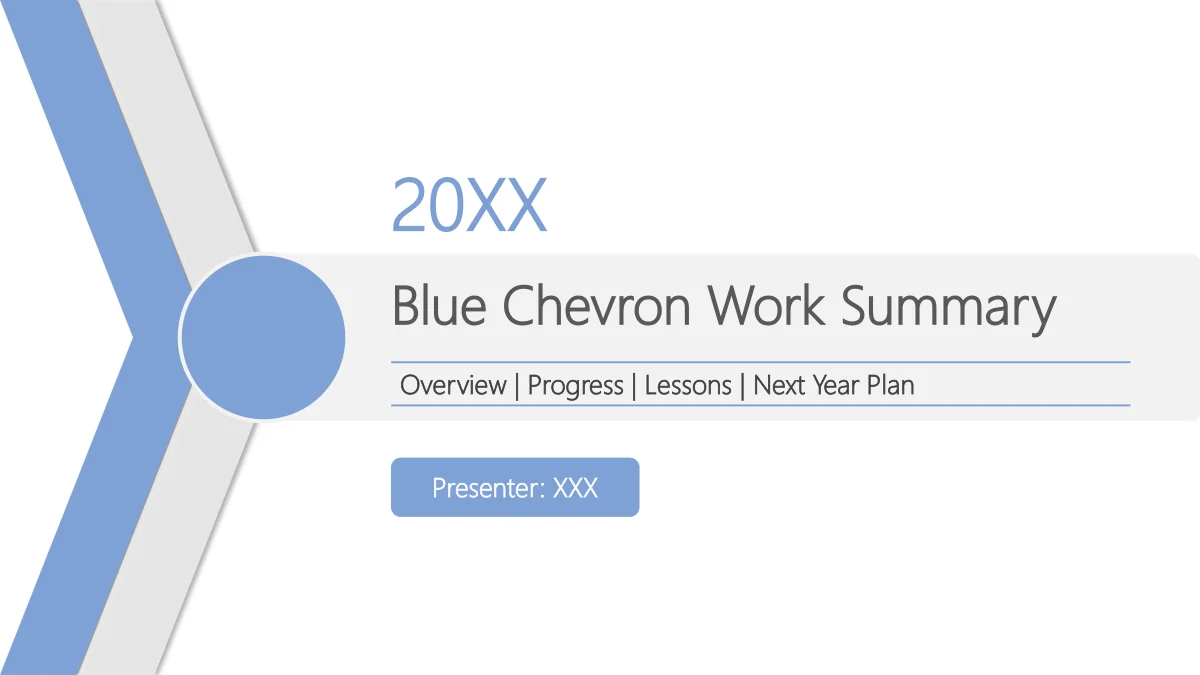
Blue Chevron Work Summary Presentation Template pairs blue chevrons and circles with white pages and desk-work photographs. Its 19 slides move from a four-entry index through Annual Overview, Work Progress, Lessons Shared and Next Year Plan, ending with a matching thank-you page. Use the Blue Chevron Work Summary Presentation Template to separate your scope, delivery, learning and priorities. Choose photographs or short text to explain each point. A timeline, folded chevron loop, gears and road with pins connect ideas through shapes rather than linked charts. The Blue Chevron Work Summary Presentation Template gives your report a framework without supplying a company story. Replace the sample year, presenter and guidance with supported information. Office photographs supply context; support claims with your own evidence.
Key Features of Blue Chevron Work Summary Presentation Template
Match each page to the point your audience needs to understand.
Blue chevrons and circular detail
Blue Chevron Work Summary Presentation Template uses blue chevrons, circles and light grey panels on white pages. Keep headings distinct from the supporting text.
Four sections with a clear index
Blue Chevron Work Summary Presentation Template separates overview, progress, lessons and planning. Rename the index and photo dividers together.
Photographs of desk work
Blue Chevron Work Summary Presentation Template includes office photographs, with full-width, angled and circular picture areas. Match each replacement to its crop.
A manual timeline
Blue Chevron Work Summary Presentation Template includes four points on a drawn timeline. Edit the bubble labels and explanations together to show your sequence.
Diagrams for lessons and priorities
Blue Chevron Work Summary Presentation Template offers gears, a magnifying glass and a road with pins. Use these shapes to organise ideas without implying data.
A matching thank-you close
Blue Chevron Work Summary Presentation Template ends in the same blue chevron style as its cover. Replace the year and presenter before adding a closing message.
How to Use the Blue Chevron Work Summary Presentation Template
Preview the layouts, download with a paid plan, then edit and share.
-
Preview and outline your review
Browse the 19 pages of the Blue Chevron Work Summary Presentation Template. Compare its four section breaks, photo layouts and manual diagrams, then choose pages for the points in your report.
-
Download an editable copy
Download the Blue Chevron Work Summary Presentation Template with an active paid plan. Keep a copy, then rename the four index entries and their matching section headings to suit your report.
-
Edit, check and share
Edit the Blue Chevron Work Summary Presentation Template with your own text and permitted photographs. Check labels, crops and wrapping in Slide Show view, then share the reviewed PPTX or PDF.
Blue Chevron Work Summary Presentation Template FAQ
How do I download the Blue Chevron Work Summary Presentation Template?
Sign in with an active paid plan and choose Download PPTX on the Blue Chevron Work Summary Presentation Template page. Paid members can download the Blue Chevron Work Summary Presentation Template without a daily limit, with repeat downloads. Free accounts can preview the gallery. Keep an untouched Blue Chevron Work Summary Presentation Template copy before editing.
How many slides are in the Blue Chevron Work Summary Presentation Template?
The Blue Chevron Work Summary Presentation Template contains 19 widescreen 16:9 slides. Four dividers on slides 3, 7, 11 and 15 organise the Blue Chevron Work Summary Presentation Template into overview, progress, lessons and planning. Its thank-you page matches the cover. If you remove pages from the Blue Chevron Work Summary Presentation Template, align the four-entry index with your chosen sequence.
Can I edit text and colours in the Blue Chevron Work Summary Presentation Template?
The Blue Chevron Work Summary Presentation Template has editable text, panels and shapes. Diagrams in the Blue Chevron Work Summary Presentation Template are drawn manually, without native charts or linked workbooks. Change labels and indicators together; new values do not resize shapes automatically. Picture lettering remains inside images, so use permitted replacement photographs when adapting the Blue Chevron Work Summary Presentation Template.
Can I preview every page of the Blue Chevron Work Summary Presentation Template?
Yes. The Blue Chevron Work Summary Presentation Template gallery displays all 19 pages. Browse its thumbnails and arrows to compare photo dividers, text areas and planning diagrams. The Blue Chevron Work Summary Presentation Template previews help you select layouts for your report. Check your edited Blue Chevron Work Summary Presentation Template at presentation size before sharing.
Can I use the Blue Chevron Work Summary Presentation Template in another editor?
Try the Blue Chevron Work Summary Presentation Template in an editor that supports PPTX, but fonts, shadows and picture crops may differ. Test a Blue Chevron Work Summary Presentation Template copy, reviewing the pages and labels. For a fixed view, export the Blue Chevron Work Summary Presentation Template to PDF and inspect it on the intended screen.
Which fonts does the Blue Chevron Work Summary Presentation Template use?
The Blue Chevron Work Summary Presentation Template uses Microsoft YaHei Light for editable text. The Blue Chevron Work Summary Presentation Template contains no embedded fonts. If your editor substitutes the font, check narrow headings and line breaks in a Blue Chevron Work Summary Presentation Template copy before presenting. Icons are vector shapes; photographed lettering stays within each image.
Is the text inside the Blue Chevron Work Summary Presentation Template in English?
The Blue Chevron Work Summary Presentation Template has English headings, guidance and notes. The sample year 20XX and presenter XXX in the Blue Chevron Work Summary Presentation Template are placeholders. Replace them with supported information. Every website language links to the same English Blue Chevron Work Summary Presentation Template file; changing the site language does not translate the slides. Printed details remain.
Can I use the Blue Chevron Work Summary Presentation Template commercially?
Follow the original terms and picture permissions when using the Blue Chevron Work Summary Presentation Template. A paid Blue Chevron Work Summary Presentation Template download does not add rights to third-party photographs or brands. Select permitted images for public use. Guidance in the Blue Chevron Work Summary Presentation Template does not verify a company project, a person’s role or business results.
How do I share the Blue Chevron Work Summary Presentation Template?
Use the Blue Chevron Work Summary Presentation Template page’s share button or copy its public URL to recommend the design. Recipients need an active paid plan to download the editable Blue Chevron Work Summary Presentation Template. Send your completed PPTX or PDF subject to source and picture permissions. Check sample details and private information before sharing the Blue Chevron Work Summary Presentation Template.