Square Portfolio Presentation Template: olive squares, brown circles and a calm portfolio frame
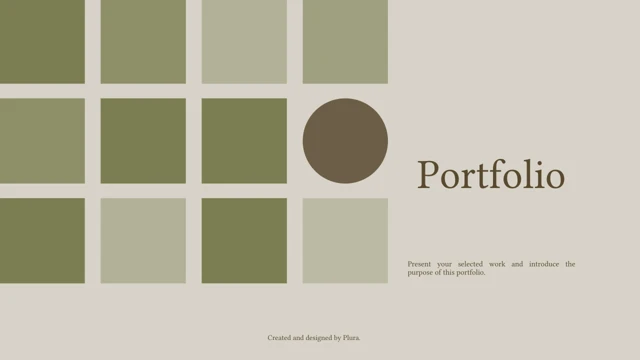
Square Portfolio Presentation Template uses olive square grids and brown circles on a pale grey background. The cover places a serif Portfolio title beside the grid; the closing page repeats the same shapes around a Thank You heading. Small Plura credits remain along the bottom of the original slides. Square Portfolio Presentation Template contains 15 widescreen pages. A four-card contents layout leads into numbered dividers for Parts 01–04. Later pages combine short text groups with different square arrangements and crops of the same monochrome building photograph. These are portfolio layouts, without native data charts. Square Portfolio Presentation Template provides an editable starting point for selected projects. Replace the sample instructions with your own work, captions and contact details. Review Square Portfolio Presentation Template in full before choosing pages, keeping its modest text areas in mind: a few focused sentences fit the layout better than long paragraphs.
Key Features of Square Portfolio Presentation Template
Olive grids, serif titles and a monochrome building photograph.
Square and Circle Motifs
Square Portfolio Presentation Template uses olive grids and brown circles. Their placement changes across the deck, framing short notes with a consistent visual style.
Four Contents Cards
Square Portfolio Presentation Template has four contents cards marked Parts 01–04. Rename them for your projects and match their order to the slides you keep.
Numbered Section Dividers
Square Portfolio Presentation Template includes four numbered dividers with a square accent. Introduce each project in the note area before showing its details.
A Monochrome Building Photo
Square Portfolio Presentation Template reuses one building photo in different layouts. Replace it with your own image and check each crop around important details.
Varied Text Groups
Square Portfolio Presentation Template offers paired notes, four text blocks and photo captions. Select a page that fits your message and keep the wording concise.
A Matching Closing Page
Square Portfolio Presentation Template ends with a square grid and Thank You title. Add a next step in the note area while retaining the original Plura author credit.
How to Use Square Portfolio Presentation Template
Choose the pages, replace the samples and review the result.
-
Review the Full Sequence
Browse all 15 pages of Square Portfolio Presentation Template. Compare its four-part contents and photo layouts with your project outline, then choose pages that give each piece of work enough room.
-
Download a Working Copy
Download Square Portfolio Presentation Template with an active paid plan. Keep a working copy of the English PPTX; paid members can download without a daily limit and repeat the same download.
-
Adapt and Check Each Page
Edit Square Portfolio Presentation Template in PowerPoint. Replace notes and photographs, update the contents and retain genuine credits. Check crops, font substitutions and spacing before export.
Questions about Square Portfolio Presentation Template
How do I download Square Portfolio Presentation Template?
Sign in with an active paid plan and use the download control on the Square Portfolio Presentation Template page. Paid members have no daily download limit and can get the same file again. Save an untouched copy of Square Portfolio Presentation Template before editing. Use a separate working file for your own version of Square Portfolio Presentation Template.
How many slides are in Square Portfolio Presentation Template?
Square Portfolio Presentation Template includes 15 pages in a 16:9 widescreen format. You do not need to use all of Square Portfolio Presentation Template. Remove pages that do not help explain your work and reorder the others as needed. Update the Part 01–04 labels and contents cards in Square Portfolio Presentation Template after making those choices.
Can I edit Square Portfolio Presentation Template?
The native text, square shapes and circles in Square Portfolio Presentation Template can be changed in PowerPoint. The building photograph remains an image asset. Replace the sample guidance in Square Portfolio Presentation Template with your own project descriptions, choosing short captions for small text areas. Keep the Plura credits in Square Portfolio Presentation Template rather than presenting the original design as your own.
Can I preview every page of Square Portfolio Presentation Template?
Yes. All 15 pages of Square Portfolio Presentation Template are shown before downloading. Use the thumbnails and enlarged preview to check the different square arrangements, text groups and photograph crops. Several pages of Square Portfolio Presentation Template reuse the building image, but the crop and placement vary. The preview of Square Portfolio Presentation Template helps you choose between a short note, a paired text layout or a page focused on an image.
Can another presentation app open Square Portfolio Presentation Template?
Editors with PowerPoint support can import the PPTX format of Square Portfolio Presentation Template. They may substitute unavailable fonts or alter line breaks, shape spacing and photo crops. Test Square Portfolio Presentation Template in the app you plan to use before making extensive changes. Format compatibility does not guarantee that Square Portfolio Presentation Template will look identical in every editor.
Which fonts does Square Portfolio Presentation Template declare?
Square Portfolio Presentation Template declares Constantia, Graphik, 字魂95号-手刻宋, 思源黑体 CN ExtraLight and 思源黑体 CN Light. No font files are embedded in Square Portfolio Presentation Template. If your app substitutes a typeface, inspect the contents cards, small captions and large part titles for new line breaks. Use properly licensed fonts when editing Square Portfolio Presentation Template, and check an exported PDF before sharing.
Are the downloaded slides of Square Portfolio Presentation Template translated?
Square Portfolio Presentation Template is supplied as one English PowerPoint file with concise editing prompts. Translated website descriptions of Square Portfolio Presentation Template refer to that same file. Choosing another website language does not change the slide text. Replace the examples in Square Portfolio Presentation Template with your preferred language, checking font coverage, line breaks and text direction.
Can I use Square Portfolio Presentation Template commercially?
Commercial permissions for the source design, photograph and fonts of Square Portfolio Presentation Template have not been verified. Paid membership gives you access to download Square Portfolio Presentation Template, but does not establish a commercial licence for every included asset. Keep the original Created and designed by Plura credit. Check relevant permissions and use your own or licensed photograph where necessary before sharing an edited version of Square Portfolio Presentation Template.
How should I share Square Portfolio Presentation Template?
Share the public Square Portfolio Presentation Template page so another person can inspect all pages and the download conditions. Share your edited Square Portfolio Presentation Template as a PDF or PPTX when the relevant permissions allow it. Retain genuine author credit and keep a working copy of Square Portfolio Presentation Template for later changes.