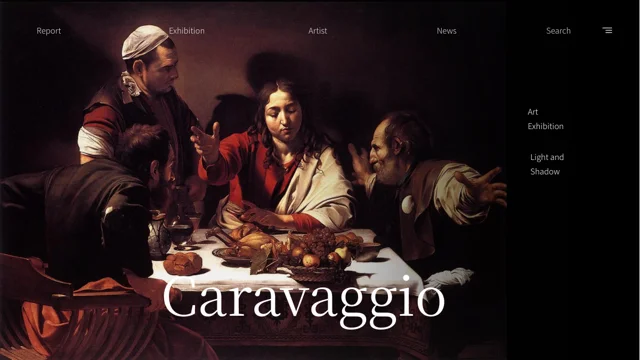
Caravaggio Art Exhibition Presentation Template: Dark Galleries, Painting Comparisons and Striped Section Numbers
Caravaggio Art Exhibition Presentation Template presents paintings against black backgrounds with thin white rules and navigation-style labels. Caravaggio Art Exhibition Presentation Template marks four sections with striped numbers on pages 3, 8, 13 and 18. Caravaggio Art Exhibition Presentation Template includes three- and five-image galleries, paired comparisons and a wide artwork beside short notes. Angled frames and repeated outline rectangles create layered compositions, while a spiral overlay provides a starting point for discussing a picture. A native column chart on page 21 offers editable sample data, and the large percentage graphic elsewhere is a separate manual example. Choose a focused sequence, replace the observation notes and check artwork titles and attributions before adding them. Keep small text readable on black and preserve important details when recropping paintings. A thank-you page appears on page 24, followed by a decorative number-style sheet on page 25.
Key Features of Caravaggio Art Exhibition Presentation Template
Black gallery pages, comparison layouts and strong numbered dividers.
Black Gallery Backgrounds
Caravaggio Art Exhibition Presentation Template uses black backgrounds, thin rules and navigation labels. Keep captions readable and leave space around paintings.
Four Striped Section Numbers
Caravaggio Art Exhibition Presentation Template places striped-number dividers on pages 3, 8, 13 and 18. Match section notes to your exhibition sequence.
Multi-Picture Comparisons
Caravaggio Art Exhibition Presentation Template includes three- and five-picture galleries plus paired layouts. Give each image a concise, verified caption.
Angled Frames and Spiral Overlay
Caravaggio Art Exhibition Presentation Template combines tilted frames, repeated outlines and a spiral overlay. Use these layouts for specific visual observations.
Editable Column Chart
Caravaggio Art Exhibition Presentation Template includes a native column chart and workbook on page 21. Replace the sample series and check labels against your data.
Thank-You and Number-Style Pages
Caravaggio Art Exhibition Presentation Template ends its main sequence with thanks on page 24. Page 25 holds decorative number styles to review section treatments.
How to Use Caravaggio Art Exhibition Presentation Template
Choose the artworks, prepare accurate notes and review the gallery sequence.
-
Select Your Gallery Sequence
Preview all 25 pages of Caravaggio Art Exhibition Presentation Template. Choose comparisons, close views and section dividers for your topic, and decide whether the chart belongs in your talk.
-
Download and Prepare Accurate Notes
Download Caravaggio Art Exhibition Presentation Template with an active paid plan; daily and repeat downloads are unlimited. Save a copy, verify artwork captions and replace the notes and data.
-
Check Images, Text and Chart
Review Caravaggio Art Exhibition Presentation Template at full size. Check artwork crops, text contrast and chart labels, then compare exported pages with the editable copy before sharing.
Questions About Caravaggio Art Exhibition Presentation Template
How do I download Caravaggio Art Exhibition Presentation Template?
Sign in with an active paid plan to download Caravaggio Art Exhibition Presentation Template. Daily and repeat downloads of Caravaggio Art Exhibition Presentation Template are unlimited. Caravaggio Art Exhibition Presentation Template is supplied as an editable PowerPoint file. Keep an untouched copy of Caravaggio Art Exhibition Presentation Template before changing the gallery sequence, replacing images or editing the sample chart data.
What is included in Caravaggio Art Exhibition Presentation Template?
Caravaggio Art Exhibition Presentation Template contains 25 slides in a 16:9 format. Caravaggio Art Exhibition Presentation Template includes a cover, four striped-number section dividers, painting galleries, comparison layouts and a native column chart. The Caravaggio Art Exhibition Presentation Template thank-you page is on page 24, followed by a decorative number-style sheet on page 25. Review all Caravaggio Art Exhibition Presentation Template previews before deciding which pages belong in your presentation.
How are the sections in Caravaggio Art Exhibition Presentation Template organized?
Caravaggio Art Exhibition Presentation Template uses large striped numbers as section dividers on pages 3, 8, 13 and 18. The Caravaggio Art Exhibition Presentation Template gallery layouts between these dividers mix paintings, notes and comparisons. Arrange Caravaggio Art Exhibition Presentation Template sections around the ideas you want to explain and update the nearby text accordingly. Keep the Caravaggio Art Exhibition Presentation Template small navigation-style labels distinct from your actual section titles and do not assume they provide website navigation.
Are all pictures in Caravaggio Art Exhibition Presentation Template verified works by Caravaggio?
Caravaggio Art Exhibition Presentation Template uses a Caravaggio-themed cover and a collection of painting images. Caravaggio Art Exhibition Presentation Template is a presentation layout, not a verified catalogue establishing the authorship of every included work. Check artwork titles, dates and attributions before adding them to Caravaggio Art Exhibition Presentation Template. Use accurate captions and retain any necessary source credit when adapting Caravaggio Art Exhibition Presentation Template for an exhibition or teaching presentation.
How can I use the comparison layouts in Caravaggio Art Exhibition Presentation Template?
Caravaggio Art Exhibition Presentation Template includes three- and five-picture galleries, paired frames and larger artworks beside notes. Select Caravaggio Art Exhibition Presentation Template images that support a specific comparison, such as composition or light. Keep Caravaggio Art Exhibition Presentation Template captions short and distinguish your observations from documented historical information. Check the Caravaggio Art Exhibition Presentation Template angled frames and narrow picture areas so they do not crop out details needed for the comparison.
What does the spiral overlay in Caravaggio Art Exhibition Presentation Template show?
Caravaggio Art Exhibition Presentation Template places a spiral and rectangular guide over an artwork on page 11. Treat this Caravaggio Art Exhibition Presentation Template overlay as a discussion aid rather than proof of the artist's intended construction. Explain the relationship you are examining in Caravaggio Art Exhibition Presentation Template and adjust the guide if you replace the picture. Review the exported Caravaggio Art Exhibition Presentation Template page to ensure the lines remain clear without obscuring the relevant painting details.
Which fonts does Caravaggio Art Exhibition Presentation Template use?
Caravaggio Art Exhibition Presentation Template uses Source Han Serif SC Regular and Source Han Sans SC Light. Fonts are not embedded in Caravaggio Art Exhibition Presentation Template, so install matching fonts if your software substitutes them. Check Caravaggio Art Exhibition Presentation Template cover lettering, small gallery captions and chart labels after opening the file. Compare the exported Caravaggio Art Exhibition Presentation Template pages with your editable copy for unexpected line breaks or changes in spacing and contrast.
Can I edit the chart in Caravaggio Art Exhibition Presentation Template?
Caravaggio Art Exhibition Presentation Template includes a native column chart with an embedded Excel workbook on page 21. Replace the Caravaggio Art Exhibition Presentation Template example series and categories with data relevant to your presentation, then check the chart labels. The Caravaggio Art Exhibition Presentation Template large percentage graphic is a separate manual design element, not another workbook-linked chart. Keep all Caravaggio Art Exhibition Presentation Template figures clearly identified as examples until you supply supported information.
What should I review before sharing Caravaggio Art Exhibition Presentation Template?
Check Caravaggio Art Exhibition Presentation Template artwork captions and any historical statements against reliable sources. Review Caravaggio Art Exhibition Presentation Template small text, tilted image crops and the spiral overlay at presentation size. Confirm that Caravaggio Art Exhibition Presentation Template chart data and manual percentage labels reflect your intended examples or verified figures. Compare the exported Caravaggio Art Exhibition Presentation Template cover, thank-you page and any selected number-style elements with your editable copy before sharing.