Retro Youth Album Presentation Template: Warm Panels and a Personal Photo Sequence
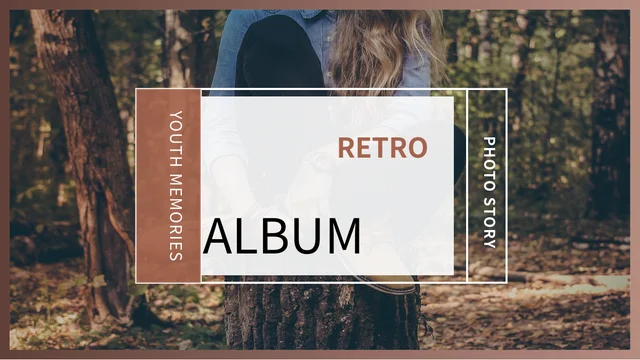
Retro Youth Album Presentation Template combines warm brown and terracotta panels with portraits, forest scenes and a dark closing section. Retro Youth Album Presentation Template contains 18 widescreen slides; the opening and thank-you ending share the same wooded photograph. Retro Youth Album Presentation Template alternates large pictures with paired layouts, four-photo rows and collages of portraits, everyday scenes and a camera. Page 5 uses a wide forest-road image, while later pages contrast sunlit pictures with darker portraits and a black text panel. The original school-life narrative is sample material, not a biography of the people shown. The editable English guidance helps you write a photo story using your own checked captions. Source article URLs remain in slide notes, separate from the new guidance. Choose images that you can explain accurately, identify your contribution and keep the order clear without inventing names, places, dates or events for the source photographs.
Key Features of Retro Youth Album Presentation Template
Warm color blocks, portrait collages and space for your own photo story.
Warm Brown and Terracotta Panels
Retro Youth Album Presentation Template uses brown and terracotta panels beside photos. Keep captions short and readable where pale text sits on a warm background.
Matching Cover and Thank-You Scene
Retro Youth Album Presentation Template opens and ends with the same forest photo. Adapt titles to frame your own album without changing the picture’s meaning.
A Wide Forest-Road Page
Retro Youth Album Presentation Template places a wide forest-road photo on page 5. Write a clear scene caption without claiming an unverified route or location.
Portrait Rows and Collages
Retro Youth Album Presentation Template includes paired photos, four-photo rows and portrait collages. Choose related images and match captions to the right scene.
Light and Dark Picture Rhythms
Retro Youth Album Presentation Template mixes sunlit images, darker portraits and a black text panel. Check contrast when shifting between the different backgrounds.
Editable Photo-Story Guidance
Retro Youth Album Presentation Template offers English photo-story guidance. Replace it with checked captions and keep source references separate from your claims.
How to Use Retro Youth Album Presentation Template
Choose your story, replace the captions and check the image sequence.
-
Choose a Story and Photo Order
Review all 18 pages of Retro Youth Album Presentation Template. Choose photos that support one story, identify your contribution and arrange the large-image pages and collages in a clear order.
-
Download and Write Your Captions
Get Retro Youth Album Presentation Template with an active paid plan and unlimited daily downloads. Save a copy, replace the example guidance and keep source references separate from your story.
-
Review Pictures and Export
Check Retro Youth Album Presentation Template picture crops, warm-panel captions and dark-page text. Verify names, dates and locations you add, then compare the export with your editable copy.
Questions About Retro Youth Album Presentation Template
How do I download Retro Youth Album Presentation Template?
Sign in with an active paid plan to download Retro Youth Album Presentation Template. Daily and repeated Retro Youth Album Presentation Template downloads are unlimited. Save the Retro Youth Album Presentation Template PowerPoint (.pptx) file as a working copy before writing captions or reorganizing photos. Browse the complete Retro Youth Album Presentation Template preview to choose large-image pages, portrait rows and collage layouts for your own story. Keep an original Retro Youth Album Presentation Template copy when changing the sequence so you can compare the source spacing and frames with your revision. The source pictures and school-life sample text do not prove your authorship, a photographed person’s identity or that any narrated event happened to you. Replace the guidance with information you can verify rather than present the example material as your biography.
How many pages and photo layouts does Retro Youth Album Presentation Template contain?
Retro Youth Album Presentation Template contains 18 original slides in 16:9. Retro Youth Album Presentation Template uses the same wooded photograph for its cover and thank-you ending, with different editable titles. The Retro Youth Album Presentation Template sequence includes a wide forest-road page, paired portraits, four-photo rows, multi-image collages and large photographs beside warm text panels. Choose the Retro Youth Album Presentation Template layouts that support your story rather than retain every page in its original order. The finished Retro Youth Album Presentation Template can contain fewer than 18 slides, and there is no need to invent chapter boundaries where the source uses a continuous album sequence. After moving a picture, review its adjacent title and caption so the layout does not attach another scene’s explanation to it.
Does Retro Youth Album Presentation Template describe a verified school-life story or the photographed people?
Retro Youth Album Presentation Template uses source narrative examples and photographs as material for an album layout, not a verified personal history. Do not treat the Retro Youth Album Presentation Template original school-life prose as an account of your own experience or the people in the pictures. The editable English Retro Youth Album Presentation Template text provides guidance for writing a photo story instead of asserting those first-person events. Add checked names, dates, locations and memories to Retro Youth Album Presentation Template only when they actually belong to the story you present. A source portrait does not establish a person’s nationality, identity, school or relationship to the narrator. Distinguish retained Retro Youth Album Presentation Template illustration photos from images you created, and explain your real contribution without inventing endorsements or a photographer.
Can I keep the Retro Youth Album Presentation Template original article-source references?
Retro Youth Album Presentation Template preserves original article-source URLs in the corresponding slide notes. These Retro Youth Album Presentation Template references record provenance, not evidence that the new English photo-story guidance translates every original article or that a photographed person wrote it. Keep a Retro Youth Album Presentation Template source-reference note separate from captions and memories you add to the album. The original Retro Youth Album Presentation Template article URLs in speaker notes are not links attached to the new guidance, and they do not verify your biography, photograph or statement. If you reorganize pages, review the notes and their associated source page together rather than imply the references describe newly added work. Before distributing your Retro Youth Album Presentation Template revision, check the relevant source and picture terms and describe your contribution separately from the source material.
Are the Retro Youth Album Presentation Template collages, pictures or text panels linked to data?
Retro Youth Album Presentation Template arranges photographs, editable text and native colored panels in static slide layouts. The Retro Youth Album Presentation Template file contains no native charts, embedded workbooks or native data tables for calculating or automatically updating the album. Change each editable Retro Youth Album Presentation Template caption, frame or panel separately, and replace pictures using appropriate images for your story. A forest road within Retro Youth Album Presentation Template is part of a photograph, not a route diagram or a verified map. The original picture sequence does not establish a measured process, a timeline of real events or a statistical relationship between portraits. Use the Retro Youth Album Presentation Template layouts to present related scenes and ideas, then check the order and caption meaning rather than claim automatic data visualization.
Can I change the Retro Youth Album Presentation Template colors and photo arrangements?
Retro Youth Album Presentation Template combines editable titles and captions with native brown, terracotta and dark panels alongside picture objects. Recolor the Retro Youth Album Presentation Template panels and frames while keeping pale text readable against warm or black backgrounds. People, clothing, cameras, trees and roads within Retro Youth Album Presentation Template remain picture content rather than independently editable native objects. After replacing Retro Youth Album Presentation Template photographs, inspect wide crops, portrait rows, paired images and collage alignment at the intended display size. Keep captions brief in narrow fields and preserve genuine writing or product marks inside any retained photographs. Remove an unnecessary Retro Youth Album Presentation Template paragraph or page instead of covering an important face or scene detail with additional words.
Which fonts does Retro Youth Album Presentation Template use?
Retro Youth Album Presentation Template uses Source Han Sans SC Regular and Bold in the final PowerPoint file. The Retro Youth Album Presentation Template fonts are not embedded, so install them or choose suitable replacements before editing. A Retro Youth Album Presentation Template photograph may contain lettering or a product mark that is part of its image rather than editable text. Changing a Retro Youth Album Presentation Template caption font will not alter those picture pixels. After a font substitution, check the cover and thank-you titles, narrow collage labels and pale captions on the brown or terracotta panels throughout Retro Youth Album Presentation Template. Review line breaks and alignment alongside the darker portraits and black text panel. Compare the exported pages with your editable copy at the intended screen size, and shorten a caption if the replacement font needs more room.
Does translating the Retro Youth Album Presentation Template website translate the PPTX into every language?
The Retro Youth Album Presentation Template website has localized descriptions and guidance for reviewing the same downloadable file. The Retro Youth Album Presentation Template final PowerPoint provides editable English photo-story guidance; choosing a website language does not produce a separate translated slide deck. You can replace the Retro Youth Album Presentation Template editable titles and captions with your own language after downloading, checking character support and line breaks throughout the sequence. Any photographed writing or product mark in Retro Youth Album Presentation Template remains part of an image rather than automatically translated text. Distinguish the language of a website explanation from the language actually present in the file. After editing a Retro Youth Album Presentation Template copy, verify every caption against its picture and your source information instead of assuming a language change also verifies the story.
What should I check before sharing Retro Youth Album Presentation Template?
Review Retro Youth Album Presentation Template for example guidance and unsupported claims about source people, dates, locations or personal memories. Check each Retro Youth Album Presentation Template caption against the picture and identify your contribution separately from source photographs and article references. Inspect Retro Youth Album Presentation Template pale text over warm brown areas, dark-page contrast and narrow collage labels on the intended display. Preserve a clear distinction between original references and your own verified photo story. Compare each Retro Youth Album Presentation Template exported page with the editable file, including the forest-road page, portrait rows and cover-to-ending sequence. Keep a private working copy, check the appropriate usage terms and share a finished export or the language-specific Retro Youth Album Presentation Template page link.