Your Style Fashion Presentation Template: layered portraits and brick-red photo layouts
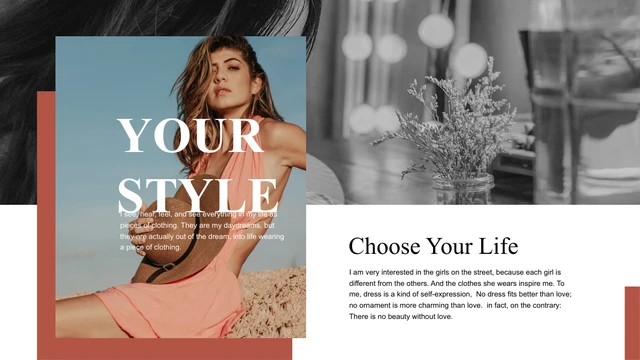
Your Style Fashion Presentation Template combines 10 widescreen slides with fashion portraits, brick-red blocks and a white background. The cover layers a color portrait over a monochrome photograph, with the large words YOUR STYLE crossing the image. Your Style Fashion Presentation Template changes the arrangement on each page: tall portraits, narrow vertical photographs, wide crops and contrasting picture pairs sit beside short text panels. Red rectangles connect the layouts without a fixed chapter sequence. Your Style Fashion Presentation Template repeats the heading Choose Your Life while varying the size and direction of the main title. Some pages place lettering across pictures; others use white space to separate the captions. Your Style Fashion Presentation Template contains editable English sample text and replaceable picture objects. Select the pages that suit your collection, then write captions about your own work rather than keeping the source fashion quotations.
Key Features of Your Style Fashion Presentation Template
Layered portraits, red blocks and large serif type.
Layered Cover Portrait
Your Style Fashion Presentation Template overlays a color portrait on a wide black-and-white image. Choose a cover photograph with space for the large title.
Brick-Red Panels
Your Style Fashion Presentation Template uses red rectangles against a white page. Keep captions concise so the color blocks frame the photographs clearly.
Contrasting Photo Pairs
Your Style Fashion Presentation Template places color and monochrome portraits together. Replace each photo separately and compare their crops and tonal balance.
Different Image Proportions
Your Style Fashion Presentation Template includes tall portraits, narrow crops and wider views. Match your picture subjects to the available frames before editing.
Oversized Serif Titles
Your Style Fashion Presentation Template varies large serif lettering across images and white space. Keep replacement titles short and check every line break.
Editable English Captions
Your Style Fashion Presentation Template provides English text objects with Times New Roman and Arial. Replace the quotations and keep a consistent caption style.
How to Use Your Style Fashion Presentation Template
Select your layouts, replace the images and check the details.
-
Choose Photo Layouts
Review the 10 pages of Your Style Fashion Presentation Template. Compare portrait pairs, narrow crops and title positions. Choose layouts that fit your photos and arrange them in a clear order.
-
Download a Working Copy
Sign in with an active paid plan to download Your Style Fashion Presentation Template. Paid members have unlimited daily and repeat downloads. Save a copy before changing photos or captions.
-
Replace and Review
Open Your Style Fashion Presentation Template in PowerPoint. Replace the photos and captions, then check crops and title spacing. Export a PDF for review and keep your editable PPTX.
Questions about Your Style Fashion Presentation Template
How do I download Your Style Fashion Presentation Template?
Sign in with an active paid plan and use the download button for Your Style Fashion Presentation Template beside the preview. Your Style Fashion Presentation Template is supplied as a PowerPoint PPTX file. Paid members have unlimited daily downloads, including repeat downloads. Save Your Style Fashion Presentation Template to your device and create a working copy for each photo collection.
How many slides are in Your Style Fashion Presentation Template?
Your Style Fashion Presentation Template contains 10 slides in a 16:9 format. The pages of Your Style Fashion Presentation Template show different fashion photo arrangements with red blocks and English sample captions; there is no fixed contents page or numbered chapter sequence. You can use fewer pages of Your Style Fashion Presentation Template if a smaller collection tells your story more clearly.
Can I change the text and colors in Your Style Fashion Presentation Template?
Yes. Headings and captions in Your Style Fashion Presentation Template are editable text objects, and the red shapes in Your Style Fashion Presentation Template can be recolored. Photographs are replaceable image objects; details inside a photo are not separate editable shapes. Review Your Style Fashion Presentation Template after changing text, photo crops or colors.
Can I preview every page of Your Style Fashion Presentation Template?
Yes. The gallery shows all 10 pages of Your Style Fashion Presentation Template. Select the thumbnails or use the arrows to review the different arrangements in Your Style Fashion Presentation Template. Enlarge Your Style Fashion Presentation Template to inspect narrow portrait crops, small captions and large lettering that crosses the images.
Can I use Your Style Fashion Presentation Template in another editor?
Your Style Fashion Presentation Template uses the PowerPoint PPTX format. Other presentation editors may import Your Style Fashion Presentation Template, but fonts, line breaks and cropping can change. Compare the imported Your Style Fashion Presentation Template with the preview before presenting. PowerPoint is the recommended starting point for editing the file.
Which fonts does Your Style Fashion Presentation Template use?
The English download of Your Style Fashion Presentation Template uses Times New Roman for serif headings and Arial for captions. The unavailable source font references were adapted for this copy; no font files are embedded. Use installed fonts and check the title spacing and text wrapping throughout Your Style Fashion Presentation Template.
Is the text in Your Style Fashion Presentation Template translated?
The visible sample text in Your Style Fashion Presentation Template was already in English. The editable copy keeps that language, and hidden Chinese master prompts are now English. Website translations describe the same English Your Style Fashion Presentation Template; they do not create separate translated PowerPoint files. Replace the sample quotations in Your Style Fashion Presentation Template with your own captions.
Can I use Your Style Fashion Presentation Template commercially?
The source of Your Style Fashion Presentation Template does not include a verified commercial redistribution license. A paid plan grants download access, without additional rights to the photographs or source material. Confirm the permissions needed for your use of Your Style Fashion Presentation Template and replace any photos you are not authorized to use.
How should I share Your Style Fashion Presentation Template?
Use the share controls to send a link to the preview of Your Style Fashion Presentation Template. Share a finished PDF or presentation containing images and text you are permitted to use. Keep an editable copy of Your Style Fashion Presentation Template; recipients need their own eligible account to download the original Your Style Fashion Presentation Template file.