Ceramic Portfolio Presentation Template: ceramic photographs and warm panels for a work collection
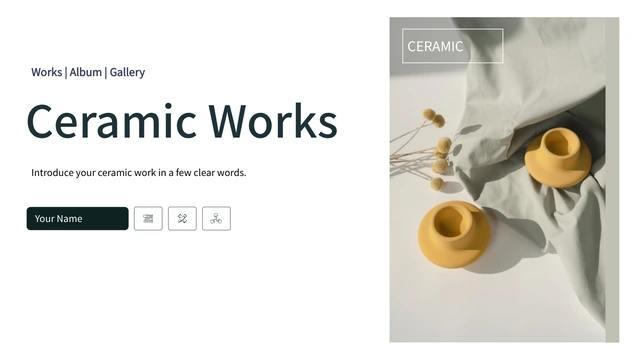
Ceramic Portfolio Presentation Template gives ceramic work a clear sequence across 15 widescreen slides. White pages, warm yellow accents and grey panels sit beside vessels, clay and pottery-wheel photographs. Four numbered circular photo openers divide Ceramic Portfolio Presentation Template into sections. Inside, upright caption cards, two long note panels and a four-stage arrow cycle give you different ways to explain a piece or a process. A three-picture collage and later four-photo panel combine detail views with short notes. Ceramic Portfolio Presentation Template ends with a Thanks layout that matches the cover. Select pages for the work you want to discuss, then explain the context, your role and the choices behind it. Replace sample titles and notes with supported information. The photographs in Ceramic Portfolio Presentation Template provide a visual setting, not evidence of your own authorship or a completed project. Check permission before using or replacing each picture.
Key Features of Ceramic Portfolio Presentation Template
Ceramic photos, numbered openers and room to explain the making process.
Ceramic and Wheel Photographs
Ceramic Portfolio Presentation Template pairs vessel pictures with wheel-work details. Choose permitted photos and give each one a caption explaining the work.
Four Numbered Section Openers
Ceramic Portfolio Presentation Template opens sections on pages 3, 6, 9 and 12 with round photos and numbers. Use clear topics to introduce the pages that follow.
Warm Yellow and Grey Cards
Ceramic Portfolio Presentation Template includes four upright cards and a three-column photo layout. Keep each note specific, with a clear link to its picture.
A Four-Stage Circular Layout
Ceramic Portfolio Presentation Template has a four-stage arrow cycle around an image icon. Describe your own process; the diagram is not verified project data.
Collages and Photo Panels
Ceramic Portfolio Presentation Template offers a three-picture collage and a later four-photo panel. Check new crops so the useful parts of each work stay visible.
Matching Cover and Thanks Pages
Ceramic Portfolio Presentation Template closes with the cover photograph and a Thanks message. Adapt both pages together and keep the closing note relevant.
How to Use Ceramic Portfolio Presentation Template
Choose your work, arrange the process and review the completed portfolio.
-
Plan a Work and Process Sequence
Preview Ceramic Portfolio Presentation Template and choose four topics. Introduce each with its numbered opener, then select photo cards or the cycle to explain the work and your actual role.
-
Download a Working Copy
Download Ceramic Portfolio Presentation Template with an active paid plan. Daily and repeat downloads are unlimited. Save a working copy beside the original to compare photo crops and notes.
-
Replace Photos and Review Notes
Edit Ceramic Portfolio Presentation Template in PowerPoint. Replace sample titles and permitted images, check card spacing and picture crops, then reopen the exported file before sharing.
Questions about Ceramic Portfolio Presentation Template
How do I download Ceramic Portfolio Presentation Template?
Sign in with an active paid plan and use the PPTX download button on this page. Paid members can download Ceramic Portfolio Presentation Template every day and repeatedly without limits. Review Ceramic Portfolio Presentation Template in the public gallery before choosing layouts. Save an editable working copy and keep the original Ceramic Portfolio Presentation Template separate so you can compare section order, photo crops and note spacing.
How many slides are in Ceramic Portfolio Presentation Template?
Ceramic Portfolio Presentation Template includes 15 widescreen slides in 16:9 format. The cover, contents page and Thanks closing are included. Four numbered circular openers in Ceramic Portfolio Presentation Template appear on pages 3, 6, 9 and 12. The remaining pages combine photos, cards and manual diagrams. Select the pages of Ceramic Portfolio Presentation Template that suit your collection; a shorter portfolio is fine when the work and explanations remain clear.
What can I edit in Ceramic Portfolio Presentation Template?
Titles, notes and manual shapes in Ceramic Portfolio Presentation Template can be edited in PowerPoint. Photo and icon objects may need replacement when a detail is part of the image rather than a separate shape. Ceramic Portfolio Presentation Template has no native data charts or linked workbooks. Use the cycle and numbered steps to explain your own process. In Ceramic Portfolio Presentation Template, sample labels and diagrams do not verify a real project or measured result.
Can I preview all of Ceramic Portfolio Presentation Template?
All 15 previews of Ceramic Portfolio Presentation Template are public and free; a paid plan is not needed to view them. Use the thumbnails and arrows to explore Ceramic Portfolio Presentation Template, then enlarge pages for inspection. Compare the three-picture collage, four-photo panel and narrow cards with your material. The Ceramic Portfolio Presentation Template gallery shows the visible slides, not verified image rights or separate editability of every detail.
Will another editor open Ceramic Portfolio Presentation Template?
Ceramic Portfolio Presentation Template is a PowerPoint PPTX. Other editors may import it, but their compatibility is unconfirmed. Compare imported Ceramic Portfolio Presentation Template pages with the public gallery, checking circular photo crops, yellow cards, arrow segments and caption wrapping. Keep the original Ceramic Portfolio Presentation Template file. Export and reopen the finished portfolio, inspecting every page before sharing it with a client or audience.
Which fonts are in Ceramic Portfolio Presentation Template?
Ceramic Portfolio Presentation Template retains four original embedded font parts: Source Han Sans CN Regular, Medium, Bold and Normal. Regular and Bold carry original Apache 2.0 notices; Medium and Normal carry SIL OFL 1.1. These font permissions do not authorize the ceramic photography or complete design in Ceramic Portfolio Presentation Template. Font support varies between editors. Check headings, numbered openers and captions when opening Ceramic Portfolio Presentation Template on another device.
Are the slides in Ceramic Portfolio Presentation Template in English?
The downloadable Ceramic Portfolio Presentation Template provides English editable labels and brief guidance for replacing examples. The original CERAMIC wording remains part of the source design. Website translations describe the same English Ceramic Portfolio Presentation Template, without separate localized slide files. Replace sample names and descriptions in Ceramic Portfolio Presentation Template with confirmed information. The photographs and original metadata do not prove your own authorship, client relationships or achievements.
Can I use Ceramic Portfolio Presentation Template commercially?
Commercial use and source-file redistribution rights for Ceramic Portfolio Presentation Template are unverified. Paid access to Ceramic Portfolio Presentation Template does not grant additional rights to its photographs or design. Font licenses concern their own software, not the whole portfolio. A verified designer and complete photo license are not documented. Before client use or distribution, check permissions, retain required attribution and select permitted replacement images for Ceramic Portfolio Presentation Template.
How do I share Ceramic Portfolio Presentation Template?
Share the public Ceramic Portfolio Presentation Template page through the control beside the download button or copy its URL. Recipients can view the gallery and download with their own active paid plan. Check image rights before distributing an adapted Ceramic Portfolio Presentation Template, and replace private or unsupported statements. Export a PDF if useful and reopen it to check each page. Keep an editable Ceramic Portfolio Presentation Template copy for later changes.