Mobile Demo Presentation Template: phone screens on a dark canvas
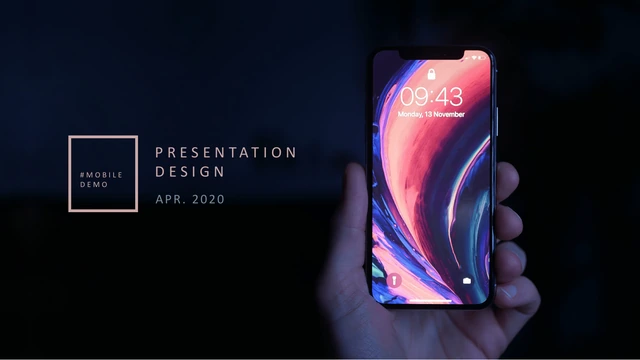
Mobile Demo Presentation Template presents a mobile-interface concept in 25 widescreen slides. A phone photograph introduces the deck, followed by a white preface and four chapters: usage scenarios, a system UI demo, operation support and an implementation plan. Mobile Demo Presentation Template uses charcoal backgrounds, pale pink outline labels and mustard accents within the phone layouts. Music imagery provides a sample context for cards, profiles, menus and lists; it does not turn the file into a working application. Mobile Demo Presentation Template also includes an editable area chart, a six-person team page and a system-architecture diagram. Pair the relevant screens with short explanations of what users would see and do. Keep the original labels as examples, replace names and sample figures, and remove pages that do not belong to your project. The closing photograph in Mobile Demo Presentation Template leaves space for your company name and contact details.
Key Features of Mobile Demo Presentation Template
Explain the screen, its context and the next step.
Dark Interface Canvas
Mobile Demo Presentation Template pairs charcoal pages with pink frames. Keep labels brief and check small light text against a dark background at presentation size.
Phone Screen Layouts
Mobile Demo Presentation Template includes profiles, menus and music-card layouts. Use these static screens to explain a sequence; this is not a working mobile app.
Four Clear Chapters
Mobile Demo Presentation Template separates scenarios, screens, support and implementation. Choose chapters that explain your concept without repeating details.
Editable Area Chart
Mobile Demo Presentation Template has an area chart with two series for April to July. Replace samples in its workbook and keep the units and labels consistent.
Team and System Pages
Mobile Demo Presentation Template offers six team positions and a NAS/ECS diagram. Change the names and connections to match your people and proposed system.
Closing Photo Layout
Mobile Demo Presentation Template ends with a photo and contact space. Add a useful next step, retain source credits and verify the company name and address.
How to Use Mobile Demo Presentation Template
Choose your screens, explain the flow and review.
-
Review the Screen Sequence
Browse all 25 pages of Mobile Demo Presentation Template. Match the four chapters to your interface outline, then choose phone layouts, a chart and team pages that support your explanation.
-
Download Your Working Copy
Sign in with an active paid plan to download Mobile Demo Presentation Template. Paid members have unlimited daily downloads. Keep a working copy so the original layouts remain available.
-
Replace and Test the Examples
Edit Mobile Demo Presentation Template in PowerPoint. Replace labels, people and chart data, check the phone layouts at presentation size, then review the full deck before exporting your version.
Questions about Mobile Demo Presentation Template
How do I download Mobile Demo Presentation Template?
Download Mobile Demo Presentation Template using the PPTX button on this page. Sign in with an active paid plan; anonymous visitors must log in to get the file. Paid members can download Mobile Demo Presentation Template repeatedly with no daily limit. Before downloading Mobile Demo Presentation Template, review its phone screens and four chapters to decide which pages explain your concept. Save a working copy and keep the original for reference.
How many slides are in Mobile Demo Presentation Template?
Mobile Demo Presentation Template contains 25 slides in a 16:9 format. The phone-photo opening, white preface, chapter dividers and closing page are part of that count. Mobile Demo Presentation Template also contains screen layouts, a six-person team page, an architecture diagram and an area chart. Trim Mobile Demo Presentation Template to the pages you need, then check that the remaining chapters introduce the screens in a clear order.
Can I edit Mobile Demo Presentation Template?
Editable text and shapes in Mobile Demo Presentation Template can be changed in PowerPoint. Phone layouts in Mobile Demo Presentation Template combine objects with picture elements, so inspect each selection before assuming every pictured label is editable. Adapt Mobile Demo Presentation Template with your own text, shorten overflowing descriptions and maintain contrast on dark pages. Changing a picture-based detail in Mobile Demo Presentation Template may require replacing that image. Keep a copy before changing larger arrangements.
Can I preview every page of Mobile Demo Presentation Template?
Yes. All 25 previews of Mobile Demo Presentation Template are public and available without buying a plan. Use the thumbnails or arrows and enlarge a page to inspect its details. Review Mobile Demo Presentation Template closely where several phones or small labels share one slide. The preview of Mobile Demo Presentation Template confirms the visible layout; it does not demonstrate a working app or prove that every pictured detail can be edited separately.
Can I use Mobile Demo Presentation Template in another editor?
Mobile Demo Presentation Template is a PowerPoint (.pptx) file. Other presentation editors may open it, but phone arrangements, fonts and the linked area chart need a fresh check after importing. Compare a copy of Mobile Demo Presentation Template with the preview, including picture crops and chart values. Compatibility of Mobile Demo Presentation Template with individual editors has not been verified, so keep the original Mobile Demo Presentation Template file and inspect the exported result.
Which fonts does Mobile Demo Presentation Template use?
The source of Mobile Demo Presentation Template declares Microsoft YaHei styles, Calibri and Helvetica Light. No fonts are embedded in Mobile Demo Presentation Template. Use licensed matching families and styles, and check wrapping if your editor substitutes them. The exact editions of unembedded source fonts are not established. In Mobile Demo Presentation Template, review thin headings and small phone labels carefully on the intended screen and in an exported PDF.
Is Mobile Demo Presentation Template in English?
The downloadable Mobile Demo Presentation Template keeps the original English labels and sample text. Names, the April 2020 cover date and example figures need to be replaced with your own information. Website translations of Mobile Demo Presentation Template describe this same English PPTX, rather than separate translated slide files. Original photos, logos and source notices in Mobile Demo Presentation Template remain part of the design; check relevant wording and permissions before sharing Mobile Demo Presentation Template.
Can I use Mobile Demo Presentation Template commercially?
Commercial and template redistribution permission for Mobile Demo Presentation Template has not been verified. Paid access to Mobile Demo Presentation Template does not grant extra rights to photographs, logos or source artwork. Confirm relevant permissions before using Mobile Demo Presentation Template for client work or circulating the editable file. Retain applicable notices, including the original PPTSTORE copyright metadata, and use replacement pictures that you may distribute.
How do I share Mobile Demo Presentation Template?
Share the public page for Mobile Demo Presentation Template through its controls or copy the URL. Recipients can preview the gallery and download Mobile Demo Presentation Template using their own active paid plan. For a presentation made with Mobile Demo Presentation Template, use content you may distribute, retain required credits and review the exported file. Share the public page address instead of circulating a private download link.