Sharp 3D Presentation Template: Soft Forms for a Clear Company Story
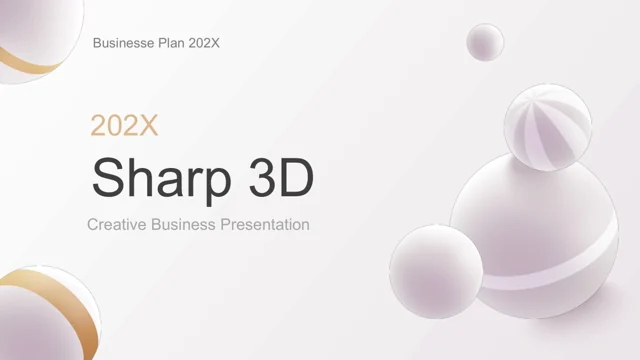
Sharp 3D Presentation Template introduces a company through pale backgrounds, rounded forms and gold details. Sharp 3D Presentation Template covers teams, artwork, services, founder history, products and charts, including a dimensional pie and contact page. Outline Sharp 3D Presentation Template before editing. Names, percentages and contacts in Sharp 3D Presentation Template are examples; decorative spheres do not substantiate business claims.
Key Features of Sharp 3D Presentation Template
Original layouts for your own facts.
Soft 3D forms
Rounded artwork frames Sharp 3D Presentation Template’s pale pages.
Team introduction
Update names and roles in Sharp 3D Presentation Template.
Artwork gallery
Show selected work with Sharp 3D Presentation Template.
Product blocks
Compare three offerings in Sharp 3D Presentation Template.
Chart layouts
Label the pie diagram in Sharp 3D Presentation Template.
Contact page
Replace sample contact details in Sharp 3D Presentation Template.
How to Use Sharp 3D Presentation Template
Select, personalize and review.
-
Select the layouts
Compare the gallery and chart pages of Sharp 3D Presentation Template.
-
Save the original
Sign in with a paid plan to download Sharp 3D Presentation Template without daily limits.
-
Finish your version
Edit Sharp 3D Presentation Template and check picture crops, labels and contact details.
Questions About Sharp 3D Presentation Template
How do I download Sharp 3D Presentation Template?
Sign in with an active paid membership to download Sharp 3D Presentation Template. Daily downloads are unlimited; edit a separate copy.
How many pages are in Sharp 3D Presentation Template?
Sharp 3D Presentation Template includes 24 slides of company, gallery, product, chart and contact layouts. It is not a completed business plan.
Can I change the text and colors of Sharp 3D Presentation Template?
Modify independent text and shapes in Sharp 3D Presentation Template. Rounded illustrations may be images; preserve contrast on pale backgrounds.
Can I preview all of Sharp 3D Presentation Template?
Preview every page of Sharp 3D Presentation Template. Enlarge the gallery, dimensional pie and contacts to check crops and labels.
Will Sharp 3D Presentation Template open in other presentation editors?
Try Sharp 3D Presentation Template in another PPTX editor. Check spheres, pie diagrams and image crops; imported layouts may differ.
Which fonts does Sharp 3D Presentation Template use?
Sharp 3D Presentation Template uses Arial, Calibri, Gill Sans, Inter Light, Lato, Lato Black, Montserrat, Montserrat ExtraLight, Montserrat Light, Muli, Open Sans, Open Sans Semibold, Poppins, Poppins SemiBold, Segoe UI, Segoe UI Light, Ubuntu. After replacement, inspect small chart labels, light headings and contact details.
Are the slides in Sharp 3D Presentation Template translated?
Sharp 3D Presentation Template keeps English examples and filler text. Translate your copy and shorten labels when more room is needed.
Can I use Sharp 3D Presentation Template commercially?
Commercial use of Sharp 3D Presentation Template depends on source licensing and artwork permissions. Paid access alone grants no broader usage rights.
How can I share Sharp 3D Presentation Template?
Share Sharp 3D Presentation Template’s page link for the original preview. Send your finished file or PDF after checking contact information.