Dolphin Work Report Presentation Template: sea illustrations and blue-and-coral work pages
Dolphin Work Report Presentation Template combines blue pages, coral-pink panels and textured sea illustrations. A dolphin above the waves introduces the report; the closing returns to the sea. Dolphin Work Report Presentation Template follows four sections: work review, market review, progress and next plan. Numbered dividers pair a short introduction with a still-life photograph. Dolphin Work Report Presentation Template repeats that photograph in wide, tall and circular frames, alongside text columns and coral captions. Four outlined cards, four numbered steps, six rounded notes and four hexagons provide ways to organize a message. Dolphin Work Report Presentation Template also has a photo surrounded by four points. Text, shapes and picture objects remain editable; the illustration and photo stay image assets. There are no native data charts. Choose pages that fit your outline, replace the English prompts with accurate work details and check the picture crops before presenting.
Key Features of Dolphin Work Report Presentation Template
A textured sea, coral accents and varied work-report layouts.
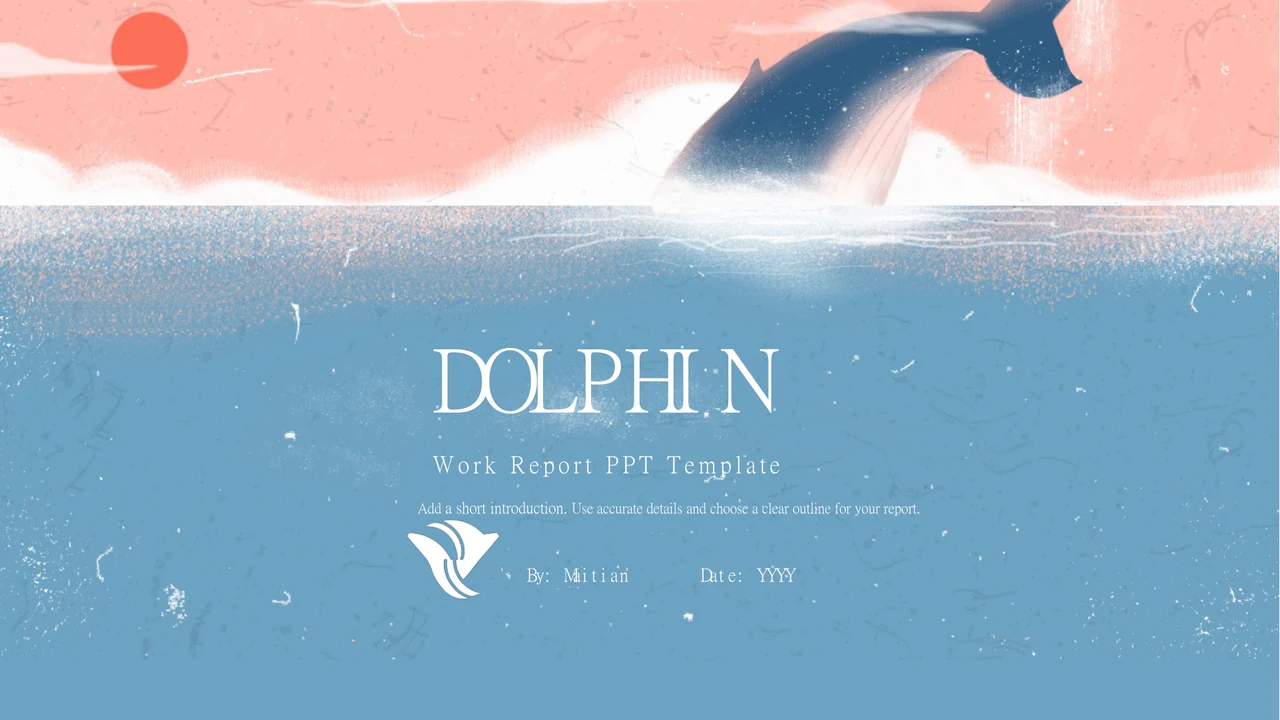
Dolphin and Sea Cover
Dolphin Work Report Presentation Template opens with a dolphin above textured waves. The illustration is an image; keep the title readable against the blue sea.
Blue and Coral Panels
Dolphin Work Report Presentation Template pairs blue backgrounds with coral-pink panels and white text. Check the contrast after changing headings and captions.
Four Work Sections
Dolphin Work Report Presentation Template covers work review, market review, progress and next plan. Use the contents and numbered dividers to keep the order clear.
Varied Photo Frames
Dolphin Work Report Presentation Template uses wide, tall and circular frames for a still-life photo. Choose authorized images and check subjects within each crop.
Four Numbered Steps
Dolphin Work Report Presentation Template has four coral cards with numbered white circles. Add one action to each card; these shapes are not a native data chart.
Rounded and Hexagon Notes
Dolphin Work Report Presentation Template offers six rounded notes and four hexagons. Keep each point concise and match its heading to the explanation beside it.
How to Use Dolphin Work Report Presentation Template
Choose the work sequence, replace the prompts and check each page.
-
Choose the Report Pages
Review all 17 pages of Dolphin Work Report Presentation Template. Match four sections to your outline. Select photo, card or note layouts and prepare accurate work details before writing.
-
Download a Working Copy
Download Dolphin Work Report Presentation Template with an active paid plan. Daily and repeat downloads are unlimited. Keep an original, then prepare authorized photos and verified details.
-
Edit and Present
Open Dolphin Work Report Presentation Template in PowerPoint. Replace titles, prompts, dates and captions. Check photo crops, fonts and contrast, then review the PDF and save an editable copy.
Questions about Dolphin Work Report Presentation Template
How do I download Dolphin Work Report Presentation Template?
Sign in with an active paid plan and choose the download button beside the preview. Dolphin Work Report Presentation Template is an editable English PowerPoint PPTX. Paid members have unlimited daily and repeat downloads. Save Dolphin Work Report Presentation Template and keep an original before editing. Work in a separate Dolphin Work Report Presentation Template copy to replace prompts. Compare its section order, photo frames and coral panels with the original when rearranging content.
How many slides does Dolphin Work Report Presentation Template contain?
Dolphin Work Report Presentation Template has 17 slides in 16:9. A dolphin cover leads to a four-topic contents page and four numbered dividers. Dolphin Work Report Presentation Template covers work review, market review, progress and next plan, ending with a sea texture. Other pages offer photos, four cards, four steps, six rounded notes and hexagons. Select fewer pages of Dolphin Work Report Presentation Template for a short report. After rearranging Dolphin Work Report Presentation Template, check the contents and section numbers.
Can I change text and colors in Dolphin Work Report Presentation Template?
Yes. Dolphin Work Report Presentation Template retains native text, shapes and picture objects for PowerPoint editing. Blue backgrounds, coral-pink panels and white labels organize the pages. The sea texture and dolphin in Dolphin Work Report Presentation Template remain images, with no separate native painted shapes. Replace them only with material you may use. Adjust panels and text, then check contrast, alignment and crops throughout Dolphin Work Report Presentation Template. There are no native charts or linked data workbooks.
Can I preview all pages of Dolphin Work Report Presentation Template?
Yes. Every page of Dolphin Work Report Presentation Template has a preview matching the English PPTX. Use thumbnails and arrows to compare dividers, columns, cards and circular images. Enlarge Dolphin Work Report Presentation Template to check heading space and captions. Look closely at numbered steps, small notes and hexagon labels. Choose pages of Dolphin Work Report Presentation Template that fit your outline before writing detailed content. Keep the original widescreen ratio when presenting.
Will Dolphin Work Report Presentation Template open in other presentation software?
Dolphin Work Report Presentation Template uses PowerPoint PPTX. A compatible editor may import it, but fonts, wrapping, shapes and picture positions can change. Compare the imported Dolphin Work Report Presentation Template with the preview, especially coral captions and circular crops. PowerPoint is recommended for editing Dolphin Work Report Presentation Template. Test on your intended screen and inspect the exported PDF. Keep an editable Dolphin Work Report Presentation Template copy to correct changes introduced by another editor or export.
Which fonts does Dolphin Work Report Presentation Template use?
Dolphin Work Report Presentation Template retains 微软雅黑, 汉仪长宋简, 等线, 等线 Light, 宋体, EngraversGothic BT, Arial and Calibri references. Three original embedded font parts for 等线, 微软雅黑 and 汉仪长宋简 remain. Your editor may still substitute an unsupported face in Dolphin Work Report Presentation Template. Check the cover title, chapter headings, vertical notes and card labels after font changes. Names do not ensure identical rendering; compare Dolphin Work Report Presentation Template with the preview and inspect each page.
Are the slide texts in Dolphin Work Report Presentation Template English?
Yes. Chinese titles and repeated placeholders in Dolphin Work Report Presentation Template become short English headings and prompts. The same four work topics, photos and illustrations remain. Creator 麦田 is preserved in metadata, with Maitian credited on the cover. Every website language describes the same English Dolphin Work Report Presentation Template file; there are no separate translated decks. Replace prompts in Dolphin Work Report Presentation Template with accurate details, dates and captions. Keep source credit distinct from people in your own report.
Can I use Dolphin Work Report Presentation Template commercially?
There is no verified commercial-use or redistribution grant for the source of Dolphin Work Report Presentation Template. Creator 麦田 and visible Maitian credit remain. Paid access to Dolphin Work Report Presentation Template adds no rights to the illustration, design, photo or fonts. Confirm permissions and preserve genuine credits. A market heading is not research evidence, and the photograph is not your work or client. Adapt Dolphin Work Report Presentation Template with authorized material and accurate report information.
How do I share Dolphin Work Report Presentation Template?
Use share controls to copy or send the preview link to Dolphin Work Report Presentation Template. Replace examples with content you may distribute, then export and inspect a PDF or presentation. Check all 17 pages, dates, captions, section numbers and the closing message. Keep editable Dolphin Work Report Presentation Template separately for updates. A recipient needing the original Dolphin Work Report Presentation Template should use their own eligible paid account. Check redistribution permission before sharing an edited Dolphin Work Report Presentation Template file.