Space Presentation Template: Wireframe Spheres and Navy Pages
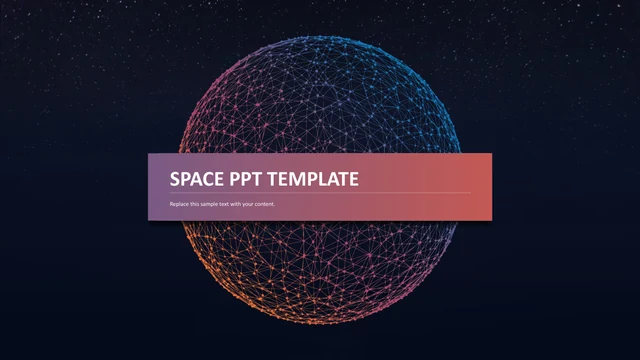
Space Presentation Template places SPACE PPT TEMPLATE on a purple-to-coral ribbon across a wireframe sphere. Orange, pink and blue connections stand against a navy star field. Space Presentation Template ends with THANK YOU on a matching ribbon. The original 30-page, 16:9 sequence retains 16 media files. The index in Space Presentation Template lists four example groups, while pages 3 and 17 mark sections 01 and 02. Seven pages in Space Presentation Template show a wireframe sphere with no body text. These are original image pages, not missing content; the sphere images are static, with no GIF or embedded video. Space Presentation Template changes from dark layouts to white diagram pages. Five icons follow a rising curve, six surround a central network, and three translucent circles overlap. A labeled world map in Space Presentation Template names regions and example countries; it does not document actual business coverage. Circle photos, a branching three-icon layout and connected value rings give Space Presentation Template different ways to arrange ideas. Two segmented shape gauges in Space Presentation Template retain independent 40% and 70% labels. There are no native charts or embedded workbooks, so these labels are not calculated from data. Four example portraits in Space Presentation Template accompany role captions. Replace the sample names rather than presenting them as your team. Space Presentation Template retains original photos, shapes, numbers, page order and object positions. Source-store promotion was cleared. Review small captions and replace the sample presentation copy before sharing Space Presentation Template. Space Presentation Template includes Calibri, Tahoma and Arial font bindings without embedded fonts. Check replacement fonts and the short captions against the complete previews. In Space Presentation Template, the Pello promotion became short English guidance; other Latin placeholder text remains.
Key Features of Space Presentation Template
Cosmic spheres, two backgrounds and editable diagrams.
Wireframe Spheres
Space Presentation Template combines orange, pink and blue connections on navy.
Gradient Ribbons
Space Presentation Template uses purple-to-coral ribbons on the cover and titles.
Two Backgrounds
Space Presentation Template keeps both navy and white diagram pages.
Icon Networks
Space Presentation Template arranges icons along curves and around a central network.
Labeled Map
Space Presentation Template keeps region labels as editable examples, not actual coverage.
Shape Gauges
Space Presentation Template retains separate 40% and 70% labels on segmented rings.
How to Use Space Presentation Template
Review the full sequence, then replace examples and check details.
-
Preview
Review all 30 pages of Space Presentation Template, including the sphere-only image pages.
-
Download
Paid members can download Space Presentation Template repeatedly without daily limits.
-
Edit
Update labels, names and text in Space Presentation Template; check small type and image rights.
Questions about Space Presentation Template
How do I download Space Presentation Template?
Sign in with an active paid plan and select Download PPTX. Space Presentation Template supports unlimited daily downloads, including repeat downloads.
How many slides are in Space Presentation Template?
There are 30 original 16:9 slides in Space Presentation Template. These include the cover, index, two numbered chapter pages, icon layouts, sphere-only image pages, gauges and closing page.
Can I edit Space Presentation Template?
Native text, icons and shapes in Space Presentation Template can be edited in PowerPoint. Photographs and sphere images remain pictures. Space Presentation Template has no native charts or embedded workbooks.
Can I preview every page of Space Presentation Template?
Yes. The gallery shows all 30 pages of Space Presentation Template. Several original pages show only the sphere artwork. Check small map labels and body text in Space Presentation Template at presentation size.
Will Space Presentation Template open in another editor?
You can import the PPTX into compatible software. Compare Space Presentation Template with the previews, checking gradients, overlapping circles, icon paths, picture crops and line breaks.
Which fonts does Space Presentation Template use?
The source of Space Presentation Template includes Calibri, Tahoma and Arial font bindings. Fonts are not embedded. Check replacements, small text and line breaks throughout Space Presentation Template.
Is the text in Space Presentation Template translated?
The deck uses English examples and Latin placeholder text. Source-store promotion was cleared from Space Presentation Template. Each localized detail page introduces the same English Space Presentation Template file.
Can I use Space Presentation Template commercially?
This page does not verify every source photograph or visual asset in Space Presentation Template for commercial use. Confirm applicable rights or replace uncertain pictures. The map and sample portraits in Space Presentation Template do not establish real company coverage or staff.
How do I share Space Presentation Template?
Send the Space Presentation Template page link with the share button, or export your edited deck. Replace sample names, region labels and copy in Space Presentation Template. Keep an editable version and confirm rights before redistributing the template itself.