Futuristic UX Portfolio Presentation Template: Futuristic Portraits, Dark Profiles and Design-Talk Layouts
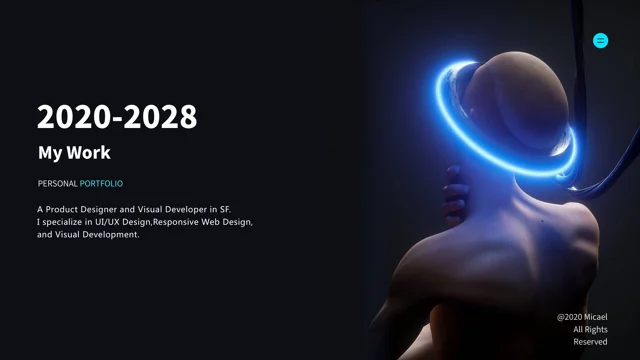
Futuristic UX Portfolio Presentation Template places sculptural figures, mechanical hands and a holographic heart against near-black backgrounds. Blue rings, cyan highlights and red edge lighting create focal points; an orange-and-black profile closes the sequence. Across 15 widescreen slides, Futuristic UX Portfolio Presentation Template combines introductions, software skill bars, event-style pages and design-talk compositions. These varied layouts do not form four matching chapters. Futuristic UX Portfolio Presentation Template includes large headings for visual hierarchy, design explanation, emotional interaction and communication. The figures are images, not editable 3D models, and the skill bars are manual graphics. Choose a clear purpose, replace unrelated sample claims and dates, and keep required source credits. Short, specific explanations work best beside the prominent portraits and dramatic lighting. Keep small grey notes readable.
Key Features of Futuristic UX Portfolio Presentation Template
Sculptural imagery, contrasting light and flexible profile and talk layouts.
Dark Figures and Colored Light
Futuristic UX Portfolio Presentation Template sets figures against dark backgrounds. Blue, cyan and red light draw attention to parts of each image.
Personal Profile Compositions
Futuristic UX Portfolio Presentation Template offers profiles with short introductions. Replace sample biographies with accurate details about your work.
Six Manual Software Skill Bars
Futuristic UX Portfolio Presentation Template includes six manual software skill bars. Edit labels and lengths yourself; they are not linked to measured data.
Large Design-Talk Headings
Futuristic UX Portfolio Presentation Template offers bold pages for design topics. Choose one clear idea and keep the supporting explanation concise.
Mechanical Hands and Holographic Heart
Futuristic UX Portfolio Presentation Template uses mechanical hands and a holographic heart as images. These are not editable models or interactive objects.
Orange-and-Black Closing Profile
Futuristic UX Portfolio Presentation Template ends with an orange-and-black UX profile. Update the sample details and give your sequence a clear conclusion.
How to Use Futuristic UX Portfolio Presentation Template
Select a purpose, replace sample claims and review the dark compositions.
-
Choose a Portfolio or Talk
Preview all 15 pages of Futuristic UX Portfolio Presentation Template. Select profile or design-talk layouts that support one purpose, then arrange them into a clear sequence for your audience.
-
Download and Replace Samples
Get Futuristic UX Portfolio Presentation Template with an active paid plan; daily and repeat downloads are unlimited. Edit a copy, verify personal claims and dates, and keep required credits.
-
Review the Dark Layouts
Check Futuristic UX Portfolio Presentation Template at presentation size. Inspect small grey text, skill bars and large headings, then compare your export with the edited file.
Questions About Futuristic UX Portfolio Presentation Template
How do I download Futuristic UX Portfolio Presentation Template?
Sign in with an active paid plan to download Futuristic UX Portfolio Presentation Template. Daily and repeat downloads are unlimited. Save the supplied Futuristic UX Portfolio Presentation Template and work on a separate copy. Begin by deciding whether your presentation introduces a designer, discusses a design problem or combines a small selection of both. The pages in Futuristic UX Portfolio Presentation Template come from several profile and talk-style compositions, so they need a deliberate order. Select the layouts in Futuristic UX Portfolio Presentation Template before filling every text area. A strong portrait page may suit a short introduction, while a large topic heading can open an explanation. Replace sample personal claims in Futuristic UX Portfolio Presentation Template with accurate information. Treat Futuristic UX Portfolio Presentation Template as a visual framework rather than a verified account of any designer’s skills, location, achievements or professional history.
How many slides are in Futuristic UX Portfolio Presentation Template?
Futuristic UX Portfolio Presentation Template contains 15 slides in a 16:9 format. The opening page of Futuristic UX Portfolio Presentation Template pairs a short portfolio introduction with a sculptural figure and blue light ring. Other pages in Futuristic UX Portfolio Presentation Template offer event-style information, designer profiles, software skill bars and large design-talk headings. There is no consistent four-chapter divider system across Futuristic UX Portfolio Presentation Template. The final page of Futuristic UX Portfolio Presentation Template is an orange-and-black UX profile composition rather than a standard thank-you slide. You can choose and rearrange these pages to form a coherent presentation. When shortening Futuristic UX Portfolio Presentation Template, check that the remaining headings, sample dates and references make sense together. Do not rely on the original order to establish a career chronology or assume that different sample names describe the same person.
Can I replace the futuristic images in Futuristic UX Portfolio Presentation Template?
The figures, mechanical hands and holographic heart in Futuristic UX Portfolio Presentation Template are image assets, not editable 3D models. Use replacement imagery you are permitted to display when adapting Futuristic UX Portfolio Presentation Template. A dark portrait with light along one edge may leave a different amount of space for text than an evenly lit photograph. Check the balance of each page in Futuristic UX Portfolio Presentation Template after changing an image, especially where a large heading sits close to a figure. Some lettering belongs to the source image itself and is not separate slide text. Preserve required image attribution in Futuristic UX Portfolio Presentation Template. Do not present the source artwork as your own creation. When replacing a visual in Futuristic UX Portfolio Presentation Template, choose it for the point you want to explain rather than for a purely decorative resemblance to another page.
Can I preview every page of Futuristic UX Portfolio Presentation Template?
The gallery displays all 15 pages of Futuristic UX Portfolio Presentation Template. Use the thumbnails and arrow controls to compare the different profile, event and design-talk compositions. Enlarge Futuristic UX Portfolio Presentation Template to inspect the small grey notes, contact-style details and labels near the manual skill bars. The previews show the supplied Futuristic UX Portfolio Presentation Template, not later edits to your own copy. Before adding text to Futuristic UX Portfolio Presentation Template, consider how much room each composition leaves around its main figure. A short title that works beside a portrait may not accommodate a full sentence. After editing Futuristic UX Portfolio Presentation Template, review the complete sequence at presentation size and on the intended display. Check the darkest areas of Futuristic UX Portfolio Presentation Template for readable contrast, and inspect both large headings and small notes rather than focusing only on the dramatic imagery.
Are the skill bars and figures in Futuristic UX Portfolio Presentation Template real data?
Futuristic UX Portfolio Presentation Template includes six manually arranged software skill bars. They are presentation graphics, not results from an assessment or a linked dataset. Edit the labels and bar lengths in Futuristic UX Portfolio Presentation Template only to express information you can support. The event-style numbers, dates and organizational references in Futuristic UX Portfolio Presentation Template are source examples, not verified statistics or current announcements. They are not PPT AI metrics. Replace or remove details that do not apply to your use of Futuristic UX Portfolio Presentation Template. The illustrated figures in Futuristic UX Portfolio Presentation Template do not establish a person’s identity, client relationship or professional endorsement. If you add achievements or project results to Futuristic UX Portfolio Presentation Template, explain their scope and verify them. Keep visual decoration separate from evidence, especially when a prominent number could be mistaken for a factual claim.
Which fonts does Futuristic UX Portfolio Presentation Template use?
Futuristic UX Portfolio Presentation Template uses Source Han Sans SC Heavy and Normal, Microsoft YaHei, Arial Regular and Bold, Avenir Book, Heavy and Medium, Candara Bold, Helvetica Bold and Wingdings for bullets. Fonts are not embedded in the PPTX. Check matching fonts before editing Futuristic UX Portfolio Presentation Template, especially where a large title shares space with a short introduction. The smaller notes in Futuristic UX Portfolio Presentation Template rely on contrast and spacing to remain readable against dark backgrounds. Inspect any font substitution your software reports. Avoid turning a short heading in Futuristic UX Portfolio Presentation Template into a dense paragraph; move supporting explanation to a more suitable page or keep it brief. Compare Futuristic UX Portfolio Presentation Template with the gallery after replacing names, dates and topic titles. Review manual skill labels and contact-style text in Futuristic UX Portfolio Presentation Template separately from the main headings. Check both your editable Futuristic UX Portfolio Presentation Template and its export for missing characters, unexpected line breaks and overlapping text. A successful import does not guarantee that the intended composition has been preserved.
Is Futuristic UX Portfolio Presentation Template in English, and can I use another editor?
The final Futuristic UX Portfolio Presentation Template uses English headings and design guidance, while genuine source names and credits remain in place. Website translations describe the same Futuristic UX Portfolio Presentation Template PPTX rather than separate native presentations for each language. Replace sample biographies and event wording in Futuristic UX Portfolio Presentation Template with your own accurate material, without treating source credit lines as ordinary placeholders. Other presentation software may import Futuristic UX Portfolio Presentation Template, but fonts, layered imagery, glow effects and grouped objects can render differently. Compare an imported Futuristic UX Portfolio Presentation Template with the gallery, using PowerPoint as the layout reference. Keep a working copy before changing several styles at once. If you translate Futuristic UX Portfolio Presentation Template, check the length of topic headings and the smallest notes. Review the exported version independently rather than assuming it matches the editable view.
Can I use Futuristic UX Portfolio Presentation Template commercially?
Check the applicable conditions for Futuristic UX Portfolio Presentation Template, the artwork images, fonts and any content you add. A paid download does not establish every reuse or redistribution right. Futuristic UX Portfolio Presentation Template retains genuine source names and credit notices, including Micael and Chuspee; preserve required attribution. Do not imply that Futuristic UX Portfolio Presentation Template grants ownership of those identities or endorsement by the people, organizations or artists mentioned in the source. Distinguish your own portfolio information from credited source material when adapting Futuristic UX Portfolio Presentation Template. Check replacement image rights separately. Permission to show a completed presentation and permission to redistribute an editable Futuristic UX Portfolio Presentation Template file are different matters. Before distributing source files or adding Futuristic UX Portfolio Presentation Template to another downloadable collection, verify the relevant conditions instead of assuming that access to the file settles every permission.
How should I share Futuristic UX Portfolio Presentation Template?
Share this public page when recommending Futuristic UX Portfolio Presentation Template, so recipients can inspect the gallery and download through their own eligible accounts. Keep an editable copy of Futuristic UX Portfolio Presentation Template for future changes to profile text, topic order and imagery. Before presenting Futuristic UX Portfolio Presentation Template, verify all personal claims, dates and sample statistics that remain. Make sure the chosen profile and talk pages in Futuristic UX Portfolio Presentation Template form a consistent sequence rather than mixing unrelated identities or events. Test Futuristic UX Portfolio Presentation Template on the intended screen, paying attention to small grey text and dark image details. Compare the exported Futuristic UX Portfolio Presentation Template with your working file to catch clipped headings, shifted labels and changes to colored highlights. Give the final profile page a clear role and leave required source credits intact.