Grey Mountain Business Presentation Template: mountain photographs and restrained grey layouts
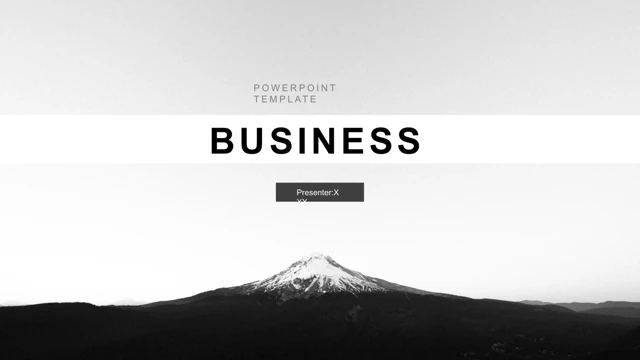
Grey Mountain Business Presentation Template uses a mountain photograph for its opening Business page and closing Thanks page. White space, grey horizontal bands, thin black rules and pale photo panels connect all 19 original widescreen slides. Grey Mountain Business Presentation Template includes a four-item contents page and four section dividers on pages 3, 7, 11 and 15. The cover spelling is corrected to Business and PowerPoint Template, and the contents, section labels and closing title are fitted within their original boxes. Grey Mountain Business Presentation Template retains a native clustered horizontal bar chart on page 14 with three series and four categories. The example values are 4.3/2.5/3.5/4.5, 2.4/4.4/1.8/2.8 and 2/2/3/5. The linked embedded Excel workbook, numerical caches and formulas stay intact. The separate 95%, 63% and 39% rows on page 12 are manually labelled examples rather than extra native charts. Grey Mountain Business Presentation Template also keeps standalone counts 38,500 and 76,329, and numbered timeline markers, for replacement with your own verified information. Grey Mountain Business Presentation Template preserves the mountain, sea, waterfront and island photographs along with every original object position. A photo timeline spans pages 8–10; later pages provide three outlined cards and six icon-led text areas. Source Chinese labels and master text are English, and Chinese-bound font references are adapted to Arial. No font files are embedded. English guidance remains as sample copy, not finished business claims. Grey Mountain Business Presentation Template has cleaned source promotion notes and metadata; the original pictures and chart values are unchanged. All 19 final previews match the cleaned English PPTX, and website translations describe that same downloadable file.
Key Features of Grey Mountain Business Presentation Template
Mountain photos and grey bands.
Mountain Photos
Grey Mountain Business Presentation Template opens and closes with a mountain image.
Four Chapters
Grey Mountain Business Presentation Template has four grey section dividers.
Native Bar Chart
Grey Mountain Business Presentation Template retains an editable chart and workbook.
Photo Timeline
Grey Mountain Business Presentation Template spreads a photo timeline across three pages.
Manual Figures
Grey Mountain Business Presentation Template includes separate 95%, 63% and 39% examples.
Text Cards
Grey Mountain Business Presentation Template offers three outlined cards and six icon-led areas.
How to Use Grey Mountain Business Presentation Template
Choose, replace and check.
-
Preview
Review all 19 pages of Grey Mountain Business Presentation Template before selecting layouts.
-
Download
Get Grey Mountain Business Presentation Template with an active paid plan.
-
Edit
Replace samples in Grey Mountain Business Presentation Template and check data and fonts.
Questions about Grey Mountain Business Presentation Template
How do I download Grey Mountain Business Presentation Template?
Sign in with an active paid plan and choose Download PPTX. Paid members may download Grey Mountain Business Presentation Template repeatedly with unlimited daily downloads. Compare the mountain cover, grey chapter bands and sea-photo pages with your outline first. Save an untouched copy of Grey Mountain Business Presentation Template to try shorter text or a reduced sequence without losing the original layouts. The preview of Grey Mountain Business Presentation Template helps you choose pages that fit the message and reading pace of your own presentation.
How many slides are in Grey Mountain Business Presentation Template?
Grey Mountain Business Presentation Template includes all 19 original widescreen slides. Four dividers separate the contents into sections; the photo timeline in Grey Mountain Business Presentation Template continues across pages 8–10. Grey Mountain Business Presentation Template also provides manual percentage rows, a native bar chart, three outlined cards and six icon-led text areas before the matching mountain Thanks page. You may select or reorder pages from Grey Mountain Business Presentation Template in a working copy. Review the timeline as a sequence before deciding which pieces to keep.
Can I edit text, colours and data in Grey Mountain Business Presentation Template?
Editable text and shapes in Grey Mountain Business Presentation Template can be changed in PowerPoint. Page 14 of Grey Mountain Business Presentation Template retains a native clustered horizontal bar chart with three series, four categories and an embedded Excel workbook. After updating the workbook, check axes, labels and legend in Grey Mountain Business Presentation Template. The 95%, 63% and 39% rows and standalone counts are manually labelled shapes, not extra data-linked charts. Replace a picture saved as one image by replacing that image in Grey Mountain Business Presentation Template.
Can I see all pages of Grey Mountain Business Presentation Template before downloading?
The gallery shows every page of Grey Mountain Business Presentation Template. Use thumbnails, arrows and enlarged previews to inspect mountain and waterfront crops, light grey text areas, chapter bands and narrow icon captions. Check the three-page timeline and percentage rows in Grey Mountain Business Presentation Template at the intended display size. Text fields in Grey Mountain Business Presentation Template contain English guidance that needs your own information. Choose useful pages of Grey Mountain Business Presentation Template rather than retaining an example only because it was in the original file.
Will Grey Mountain Business Presentation Template work in another presentation editor?
Grey Mountain Business Presentation Template is supplied as a PowerPoint .pptx file. Other editors may import Grey Mountain Business Presentation Template, but font substitutions, grey-panel spacing, image crops and chart behaviour can differ. Compare the import of Grey Mountain Business Presentation Template with the final preview, including the workbook link, four chapter labels and closing Thanks title. Export and review a PDF of your edited Grey Mountain Business Presentation Template on the intended screen before sharing. Keep an editable file for later data and photograph updates.
Which fonts does Grey Mountain Business Presentation Template use?
The cleaned text bindings in Grey Mountain Business Presentation Template use Arial-compatible references in place of the source Chinese-bound face. Chart and theme font references remain in the file; no font payloads are embedded in Grey Mountain Business Presentation Template. Font references in Grey Mountain Business Presentation Template do not guarantee fonts are installed on another device. After any substitution, inspect Contents, Part 01–04, Thanks, chart labels and narrow card headings throughout Grey Mountain Business Presentation Template. Keep text within its existing boxes and compare against the final preview.
Is the sample text in Grey Mountain Business Presentation Template translated?
Source Chinese labels, master text and chart-workbook labels in Grey Mountain Business Presentation Template are now English. Most visible content in Grey Mountain Business Presentation Template is English editing guidance, which remains for replacement. Grey Mountain Business Presentation Template corrects the cover spelling and fits titles without changing photo placement or sample figures. Replace dates, counts, percentages, category names and paragraphs with verified content. Website language settings translate the description of Grey Mountain Business Presentation Template; the file itself stays the same cleaned English PPTX. Source promotion notes and metadata are removed.
Can I use Grey Mountain Business Presentation Template commercially?
Use Grey Mountain Business Presentation Template within the permissions you hold for the source presentation, photos, icons and other artwork. A paid download of Grey Mountain Business Presentation Template does not establish commercial rights to every mountain, sea or city image. Review the applicable licence before client delivery or redistribution and replace assets that do not cover your use. Verify any example figure or statement retained from Grey Mountain Business Presentation Template instead of treating a decorative count or placeholder paragraph as evidence.
How can I share Grey Mountain Business Presentation Template?
Share this page link so colleagues can preview Grey Mountain Business Presentation Template and download through their own accounts. If asset permissions allow, share your edited Grey Mountain Business Presentation Template as a PPTX or PDF. Before sharing Grey Mountain Business Presentation Template, check English guidance, sample counts, percentage rows, bar-chart values, missing fonts and chapter labels. Keep an editable copy of Grey Mountain Business Presentation Template with the project so figures and photos can be revised while retaining the quiet grey frames and timeline structure.