Iridescent Art Portfolio Presentation Template: Gradient Fields and Layered Art Collages
Iridescent Art Portfolio Presentation Template combines blue-green and pink gradients with translucent panels and bright image collages. Sculptural heads, a metallic hand, a faceted unicorn and crystals appear alongside fish, ocean waves and floral ice imagery. Across 20 widescreen slides, Iridescent Art Portfolio Presentation Template varies the scale and placement of pictures, mixing large crops with smaller overlapping details. A five-topic contents page introduces the material, while numbered divider compositions appear only on slides 4, 10 and 15. Iridescent Art Portfolio Presentation Template closes with a summary and a simple thank-you page. Use short project notes to give these varied images a coherent purpose. The supplied visuals are static image assets, not editable 3D objects or scientific diagrams. Choose material you have permission to show, keep important details visible through the layered compositions, and describe your own contribution accurately.
Key Features of Iridescent Art Portfolio Presentation Template
Shifting color, sculptural imagery and translucent layers.
Blue-Green and Pink Gradients
Iridescent Art Portfolio Presentation Template shifts between blue-green and pink gradients. Translucent panels link the varied images across the pages.
Sculpture and Metallic Imagery
Iridescent Art Portfolio Presentation Template features sculptural heads and a metallic hand. These are image assets rather than editable 3D models.
Crystals and Faceted Unicorn
Iridescent Art Portfolio Presentation Template pairs crystals with a faceted unicorn. Use short notes to explain how these visuals relate to your project.
Ocean and Floral Image Collages
Iridescent Art Portfolio Presentation Template mixes fish, ocean waves and floral ice imagery. Choose related pictures rather than assuming a shared story.
Varied Contents and Divider Pages
Iridescent Art Portfolio Presentation Template has five contents topics and three numbered divider pages. Review both when reorganizing the sequence.
Summary and Simple Thank You
Iridescent Art Portfolio Presentation Template ends with a summary and a thank-you page. Keep the closing message concise and specific to the selected work.
How to Use Iridescent Art Portfolio Presentation Template
Choose a visual sequence, add concise notes and check the layers.
-
Plan Your Visual Sequence
Preview all 20 pages of Iridescent Art Portfolio Presentation Template. Select a coherent group of images, then match your contents and divider labels to the order you intend to present.
-
Download and Add Your Notes
Get Iridescent Art Portfolio Presentation Template with an active paid plan; daily and repeat downloads are unlimited. Edit a copy and add short, accurate notes about your own work.
-
Inspect Text and Layered Images
Review Iridescent Art Portfolio Presentation Template at full size. Check translucent panels, image crops and narrow headings, then compare the export with your editable presentation.
Questions About Iridescent Art Portfolio Presentation Template
How do I download Iridescent Art Portfolio Presentation Template?
Sign in with an active paid plan to download Iridescent Art Portfolio Presentation Template. Daily and repeat downloads are unlimited. Save the supplied Iridescent Art Portfolio Presentation Template and work on a separate copy. Choose a clear purpose before filling every image and note area. Iridescent Art Portfolio Presentation Template contains varied art compositions, so a deliberate selection is more useful than treating every picture as part of one verified project. Use Iridescent Art Portfolio Presentation Template to introduce an idea, show a visual exploration or explain specific choices in your own work. Replace sample guidance with concise, accurate notes. A download of Iridescent Art Portfolio Presentation Template provides access to the file rather than ownership of the supplied artwork. Check permissions for source and replacement material before showing or redistributing an edited Iridescent Art Portfolio Presentation Template.
How many slides are in Iridescent Art Portfolio Presentation Template?
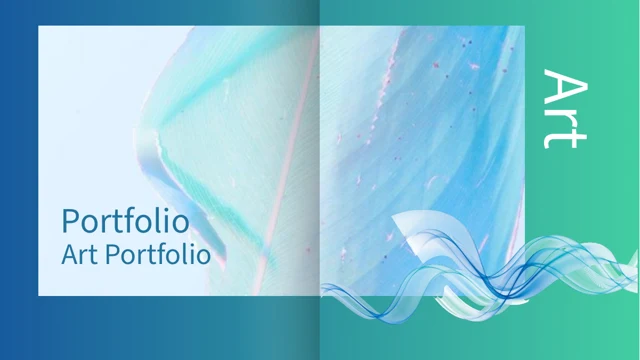
Iridescent Art Portfolio Presentation Template contains 20 slides in a 16:9 format. The cover of Iridescent Art Portfolio Presentation Template combines a broad iridescent image with an overlapping ribbon-like visual. A profile composition and a five-topic contents page follow. Numbered divider layouts in Iridescent Art Portfolio Presentation Template appear on slides 4, 10 and 15; there is not a complete set of five numbered chapter dividers. The image pages in Iridescent Art Portfolio Presentation Template alternate portraits, sculpture, metallic forms and natural imagery. A summary composition precedes the final thank-you page. You can shorten or rearrange Iridescent Art Portfolio Presentation Template, but update the contents and visible divider labels together. The supplied sequence is a visual framework, not a verified exhibition catalogue, a career chronology or proof that all the images belong to the same project or artist.
Can I replace the art in Iridescent Art Portfolio Presentation Template?
You can adapt Iridescent Art Portfolio Presentation Template with images you are permitted to use. Choose replacements for their shape, color and purpose, rather than only their resemblance to the source artwork. A large sculptural head in Iridescent Art Portfolio Presentation Template occupies a different visual space from a narrow texture strip or a small crystal image. Check crops and overlap after each change. The sculpture, metallic hand, unicorn and other visuals in Iridescent Art Portfolio Presentation Template are static image assets, not editable 3D meshes or materials. Do not describe them as objects that can be rotated or relit inside the file. Preserve required attribution when replacing artwork in Iridescent Art Portfolio Presentation Template. Review the whole Iridescent Art Portfolio Presentation Template sequence after changing imagery so the gradient fields and translucent panels still leave your focal details clear.
Can I preview every page of Iridescent Art Portfolio Presentation Template?
The gallery displays all 20 pages of Iridescent Art Portfolio Presentation Template. Use the thumbnails and arrows to compare the gradient palettes, large image crops and layered collages. Enlarge Iridescent Art Portfolio Presentation Template to inspect short headings, vertical text areas and the boundaries of translucent panels. Consider how much explanation a composition can hold before selecting it from Iridescent Art Portfolio Presentation Template. Some pages suit one strong image, while others contrast two or more visual elements. The previews show the supplied Iridescent Art Portfolio Presentation Template rather than changes to your later working copy. After editing Iridescent Art Portfolio Presentation Template, review every modified crop and note, including the contents, summary and final page. Compare the exported Iridescent Art Portfolio Presentation Template with the editable view. Light text over a gradient can look different on another screen, even when the main image remains clear.
Does Iridescent Art Portfolio Presentation Template include charts or interactive models?
Iridescent Art Portfolio Presentation Template contains no native charts, tables or linked workbooks. It uses artwork and decorative shapes to present a visual portfolio. The illustrated sculpture and faceted forms are images, not interactive models or linked analytical objects. The fish and ocean pictures in Iridescent Art Portfolio Presentation Template are visual material, not evidence for scientific measurements or species identification. Do not turn a decorative image in Iridescent Art Portfolio Presentation Template into an unsupported factual claim. The numbers on divider pages in Iridescent Art Portfolio Presentation Template organize the sequence rather than report results. If you add project data to Iridescent Art Portfolio Presentation Template, verify it and provide an appropriate explanation. Keep short notes focused on visible details or decisions you can describe accurately. A convincing color treatment in Iridescent Art Portfolio Presentation Template does not establish who created the source artwork, how it was produced or whether it belongs to the same collection as another image.
Which fonts does Iridescent Art Portfolio Presentation Template use?
Iridescent Art Portfolio Presentation Template uses Source Han Sans SC Regular. Fonts are not embedded in the PPTX, so matching installed fonts may be needed. Check matching fonts before editing Iridescent Art Portfolio Presentation Template, especially where a heading sits in a narrow area or beside a large image. Keep short labels concise. When translating Iridescent Art Portfolio Presentation Template, inspect each note area instead of assuming it will keep the English line breaks. The translucent layers in Iridescent Art Portfolio Presentation Template also affect the contrast of light and dark text. Review headings against the actual background underneath them. Compare Iridescent Art Portfolio Presentation Template with the gallery after changing titles, contents labels and the summary. Check both the editable Iridescent Art Portfolio Presentation Template and an export for missing characters, clipped text and unexpected wrapping. A file opening successfully does not guarantee that every layered image or text area has retained its intended appearance. Test Iridescent Art Portfolio Presentation Template on the screen you will use.
Is Iridescent Art Portfolio Presentation Template in English, and can I use another editor?
The downloadable Iridescent Art Portfolio Presentation Template uses English headings and concise project guidance. Website translations describe the same Iridescent Art Portfolio Presentation Template PPTX rather than separate native files for each language. Replace sample notes with accurate descriptions of your own work and preserve any required source attribution. Other presentation software may import Iridescent Art Portfolio Presentation Template, but fonts, transparent panels, gradients and grouped shapes can render differently. Use PowerPoint as the layout reference and compare an imported Iridescent Art Portfolio Presentation Template with the gallery. Keep a working copy before changing several design properties at once. If you translate Iridescent Art Portfolio Presentation Template, review narrow headings and the contents separately from body notes. Inspect the exported file on the intended display, including light lettering over colorful fields, rather than relying only on the editor view.
Can I use Iridescent Art Portfolio Presentation Template commercially?
Check the applicable conditions for Iridescent Art Portfolio Presentation Template, its source artwork, fonts and anything you add. A paid download does not settle every right to reuse or redistribute the material. Do not present the images in Iridescent Art Portfolio Presentation Template as your own creations unless that claim is accurate. Check replacement image permissions separately and preserve any required credits. Showing a finished presentation made with Iridescent Art Portfolio Presentation Template and distributing its editable source are different activities. Before adding Iridescent Art Portfolio Presentation Template to another downloadable collection, verify the relevant conditions. Describe your contribution clearly, distinguishing your project decisions from supplied illustrative assets. The appearance of a person, sculpture or other recognizable subject in Iridescent Art Portfolio Presentation Template does not establish an endorsement or a professional relationship. Carry any required attribution or usage restrictions into the finished presentation.
How should I share Iridescent Art Portfolio Presentation Template?
Share this public page when recommending Iridescent Art Portfolio Presentation Template, so others can inspect the gallery and download through their own eligible accounts. Keep an editable copy of Iridescent Art Portfolio Presentation Template for changes to images, notes and section order. Before presenting Iridescent Art Portfolio Presentation Template, make the five-topic contents and the selected numbered dividers consistent with your actual sequence. Check that your summary explains the work shown rather than implying an unsupported connection between source images. Test Iridescent Art Portfolio Presentation Template on the intended screen, looking for low-contrast text over gradients and important details obscured by translucent layers. Compare an export of Iridescent Art Portfolio Presentation Template with the working file to catch shifted crops or broken headings. Keep the thank-you page simple and share the result only under the conditions that apply to its images, design and other content.