Pastel Gradient Portfolio Presentation Template: Mint-Peach Circles, Capsule Cards and Manual Diagrams
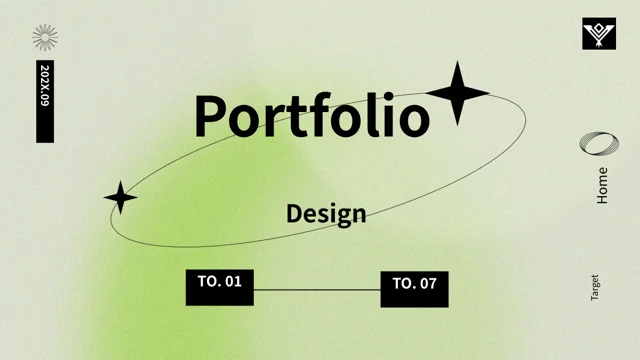
Pastel Gradient Portfolio Presentation Template frames its cover and closing page with a rounded black outline over mint and peach circles. Pastel Gradient Portfolio Presentation Template continues the soft gradients in capsule-shaped contents labels, chapter numbers and small markers. Pastel Gradient Portfolio Presentation Template has four numbered chapter pages, each combining a large colored circle with a thin outlined note area. Inside, rounded cards, icon notes and paired arrow loops offer ways to compare or connect ideas. Horizontal bars with movable-looking knobs, vertical thermometer forms, a curved node line and dotted rings contain manual number examples. Large S, W, O and T letters lead a four-page analysis sequence; circular arrows and linked labels provide further diagram layouts. Replace the English guidance, sample 2021 dates and figures with your own material, and check that each manual diagram communicates what its label says.
Key Features of Pastel Gradient Portfolio Presentation Template
Soft gradients, black outlines and a varied set of manual diagrams.
Mint and Peach Circles
Pastel Gradient Portfolio Presentation Template layers mint-peach circles behind black titles. Check small-text contrast when changing backgrounds or accent colors.
Capsule Contents and Chapters
Pastel Gradient Portfolio Presentation Template has capsule contents and four chapter pages. Update contents and numbering together when moving or removing pages.
Rounded Cards and Icon Notes
Pastel Gradient Portfolio Presentation Template uses rounded cards, paired notes and icons. Keep descriptions brief so they remain clear beside gradient headings.
Manual Bars and Dot Rings
Pastel Gradient Portfolio Presentation Template includes bars, thermometer forms and dot rings. Replace values and reshape drawings to support your actual figures.
Large SWOT Letter Pages
Pastel Gradient Portfolio Presentation Template gives S, W, O and T their own layouts. Add a verified point to each area; the letters do not supply analysis.
Arrow Loops and Linked Labels
Pastel Gradient Portfolio Presentation Template combines paired loops, circular arrows and labels. Name stages clearly and check the direction of each sequence.
How to Use Pastel Gradient Portfolio Presentation Template
Select the structure, replace the examples and check each diagram.
-
Plan the Four Chapters
Preview all 20 pages of Pastel Gradient Portfolio Presentation Template. Choose chapter topics and cards, comparison layouts or diagrams that fit your material before changing the contents labels.
-
Download and Replace the Samples
Download Pastel Gradient Portfolio Presentation Template with an active paid plan; daily and repeat downloads are unlimited. Save a copy and replace example dates, notes and analysis statements.
-
Review the Manual Diagrams
Check Pastel Gradient Portfolio Presentation Template bars, ring labels and arrow directions against verified information. Compare exports with the editable file and test small notes before sharing.

Questions About Pastel Gradient Portfolio Presentation Template
How do I download Pastel Gradient Portfolio Presentation Template?
Use an account with an active paid plan to download Pastel Gradient Portfolio Presentation Template. Daily and repeat downloads of Pastel Gradient Portfolio Presentation Template are unlimited. Pastel Gradient Portfolio Presentation Template is provided as an editable PowerPoint file. Save a separate Pastel Gradient Portfolio Presentation Template copy before replacing sample notes, updating figures or changing the four-chapter arrangement, so you can compare your changes with the original capsule cards and diagram layouts.
What is included in Pastel Gradient Portfolio Presentation Template?
Pastel Gradient Portfolio Presentation Template contains 20 slides in a 16:9 format. Pastel Gradient Portfolio Presentation Template opens with a rounded-frame cover and capsule-style contents page, followed by four numbered chapters and a matching thank-you page. The Pastel Gradient Portfolio Presentation Template layouts include icon cards, manual bars, dotted rings, curved lines, large SWOT letters and circular arrows. Pastel Gradient Portfolio Presentation Template has no native data charts or chart workbooks. Review every Pastel Gradient Portfolio Presentation Template preview before choosing which structures to adapt for your material.
Where are the chapters in Pastel Gradient Portfolio Presentation Template?
Pastel Gradient Portfolio Presentation Template places its four numbered chapter pages at 3, 8, 11 and 16. Each Pastel Gradient Portfolio Presentation Template chapter uses a large gradient circle and a smaller outlined area for a short note. Match the four Pastel Gradient Portfolio Presentation Template contents labels to the chapter topics you choose. If you remove or move Pastel Gradient Portfolio Presentation Template pages, check the numbering and the contents sequence together so the audience can follow the revised structure.
Do the sliders in Pastel Gradient Portfolio Presentation Template work like interactive controls?
Pastel Gradient Portfolio Presentation Template has horizontal bars with circular knobs and vertical thermometer-style forms. These Pastel Gradient Portfolio Presentation Template drawings do not create live sliders, temperature readings or input controls. Set a Pastel Gradient Portfolio Presentation Template label to an accurate value, then adjust the relevant bar or marker manually if it needs to represent that value. The Pastel Gradient Portfolio Presentation Template menu symbols and arrow badges are also visual accents, so do not describe the file as a functional website or application.
Are the rings and line in Pastel Gradient Portfolio Presentation Template linked to a spreadsheet?
Pastel Gradient Portfolio Presentation Template includes dotted rings, partial arc shapes and a curved line with nodes. The Pastel Gradient Portfolio Presentation Template file has no native charts or embedded chart workbooks to update these drawings automatically. Change each Pastel Gradient Portfolio Presentation Template example label and check its geometry separately; an edited number alone does not change the dots, arc length or node position. If you retain a Pastel Gradient Portfolio Presentation Template diagram, explain what it measures and verify the information before presenting it.
How should I use the SWOT pages in Pastel Gradient Portfolio Presentation Template?
Pastel Gradient Portfolio Presentation Template spreads large S, W, O and T letters across pages 12–15. The Pastel Gradient Portfolio Presentation Template letters are starting points for a four-part analysis, not verified strengths, weaknesses, opportunities or threats for your project. Replace the Pastel Gradient Portfolio Presentation Template sample notes with specific statements you can support and keep related evidence nearby. Check each Pastel Gradient Portfolio Presentation Template page for a clear heading and relevant explanation, avoiding duplicated claims simply to fill the available space.
Which fonts does Pastel Gradient Portfolio Presentation Template use?
Pastel Gradient Portfolio Presentation Template uses Source Han Sans SC Regular and Bold for its final text. The Pastel Gradient Portfolio Presentation Template file retains some original font attachments, but the current Source Han font is not newly embedded. If your editor substitutes a different typeface in Pastel Gradient Portfolio Presentation Template, install the matching font and recheck the text. Inspect Pastel Gradient Portfolio Presentation Template chapter numbers, large SWOT letters, tiny menu labels and rounded-card notes after any font change, then compare exports with the supplied previews.
Do the dates in Pastel Gradient Portfolio Presentation Template describe a real project?
Pastel Gradient Portfolio Presentation Template includes sample 2021 labels and a 2021.06 date. Those Pastel Gradient Portfolio Presentation Template dates do not establish a real event, campaign or project history. Replace Pastel Gradient Portfolio Presentation Template dates with accurate periods, or remove them if your material does not need a time reference. Treat the Pastel Gradient Portfolio Presentation Template English guidance and figures as examples to edit, and do not claim completed work or measured results solely because a layout contains a year or percentage.
What should I review before sharing Pastel Gradient Portfolio Presentation Template?
Check Pastel Gradient Portfolio Presentation Template contents labels, chapter numbering and final message. Review Pastel Gradient Portfolio Presentation Template analysis notes and date labels against your own verified material. Inspect Pastel Gradient Portfolio Presentation Template bar lengths, dotted rings, node positions and arrow directions, then confirm that the diagrams agree with their explanations. Compare every Pastel Gradient Portfolio Presentation Template exported page with the editable file on your intended screen. Share Pastel Gradient Portfolio Presentation Template after checking small text and replacing the sample statements throughout the presentation.