Marble Art Portfolio Presentation Template: marble textures and calm panels for a visual portfolio
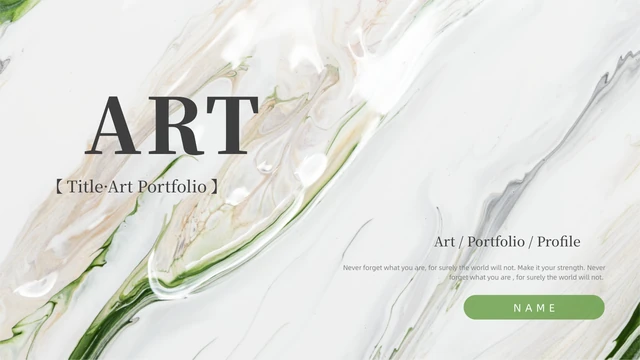
Marble Art Portfolio Presentation Template arranges a work collection across 24 widescreen slides. White space, cream rectangles and green rules sit beside abstract liquid and marble textures with gold details. The opening and closing share the same portfolio cover, while four chapter dividers give Marble Art Portfolio Presentation Template a sequence. Inside, staggered image columns, circular accents and dot patterns leave space for captions. A three-strip angled composition, a four-piece collage and five side-by-side slices show different ways to crop artwork. Marble Art Portfolio Presentation Template uses images and manual shapes rather than native data charts or linked workbooks. Select pages that introduce a piece of work, explain your role and add a description. Replace sample titles and text with supported details. Check permission for each artwork before adapting Marble Art Portfolio Presentation Template; decorative textures do not establish authorship or a project history.
Key Features of Marble Art Portfolio Presentation Template
Marble artwork, quiet captions and a four-part visual sequence.
Marble and Gold Textures
Marble Art Portfolio Presentation Template pairs marble textures with gold details. Choose permitted artwork and keep captions clear of the decorative pattern.
Four Chapter Dividers
Marble Art Portfolio Presentation Template has four dividers on pages 3, 9, 14 and 19. Name the sections for your work and keep later pages in a useful order.
Cream Caption Panels
Marble Art Portfolio Presentation Template uses cream panels for brief notes. Describe the context and your role, replacing placeholder text with confirmed details.
Tilted Image Arrangements
Marble Art Portfolio Presentation Template offers three angled strips and a four-piece collage. Inspect each crop for new artwork so key details stay visible.
Green Lines and Dot Patterns
Marble Art Portfolio Presentation Template adds green rules, small dot grids and circles. Let these guide the eye while keeping your headings and notes concise.
Matching Portfolio Covers
Marble Art Portfolio Presentation Template repeats the cover at the end. Adapt both pages consistently, and check that your title fits within the original space.
How to Use Marble Art Portfolio Presentation Template
Select a chapter sequence, replace the artwork and review the result.
-
Plan the Four-Part Sequence
Marble Art Portfolio Presentation Template has 24 pages to preview. Choose four section topics for your work, then select image and caption layouts that explain each piece without repetition.
-
Download a Working Copy
Marble Art Portfolio Presentation Template is available with an active paid plan. Daily and repeated downloads are unlimited. Keep a working copy and the original to compare chapters and crops.
-
Replace Artwork and Check Layouts
Edit Marble Art Portfolio Presentation Template in PowerPoint. Replace sample titles and notes, check each crop and confirm image permissions. Reopen the exported file before sharing.
Questions about Marble Art Portfolio Presentation Template
How do I download Marble Art Portfolio Presentation Template?
Choose the PPTX download button on this page and sign in with an active paid plan. Guests need to log in before downloading Marble Art Portfolio Presentation Template. Paid members have unlimited daily and repeat downloads. Review the public gallery before selecting Marble Art Portfolio Presentation Template, then save a working copy. Keep the original Marble Art Portfolio Presentation Template file to compare chapters, artwork placements and captions while editing.
How many slides are in Marble Art Portfolio Presentation Template?
Marble Art Portfolio Presentation Template includes 24 slides in a 16:9 widescreen format. The opening and repeated closing cover count toward the total. Four chapter dividers in Marble Art Portfolio Presentation Template appear on pages 3, 9, 14 and 19; the remaining pages offer artwork and caption arrangements. Choose the relevant pages of Marble Art Portfolio Presentation Template for your collection. Your portfolio can be shorter; keep its sections and explanations clear.
Can I edit Marble Art Portfolio Presentation Template?
Marble Art Portfolio Presentation Template includes editable text and shapes alongside original artwork. Change short titles, notes and section labels in PowerPoint. There are no native charts or linked data workbooks in Marble Art Portfolio Presentation Template; decorative lines and image pieces are manual objects. Inspect what is selected in Marble Art Portfolio Presentation Template: detail merged into an image may require replacing that image instead of editing a separate layer.
Can I preview all of Marble Art Portfolio Presentation Template?
All 24 previews of Marble Art Portfolio Presentation Template are public and free, without a paid plan. Explore Marble Art Portfolio Presentation Template using the thumbnails and arrows, then enlarge layouts for inspection. Check the narrow captions and the crops in angled strips or side-by-side slices. The Marble Art Portfolio Presentation Template gallery shows the visible slides; it does not verify artwork rights or separate editability of every image detail.
Can another editor open Marble Art Portfolio Presentation Template?
Marble Art Portfolio Presentation Template is a PowerPoint PPTX. Other presentation editors may import it, but individual compatibility is unconfirmed. Compare an imported copy of Marble Art Portfolio Presentation Template with the public gallery, checking serif titles, cream panels, circular accents and picture crops. Keep the original Marble Art Portfolio Presentation Template file. Export and reopen your completed portfolio, then check each page for changed wrapping or spacing before sharing.
Which fonts does Marble Art Portfolio Presentation Template use?
Marble Art Portfolio Presentation Template references 思源宋体 CN Light, 思源宋体 CN Medium, 思源宋体 CN Heavy, 思源宋体 Heavy, 思源黑体 CN Light, 思源黑体 CN Medium, 思源黑体 CN Heavy, 思源黑体, 阿里巴巴普惠体, Arial and Calibri. No fonts are embedded in Marble Art Portfolio Presentation Template, and their historical editions are unknown. Use licensed matching families when editing Marble Art Portfolio Presentation Template. Check short titles, narrow labels and paragraph breaks after any substitution, on your screen and in the export.
Are the slides in Marble Art Portfolio Presentation Template in English?
The downloadable Marble Art Portfolio Presentation Template supplies English editable labels and short guidance for replacing sample content. Original decorative wording in Marble Art Portfolio Presentation Template, including THE MOMENT, remains part of the source design. Website translations describe this same English PPTX without separate translated slide files. In Marble Art Portfolio Presentation Template, replace sample titles, names and work descriptions with confirmed information; the source examples do not prove authorship, client relationships or achievements.
Can I use Marble Art Portfolio Presentation Template commercially?
Commercial use and template redistribution permissions for Marble Art Portfolio Presentation Template are unverified. Paid access to Marble Art Portfolio Presentation Template does not add rights to its marble artwork or decorative images. The source establishes no confirmed designer or complete license; font permissions do not license the portfolio itself. Check rights before client use or file distribution. Retain required credits and choose permitted replacement artwork for Marble Art Portfolio Presentation Template.
How do I share Marble Art Portfolio Presentation Template?
Share the public Marble Art Portfolio Presentation Template page through the control beside the download button or copy its URL. Recipients can view the whole gallery and download with their own active paid plan. Before distributing an adapted Marble Art Portfolio Presentation Template, replace private or unsupported statements and check artwork rights. Export a PDF of your adapted Marble Art Portfolio Presentation Template if useful, reopen it and review every page. Keep an editable working copy for later changes.