Neon Business Report Presentation Template: neon spheres, fluid textures and a four-part report
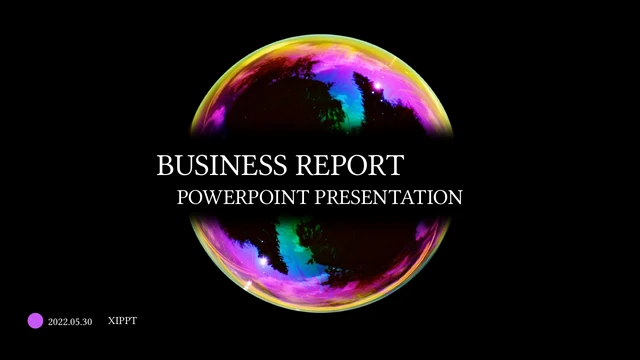
Neon Business Report Presentation Template uses a black background, bright spheres and purple accents. Fluid textures fill banners and image panels. The Business Report cover and Thank You closing repeat the glowing sphere, with the original XIPPT credit retained. Neon Business Report Presentation Template contains 19 widescreen slides. A contents page introduces four numbered parts: summary of work, problems and solutions, next-step work plan and specific work content. Later layouts combine notes with portraits, icons, percentage rings and a four-step circular diagram. Neon Business Report Presentation Template is a visual starting point for your own report. Replace the examples with verified project details and choose the pages that support your message. Review Neon Business Report Presentation Template before downloading to compare its compact text areas and colourful image groups with your outline. Keep headings brief so the bright decoration does not compete with the content.
Key Features of Neon Business Report Presentation Template
Bright spheres, fluid image panels and four report sections.
A Repeated Neon Sphere
Neon Business Report Presentation Template uses a glowing sphere on the cover, closing and dividers. Purple circles connect the decoration across a black background.
Four Numbered Sections
Neon Business Report Presentation Template has four contents entries and dividers numbered 01–04. Rename each section to match your report and the pages you keep.
Fluid Texture Panels
Neon Business Report Presentation Template uses colourful fluid images in banners, pairs and tall panels. Replace them with your own visuals and check each crop.
A Three-Portrait Row
Neon Business Report Presentation Template includes three monochrome portraits above short text columns. Add verified role descriptions and use images you can share.
Percentage Ring Examples
Neon Business Report Presentation Template has percentage rings made from shapes and labels. Update figures and ring proportions together to reflect your data.
A Four-Step Circle
Neon Business Report Presentation Template offers a circular four-step diagram with notes around it. Replace each step with a short action and explain the sequence.
How to Use Neon Business Report Presentation Template
Select the sections, download a copy and replace the examples.
-
Review the Four-Part Structure
Browse all 19 pages of Neon Business Report Presentation Template. Compare the four sections, portrait row and shape diagrams with your outline, then choose layouts that explain your report clearly.
-
Save the English PowerPoint
Download Neon Business Report Presentation Template with an active paid plan. Keep a working copy of the English PPTX; paid members have no daily download limit and can get the same file again.
-
Edit and Check the Details
Edit Neon Business Report Presentation Template in PowerPoint. Replace notes, photos, dates and sample figures, retain genuine credits, and check fonts, ring proportions and spacing before sharing.
Questions about Neon Business Report Presentation Template
How do I download Neon Business Report Presentation Template?
Sign in with an active paid plan and use the download button on the Neon Business Report Presentation Template page. Paid members have no daily download limit and can download the same file again when needed. Save an unchanged copy of Neon Business Report Presentation Template before editing. Create a separate Neon Business Report Presentation Template working file so you can return to the original four-part structure and image layouts later.
How many slides are in Neon Business Report Presentation Template?
Neon Business Report Presentation Template has 19 slides in a 16:9 widescreen format. A contents page and four numbered dividers organise the report between matching opening and closing pages. You can remove or reorder pages of Neon Business Report Presentation Template to suit a shorter presentation. Update the contents and section names in Neon Business Report Presentation Template after choosing the layouts, rather than leaving a report structure that no longer matches your work.
Can I change the text, colours and diagrams in Neon Business Report Presentation Template?
Native text and shapes in Neon Business Report Presentation Template can be edited in PowerPoint; the spheres, fluid textures and portraits are image assets. The percentage rings show 75%, 45% and 15% as manually labelled shape examples, not linked data charts. When changing Neon Business Report Presentation Template, update the labels and ring proportions together. The four-step diagram in Neon Business Report Presentation Template also uses editable shapes and text, with no linked workbook.
Can I preview every page of Neon Business Report Presentation Template?
Yes. The gallery displays all 19 pages of Neon Business Report Presentation Template before download. Enlarge the views to inspect the dark backgrounds, short text columns and vivid texture panels. Compare Neon Business Report Presentation Template with the size and orientation of your own images. Use the preview of Neon Business Report Presentation Template to decide whether a portrait row, percentage-ring page or four-step diagram contributes useful information rather than keeping every layout.
Can another editor open Neon Business Report Presentation Template?
Neon Business Report Presentation Template is supplied as a PowerPoint .pptx file. Editors that import PPTX can open it, but missing fonts, image crops, ring geometry and line breaks may change. Test Neon Business Report Presentation Template in your intended app before making extensive edits. Review any exported PDF as well. Format compatibility does not guarantee that Neon Business Report Presentation Template will look identical in every presentation editor.
Which fonts does Neon Business Report Presentation Template declare?
Neon Business Report Presentation Template includes Arial, HYYakuHei 55W, 三极准柔宋, Century Gothic and Adobe Gothic Std B, along with theme font references. No font files are embedded in Neon Business Report Presentation Template. An unavailable family may be substituted, changing headings or the small notes. Choose correctly licensed fonts and check Neon Business Report Presentation Template after any substitution. The website preview uses renderer substitutes and cannot guarantee the same font appearance on your device.
Are the downloaded slides of Neon Business Report Presentation Template translated?
Neon Business Report Presentation Template is provided as one English PowerPoint file with concise project-editing prompts. The 15 website languages describe the same download; choosing a different site language does not translate the slide text. Replace the prompts in Neon Business Report Presentation Template with your preferred language and check character coverage and line breaks. The image content and original XIPPT credit in Neon Business Report Presentation Template remain unchanged.
Can Neon Business Report Presentation Template be used commercially?
Commercial permissions for the source design, portraits, texture images and fonts in Neon Business Report Presentation Template have not been verified. Paid membership gives access to Neon Business Report Presentation Template, but does not establish a commercial licence for every asset. Keep the genuine XIPPT credit. Before distributing an edited Neon Business Report Presentation Template, confirm relevant permissions and replace images with your own or appropriately licensed material where necessary.
How should I share Neon Business Report Presentation Template?
Share the public Neon Business Report Presentation Template page so another person can inspect the full gallery and download conditions. If relevant permissions allow it, share your version of Neon Business Report Presentation Template as a PDF for viewing or a PPTX for further editing. Check that sample dates, descriptions and percentages have been replaced with your verified details. Keep a working copy of Neon Business Report Presentation Template and retain genuine author credit.