Neon Sculpture Exhibition Presentation Template: Glowing Busts and Dark Geometric Layouts
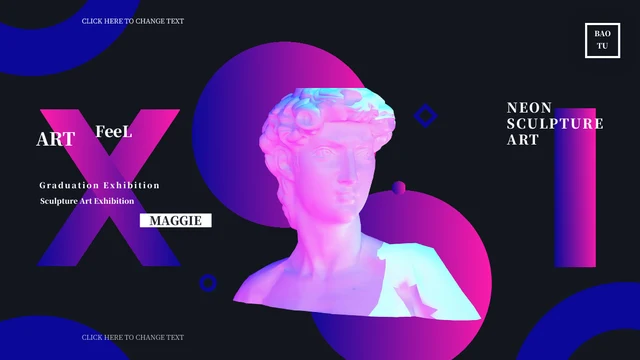
Neon Sculpture Exhibition Presentation Template combines classical busts with pink, cyan and violet lighting on almost-black slides. Blue corner arcs, gradient circles and fine geometric frames link the 24 widescreen pages. Neon Sculpture Exhibition Presentation Template opens with a large X and a brightly lit sculpture, then introduces four sections through a contents page and matching numbered dividers. Inside, three artwork cards, paired notes and staggered columns offer different ways to describe an exhibition. Neon Sculpture Exhibition Presentation Template also includes triangular image frames, an A–D text layout and a page with four paper-plane notes. The final slide repeats the cover composition, giving the sequence a visual return to its opening. Use the existing pictures to assess the look, then select pages for your own artwork and concise captions. The sculptures and lighting effects are picture elements; the surrounding headings and text can be edited in PowerPoint.
Key Features of Neon Sculpture Exhibition Presentation Template
Explore luminous artwork, dark backgrounds and four chapters in Neon Sculpture Exhibition Presentation Template.
Neon Sculpture Imagery
Neon Sculpture Exhibition Presentation Template pairs classical busts with pink and cyan lighting. Keep captions brief so the illuminated artwork remains the focus.
Four Matching Chapters
Neon Sculpture Exhibition Presentation Template provides a contents page and four numbered dividers. Rename each section to organize your own exhibition or creative narrative.
Geometric Artwork Frames
Neon Sculpture Exhibition Presentation Template uses triangles, rings and rectangles around images. Check the focal point when replacing a sculpture with your artwork.
Three Artwork Cards
Neon Sculpture Exhibition Presentation Template places three image details beside short text areas. Choose related pieces and consistent captions for easy comparison.
Flexible Text Arrangements
Neon Sculpture Exhibition Presentation Template offers paired notes, staggered columns and four A–D blocks. Give each idea enough room by choosing a suitable layout.
A Repeated Cover Ending
Neon Sculpture Exhibition Presentation Template returns to its opening sculpture on the last slide. Keep that visual echo or choose another closing page for your presentation.
How to Use Neon Sculpture Exhibition Presentation Template
Select your artwork, organize four sections and refine each caption.
-
Plan the Exhibition
Preview all 24 pages of Neon Sculpture Exhibition Presentation Template. Choose artwork and group the story into four sections. Select only the cards and text layouts you need, then write short captions.
-
Download a Working Copy
Get Neon Sculpture Exhibition Presentation Template with an active paid membership. Daily downloads and repeat downloads are unlimited. Save the PPTX and make a working copy before replacing the sample material.
-
Edit and Check the Contrast
Edit Neon Sculpture Exhibition Presentation Template in PowerPoint. Replace titles and pictures, check crops and contrast, then read the small captions at presentation size before exporting.
Questions About Neon Sculpture Exhibition Presentation Template
How do I download Neon Sculpture Exhibition Presentation Template?
Sign in with an active paid membership and use the download control on the Neon Sculpture Exhibition Presentation Template page. Paid members can download without a daily limit, including repeat downloads. The Neon Sculpture Exhibition Presentation Template download is a PowerPoint file with editable text and separate picture elements. Browse the gallery before saving Neon Sculpture Exhibition Presentation Template so you can choose the layouts you want to use. Keep an untouched copy of Neon Sculpture Exhibition Presentation Template alongside your working file if you may need to recover an original page or compare its spacing later.
How many slides are in Neon Sculpture Exhibition Presentation Template?
Neon Sculpture Exhibition Presentation Template contains 24 slides in a 16:9 widescreen format. A contents page introduces four sections, with numbered dividers on pages 3, 11, 16 and 21. The final page of Neon Sculpture Exhibition Presentation Template repeats the cover artwork rather than presenting a separate thank-you message. You can shorten Neon Sculpture Exhibition Presentation Template by choosing only the pages that support your exhibition. If you rearrange Neon Sculpture Exhibition Presentation Template, update the contents and divider labels together so the audience can follow the order without encountering unused sections or inconsistent numbers.
Can I edit the sculptures in Neon Sculpture Exhibition Presentation Template?
The sculptures in Neon Sculpture Exhibition Presentation Template are picture elements, not interactive 3D models. Their lighting and surface colors belong to the images. You can replace or crop those images in Neon Sculpture Exhibition Presentation Template, while the surrounding text remains editable. To use a different artwork in Neon Sculpture Exhibition Presentation Template, choose a suitable picture and inspect how it sits within each triangle, circle or rectangular frame. Keep any required credits. Avoid stretching pictures in Neon Sculpture Exhibition Presentation Template to fill a space; adjust the crop or select another layout that better matches the proportions of your work.
Can I preview the whole Neon Sculpture Exhibition Presentation Template?
Yes. Every supplied page of Neon Sculpture Exhibition Presentation Template appears in the gallery. Use the thumbnails and enlarged view to compare the artwork, numbered cards and short text columns. When reviewing Neon Sculpture Exhibition Presentation Template, pay particular attention to the smaller captions on the nearly black backgrounds. The preview of Neon Sculpture Exhibition Presentation Template shows the supplied file, so replacement fonts and pictures may change the result. After editing Neon Sculpture Exhibition Presentation Template, run through your own presentation at the size your audience will see, checking contrast and legibility as well as image placement.
Which layouts are available in Neon Sculpture Exhibition Presentation Template?
Neon Sculpture Exhibition Presentation Template includes three artwork cards, paired notes, staggered text columns and a four-part A–D arrangement. There are also four small paper-plane notes on one page of Neon Sculpture Exhibition Presentation Template. These are visual ways to organize captions and ideas, not automatic data charts. Choose a layout in Neon Sculpture Exhibition Presentation Template according to the amount of text and the artwork you want to show. Keep the notes specific to each piece. If a passage feels crowded in Neon Sculpture Exhibition Presentation Template, shorten it or move the supporting explanation to another page instead of reducing every caption to tiny type.
Which fonts does Neon Sculpture Exhibition Presentation Template need?
Neon Sculpture Exhibition Presentation Template uses Source Han Serif SC Heavy, Source Han Serif SC ExtraLight and DengXian. Fonts are not embedded in the file. Install the matching typefaces or choose suitable replacements before editing Neon Sculpture Exhibition Presentation Template. The heavier titles and lighter captions in Neon Sculpture Exhibition Presentation Template have different spacing needs, so review both when changing fonts. Check the vertical titles and narrow columns too. Browser previews of Neon Sculpture Exhibition Presentation Template are rendered images; viewing them does not install fonts on your computer or guarantee that a different presentation app will preserve every line break.
Is Neon Sculpture Exhibition Presentation Template translated, and can another app open it?
The editable headings and sample passages in Neon Sculpture Exhibition Presentation Template are in English. Website language versions describe the same English file; they do not provide separate translated slide decks. Genuine credits and original pictures remain in Neon Sculpture Exhibition Presentation Template. Applications that import PPTX may open Neon Sculpture Exhibition Presentation Template, although image effects, fonts and spacing can vary. PowerPoint is the main editing reference. Compare an imported Neon Sculpture Exhibition Presentation Template with the gallery before presenting, then replace the sample captions with accurate descriptions of your own exhibition and check the exported result.
Can I use Neon Sculpture Exhibition Presentation Template commercially?
Check the terms that apply to Neon Sculpture Exhibition Presentation Template and the individual pictures and fonts you use. Paid downloading of Neon Sculpture Exhibition Presentation Template does not separately establish rights to every included artwork or credit. For a commercial exhibition, include material you have permission to use and preserve any required attribution in Neon Sculpture Exhibition Presentation Template. Obtain the necessary permissions before redistributing an editable file or selling a derivative design. When replacing sample pictures in Neon Sculpture Exhibition Presentation Template, keep a record of the rights for your own artwork and choose a sharing format appropriate to the intended audience.
How do I share Neon Sculpture Exhibition Presentation Template?
Send the public Neon Sculpture Exhibition Presentation Template page when recommending the design itself. Recipients can inspect the gallery and download Neon Sculpture Exhibition Presentation Template through their own eligible accounts. For your completed exhibition, export an edited copy of Neon Sculpture Exhibition Presentation Template to PDF or present it from your chosen application after checking every page. Keep the editable version for future changes. Before sharing Neon Sculpture Exhibition Presentation Template, replace placeholder titles, verify captions and review the dark slides on the target screen. Do not redistribute the untouched file beyond the permissions that apply to the template and its assets.