Vaporwave Presentation Template: neon collage and playful digital images
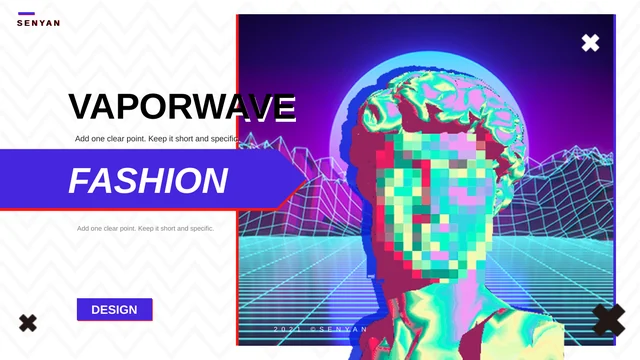
Vaporwave Presentation Template opens with a pixelated classical bust against a neon grid. Purple banners, pink edges and white zigzag backgrounds connect its 15 widescreen pages. The closing repeats the cover image with a Thank You message. Vaporwave Presentation Template has four contents entries and one PART ONE divider, followed by varied art layouts. You will find an iridescent folded form, a reclining sculpture, colorful block letters, a liquid splash, an astronaut and a statue blowing a pink bubble. Pixel cursors and a ringed planet add a playful digital theme. Vaporwave Presentation Template balances these large images with short text areas, picture rows and layered frames. The dramatic objects are image assets, not editable 3D models. Choose pages that support one clear idea, replace the English prompts with your own message and check contrast over busy art. Retain creator credits and use pictures you may share.
Key Features of Vaporwave Presentation Template
Neon imagery, open text areas and layered purple details.
A Glitch Cover and Closing
Vaporwave Presentation Template repeats a pixelated bust and neon grid on its cover and closing. Keep a short headline clear beside the colorful picture.
Four Contents Entries
Vaporwave Presentation Template has four contents entries and one PART ONE divider. Name the topics for your material and update the list after selecting pages.
Sculptures and Folded Forms
Vaporwave Presentation Template pairs sculptures with a folded form and liquid art. These are pictures; use replacement images with matching proportions.
Pixel Cursors and a Planet
Vaporwave Presentation Template includes pixel cursor pictures and a ringed planet. Keep these accents around a clear point instead of decorating every page.
White Space and Purple Panels
Vaporwave Presentation Template combines white layouts, purple panels and pink edges. Keep new captions readable against both pale and saturated areas.
Rows, Frames and Large Images
Vaporwave Presentation Template has picture rows, layered borders and large art panels. Match crops and leave space between your text and the decorative frames.
How to Use Vaporwave Presentation Template
Choose a visual sequence, add your message and check the result.
-
Choose Your Visual Sequence
Browse all 15 pages of Vaporwave Presentation Template. Compare the four contents entries, single divider and art layouts. Choose a sequence that supports your story and rename the topics.
-
Download an English Working Copy
Use an active paid plan to download Vaporwave Presentation Template. Daily and repeat downloads are unlimited. Save a copy, prepare your text and choose pictures you have permission to use.
-
Edit and Check the Contrast
Open Vaporwave Presentation Template in PowerPoint. Replace prompts and check font wrapping and captions against busy art. Review the export and keep an editable copy for later changes.
Questions about Vaporwave Presentation Template
How do I download Vaporwave Presentation Template?
Sign in with an active paid plan and use the download button beside the preview. Vaporwave Presentation Template is supplied as an English PowerPoint PPTX file. Paid members have unlimited daily downloads, including repeated downloads of Vaporwave Presentation Template. Save Vaporwave Presentation Template to your device and create a working copy before replacing the sample text.
How many slides are in Vaporwave Presentation Template?
Vaporwave Presentation Template contains 15 original slides in a 16:9 format. Vaporwave Presentation Template includes four contents entries, one PART ONE divider and a closing page that repeats the cover art. Select or rearrange pages of Vaporwave Presentation Template for your outline, then update the contents labels so the opening matches your finished sequence.
Can I change the text and colors in Vaporwave Presentation Template?
Yes. Native text boxes, panels, lines and shapes in Vaporwave Presentation Template are editable in PowerPoint. Vaporwave Presentation Template combines white space with purple, blue and pink accents, so review text contrast after a color change. Glitch portraits, sculptures and pixel objects in Vaporwave Presentation Template remain images. Replace them with pictures you are allowed to use.
Can I see every page of Vaporwave Presentation Template before downloading?
The gallery shows all 15 pages of Vaporwave Presentation Template. Use thumbnails and arrow controls to compare Vaporwave Presentation Template, including the white text layouts, dark liquid-art page and large picture panels. Enlarge Vaporwave Presentation Template to check short captions and layered headings; the preview matches the English file supplied for download.
Does Vaporwave Presentation Template include editable 3D models or data charts?
No. The sculptures, folded form, block letters and planet in Vaporwave Presentation Template are image assets, not native 3D models. Vaporwave Presentation Template contains no linked data charts or embedded workbooks. Edit native labels and decorative shapes separately, and replace the art in Vaporwave Presentation Template as pictures rather than expecting to rotate or recolor a model.
Which fonts does Vaporwave Presentation Template use?
The English release of Vaporwave Presentation Template uses Arial and Times New Roman. Source references to Josefin Sans, Playfair Display and Source Han Sans were adapted because those fonts were unavailable. No font files are embedded in Vaporwave Presentation Template. Use installed fonts and review narrow headings, large outlined text and caption wrapping in Vaporwave Presentation Template before exporting.
Are the slides in Vaporwave Presentation Template translated for each website language?
The downloadable Vaporwave Presentation Template is English. Latin filler and the nonsensical word-mountains passage were replaced with short English editing prompts in Vaporwave Presentation Template; hidden Chinese master prompts are English too. Each website translation explains the same English Vaporwave Presentation Template, rather than supplying a separately translated PPTX. Add your own content to the prompts.
Can I use Vaporwave Presentation Template commercially?
A commercial or redistribution license for Vaporwave Presentation Template has not been verified. Download access does not grant extra rights to the original artwork or design. Keep the SENYAN copyright and original creator attribution in Vaporwave Presentation Template, and confirm the permissions needed for your intended use. Add only text and pictures that you may share when editing Vaporwave Presentation Template.
How should I share Vaporwave Presentation Template?
Use the share controls to send the public preview link for Vaporwave Presentation Template. For your finished project, distribute a reviewed PDF or presentation containing material you have permission to share. Keep the editable Vaporwave Presentation Template separately for later revisions. Someone who needs the original Vaporwave Presentation Template must use their own eligible paid account.