Green Swirl Work Plan Presentation Template: Monthly Review Within Light-Swirl Frames
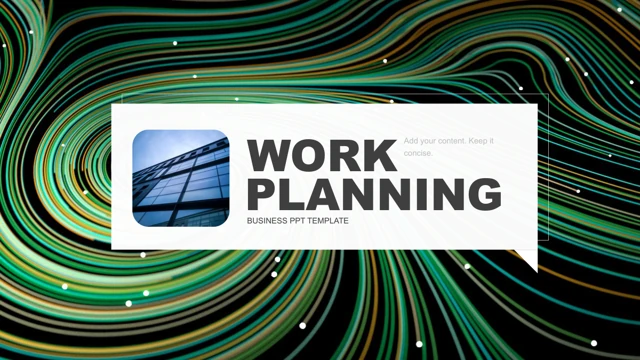
Green Swirl Work Plan Presentation Template frames a monthly work sequence with green and gold light swirls on black. White content panels, gray text and photographic pages give Green Swirl Work Plan Presentation Template its restrained structure. Four numbered parts in Green Swirl Work Plan Presentation Template separate last month’s work, achievements and progress, problems and deficiencies, and next month’s plan. The opening section of Green Swirl Work Plan Presentation Template combines short text cards with a circular portrait and hexagonal building photographs. A set of rings in Green Swirl Work Plan Presentation Template shows example labels 42%, 75% and 30%. Four vertical bars elsewhere in Green Swirl Work Plan Presentation Template carry 53%, 72%, 60% and 90%. These are independent shapes rather than native charts; there is no embedded workbook in Green Swirl Work Plan Presentation Template. Photo-led pages in Green Swirl Work Plan Presentation Template include office-computer, architecture and joined-hands compositions. Circular portraits and a four-image building grid in Green Swirl Work Plan Presentation Template offer different ways to balance a photograph with short supporting text. Later planning pages in Green Swirl Work Plan Presentation Template divide ideas into small numbered groups. Their sample text needs your own evidence, not just a new heading. Source prompts in Green Swirl Work Plan Presentation Template were shortened for English editing. Promotion, notes and author details were removed; original images and object positions in Green Swirl Work Plan Presentation Template remain intact. Browse every page of Green Swirl Work Plan Presentation Template, choose a sequence and replace unsupported percentages. Check the gray text against its background in Green Swirl Work Plan Presentation Template at presentation size, then shorten any heading that spills beyond its frame.
Key Features of Green Swirl Work Plan Presentation Template
Monthly sections, framed photos and editable diagram shapes.
Green light-swirled frames
Green and gold traces edge black panels and white outlines.
Four monthly work parts
Review, progress, problems and next month’s plan form the sequence.
Photo and text combinations
Portraits, building grids and desk images leave space for short points.
Independent percentage rings
42%, 75% and 30% are sample shape labels, not workbook values.
Four shape-based bars
53%, 72%, 60% and 90% need replacement with verified figures.
Small planning groups
Numbered blocks help divide a next-month plan into concise points.
How to Use Green Swirl Work Plan Presentation Template
Select your month, replace the evidence and review contrast.
-
Review the 20 pages
Inspect section dividers, photo crops and percentage shapes.
-
Download a working copy
Use an active paid plan. Daily downloads are unlimited.
-
Add your own monthly facts
Replace prompts and figures. Check short titles and pale text.
Questions about Green Swirl Work Plan Presentation Template
How do I download Green Swirl Work Plan Presentation Template?
Sign in with an active paid plan and choose Download PPTX for Green Swirl Work Plan Presentation Template. A temporary link provides the PowerPoint file. Repeated downloads of Green Swirl Work Plan Presentation Template have no daily limit while your plan remains active. Save a working copy of Green Swirl Work Plan Presentation Template before changing its content.
How many slides are in Green Swirl Work Plan Presentation Template?
Green Swirl Work Plan Presentation Template contains 20 slides in 16:9. The four parts of Green Swirl Work Plan Presentation Template cover last month’s work, achievements and progress, problems and deficiencies, and next month’s plan. Opening, contents and closing pages complete Green Swirl Work Plan Presentation Template. Select and reorder Green Swirl Work Plan Presentation Template pages to match your actual reporting period.
Can I edit Green Swirl Work Plan Presentation Template?
Text, outlined frames and diagram shapes in Green Swirl Work Plan Presentation Template can be edited separately where they are native objects. Green Swirl Work Plan Presentation Template has no native chart or embedded workbook; percentage rings and bars are shapes with independent labels. Replace photographs to change image content in Green Swirl Work Plan Presentation Template. Update both a percentage and its graphic when adapting Green Swirl Work Plan Presentation Template.
Can I preview all of Green Swirl Work Plan Presentation Template?
Yes. Review Green Swirl Work Plan Presentation Template with the thumbnails and arrow controls. Enlarge the photo crops, outlined panels and pale text of Green Swirl Work Plan Presentation Template before adding material. The preview shows the provided Green Swirl Work Plan Presentation Template, not your later edits. Check each section of Green Swirl Work Plan Presentation Template against your monthly outline.
Can another editor open Green Swirl Work Plan Presentation Template?
An editor supporting PPTX may open Green Swirl Work Plan Presentation Template, but fonts, grouped shapes and picture crops can differ. Compare its output with the Green Swirl Work Plan Presentation Template preview. Keep a PowerPoint copy of Green Swirl Work Plan Presentation Template before conversion, then inspect all 20 pages of Green Swirl Work Plan Presentation Template in the chosen editor.
Which fonts does Green Swirl Work Plan Presentation Template use?
Source text in Green Swirl Work Plan Presentation Template uses Arial and Calibri, with theme font references also present. Check available fonts before opening Green Swirl Work Plan Presentation Template. After substitution, review divider headings, narrow outlines and percentage labels throughout Green Swirl Work Plan Presentation Template. Shorten text that exceeds its original box in Green Swirl Work Plan Presentation Template.
Are the slides of Green Swirl Work Plan Presentation Template translated?
Green Swirl Work Plan Presentation Template is supplied in English. English editing prompts in Green Swirl Work Plan Presentation Template were shortened and source promotion was cleared. Website language selection translates the page about Green Swirl Work Plan Presentation Template, while the PPTX remains English. The percentages and sample statements in Green Swirl Work Plan Presentation Template are examples rather than verified monthly results.
Can I use Green Swirl Work Plan Presentation Template commercially?
Paid access to Green Swirl Work Plan Presentation Template does not establish commercial rights to its design or images. Check permissions for Green Swirl Work Plan Presentation Template and replace material whose rights are uncertain. Verify picture rights and distribution permissions before sharing a modified Green Swirl Work Plan Presentation Template with clients or an audience.
How do I share Green Swirl Work Plan Presentation Template?
Use the share control or copy the public link for Green Swirl Work Plan Presentation Template. Before distributing an edited Green Swirl Work Plan Presentation Template, check the reporting period, section names, percentages and photo crops. Retain an editable Green Swirl Work Plan Presentation Template copy alongside any PDF exported for review.