Pastel Bloom Project Presentation Template: pastel petals and a clear project story
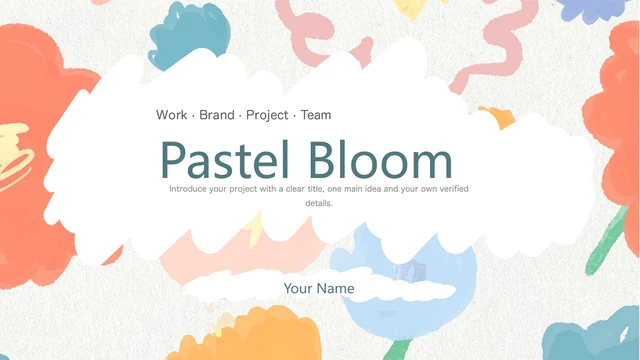
Pastel Bloom Project Presentation Template frames a project introduction with coral, pink, blue and yellow petals around a textured background. A white area with an irregular edge keeps the central message separate from the floral border. Pastel Bloom Project Presentation Template contains 24 widescreen slides, a four-part contents page and four numbered dividers. Seedlings, flower arrangements, leaves beside a laptop and flowers with a book give the photo pages a quiet botanical character. Pastel Bloom Project Presentation Template also includes five rising text columns, outlined cards, connected icons, three gears and a four-part circular diagram. These are layouts for your own explanations, not live data charts. Pastel Bloom Project Presentation Template ends with a matching Thanks page. Use the short English prompts as starting points, select the pages that fit your argument and replace the sample wording before presenting.
Key Features of Pastel Bloom Project Presentation Template
Flower borders, photo layouts and visual sequences.
Petal Borders
Pastel Bloom Project Presentation Template sets coral and blue petals around a white centre. Keep headings short so the bright border supports your message.
Four-Part Outline
Pastel Bloom Project Presentation Template pairs a vertical contents page with four numbered dividers. Rename the sections to match your project and audience.
Botanical Photographs
Pastel Bloom Project Presentation Template combines seedlings, flowers and workspace leaves. Replace photos carefully and check each rectangular or circular crop.
Rising Text Columns
Pastel Bloom Project Presentation Template uses five ascending columns to organize a sequence. Write one step per column; their heights do not measure results.
Gears and Circular Ideas
Pastel Bloom Project Presentation Template offers three gears and a four-part circular layout. Explain relationships with concise labels and matching side notes.
Photo Cards and Milestones
Pastel Bloom Project Presentation Template includes overlapping photo cards and a four-node line. Use them for selected highlights and update every caption.
How to Use Pastel Bloom Project Presentation Template
Choose your pages, add your story and review.
-
Choose your layouts
Browse all 24 pages of Pastel Bloom Project Presentation Template. Plan your four sections, then choose the photo, card or sequence layouts that suit each point. Leave out pages you do not need.
-
Download and personalize
Sign in with an active paid plan to download Pastel Bloom Project Presentation Template. Open a working copy in PowerPoint, replace the prompts and choose photos you have permission to use.
-
Check before sharing
Review Pastel Bloom Project Presentation Template on your screen. Check font substitutions, vertical labels, image crops and pale text, then inspect any PDF before sharing the finished deck.
Frequently Asked Questions About Pastel Bloom Project Presentation Template
How do I download Pastel Bloom Project Presentation Template?
Sign in to PPT AI with an active paid plan, open Pastel Bloom Project Presentation Template and use the download button on this page. The file is a PowerPoint PPTX. Paid members can download Pastel Bloom Project Presentation Template as often as needed each day, including repeat downloads. Browsing the gallery does not require a purchase. Keep an editable working copy of Pastel Bloom Project Presentation Template so your changes are separate from the downloaded file.
How many slides are in Pastel Bloom Project Presentation Template?
Pastel Bloom Project Presentation Template has 24 slides in a 16:9 format, including the cover and closing page. A contents page and four numbered dividers organize Pastel Bloom Project Presentation Template into four sections. The dividers appear on pages 3, 8, 14 and 19. Photo panels, icon cards and visual sequences fill the intervening pages. Select and reorder pages in Pastel Bloom Project Presentation Template to suit your own outline; you do not have to use all 24.
What can I edit in Pastel Bloom Project Presentation Template?
Text and native shapes in Pastel Bloom Project Presentation Template can be changed in PowerPoint. The five rising columns, gears, circular layout and milestone line are visual arrangements, not linked data charts. Pastel Bloom Project Presentation Template has no native charts or Excel workbooks. Edit the labels and shapes of Pastel Bloom Project Presentation Template manually when your explanation changes. Photos and artwork in Pastel Bloom Project Presentation Template may be stored as a single image, so replace the whole image when its internal details need changing.
Can I preview every page of Pastel Bloom Project Presentation Template?
Yes. The gallery shows all 24 pages of Pastel Bloom Project Presentation Template in order. Use the thumbnails or arrow controls in Pastel Bloom Project Presentation Template to move through the deck and enlarge the current page for a closer look. You can review Pastel Bloom Project Presentation Template before buying a plan. Look particularly at the vertical contents, narrow text columns and captions beside pictures. The gallery describes the same English file supplied when you download Pastel Bloom Project Presentation Template.
Will Pastel Bloom Project Presentation Template work in another presentation editor?
An editor that imports PPTX files may open Pastel Bloom Project Presentation Template, but the appearance of Pastel Bloom Project Presentation Template can change. Fonts, vertical text, picture crops and vector artwork may render differently in other applications. Compare Pastel Bloom Project Presentation Template in your chosen editor with the gallery and check a PDF export before presenting. There are no linked chart workbooks to import. Use PowerPoint for the main editing workflow of Pastel Bloom Project Presentation Template, while checking the result on the device your audience will see.
Which fonts does Pastel Bloom Project Presentation Template use?
Pastel Bloom Project Presentation Template retains source references to Arial, Microsoft YaHei, Source Han Sans CN Light and Regular, Source Han Serif CN Light and 三极隶书简体, alongside theme fonts. No font files are embedded in Pastel Bloom Project Presentation Template. Some font references in Pastel Bloom Project Presentation Template require separately licensed fonts; their names do not grant permission to use them. Available replacement fonts may change line breaks or vertical text. Check the headings, contents and small captions throughout Pastel Bloom Project Presentation Template after choosing suitable replacements.
Is the text in Pastel Bloom Project Presentation Template available in every website language?
The downloadable Pastel Bloom Project Presentation Template contains short English editing prompts and section labels. They are sample guidance, not completed project claims. The website description of Pastel Bloom Project Presentation Template is translated into all 15 site languages, while every version links to the same English PPTX. This does not supply 15 translated slide files. Replace the prompts in Pastel Bloom Project Presentation Template with your own language and review spacing, punctuation and reading direction afterwards.
Can I use Pastel Bloom Project Presentation Template commercially?
The original artwork, photographs and design rights of Pastel Bloom Project Presentation Template have not been independently verified for commercial reuse. A paid download of Pastel Bloom Project Presentation Template gives access to the file; it does not establish permission for every image, font or illustration. Check the rights needed for your intended use, obtain any necessary licences and retain genuine author information where required. Use your own verified claims and appropriately licensed assets when adapting Pastel Bloom Project Presentation Template.
How should I share Pastel Bloom Project Presentation Template?
Use this page’s share controls or copy its URL to let others inspect Pastel Bloom Project Presentation Template. Recipients can browse the full gallery and must meet their own download requirements for Pastel Bloom Project Presentation Template. For a finished presentation, check names, confidential details, image permissions and readability before sending it. A reviewed PDF may be convenient for viewing, while you keep an editable copy. Sharing an edited Pastel Bloom Project Presentation Template does not remove the original asset or font rights.