

Pastel Fox Classroom Presentation Template: animal illustrations for your lesson notes
Pastel Fox Classroom gives lesson notes a gentle setting of pale green and cream stripes, white panels and illustrated animals. A large painterly fox fills the opening and closing, while bears, rabbits, a chick and cats introduce variety inside. Four numbered sections—Overview, Ideas, Activities and Review—use matching mountain, cloud and kite dividers. Across the 20 slides, you can place six brief ideas under leaf headers, compare three examples or arrange four observations around a character. A cat beside a flowerpot accompanies three steps, and two opposing arcs provide another way to connect four points. The pages contain English placeholders rather than a prepared lesson, so choose the layouts that suit your topic and supply your own explanations. Keep notes short to leave room for the illustrations. The matching fox closing invites a final thought and gives the session a clear ending without adding another content section.
Key Features of Pastel Fox Classroom Presentation Template
Soft colors, animal drawings and varied note groups.
A Fox Cover and Matching Closing
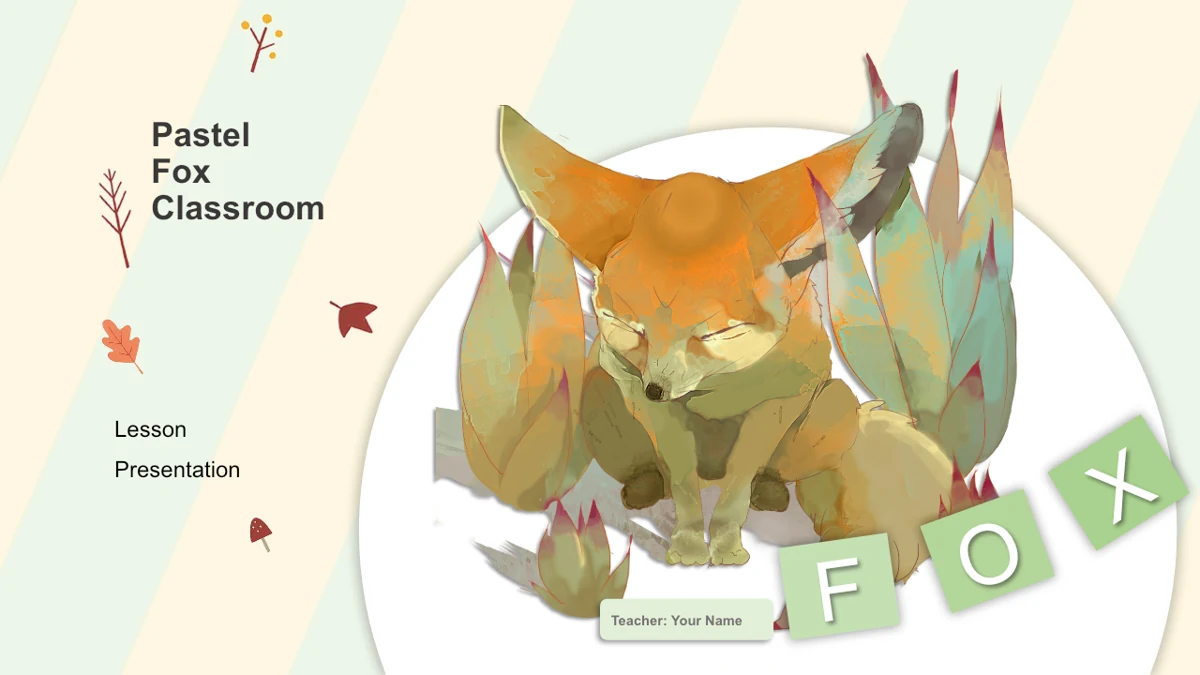
A painterly fox sits inside a white circle on striped green and cream backgrounds. Letter tiles frame the cover and closing, with room for your title and name.
Four Numbered Lesson Sections
Overview, Ideas, Activities and Review have matching dividers with mountains, clouds and a kite. Add a brief introduction to give each part a clear purpose.
Animal Illustrations throughout
Bears, rabbits, a yellow chick and cats accompany different note layouts. Choose the character and amount of text that best support the point you want to explain.
Space for Groups of Short Ideas
Leaf headers hold six notes, while three-column pages compare examples. Four-part layouts put related points around a central illustration or a divided circle.
Simple Sequences and Connections
Three numbered diamonds sit beside a cat and flowerpot. Another page links four notes with opposing arcs; both arrangements use shapes and editable text.
A Calm Frame for Class Discussion
Pale panels and generous white areas leave space around the artwork. Use the three note bands beside a black cat to collect observations, examples and a question.
How to Use Pastel Fox Classroom Presentation Template
Choose the pages and build your own lesson.
-
Choose the notes your topic needs
Review the 20 previews and plan your four lesson sections. Pick six-note, three-column or four-part layouts according to your material, keeping each explanation short enough for the space.
-
Replace the English placeholders
Download with an active paid membership and save a working copy. Change the title, teacher name and example notes, then write your own questions and activities for the class you will teach.
-
Review the complete presentation
Check headings, picture crops and small labels on your presentation computer. Run the slide show to inspect effects, then export a PDF and confirm that each illustration and note stays clear.
Questions about Pastel Fox Classroom Presentation Template
What comes in the 20-slide file?
The presentation includes a fox cover, a contents page, four section dividers, 13 content pages and a matching fox closing. Slides 3, 8, 12 and 16 introduce Overview, Ideas, Activities and Review.
Is this a complete lesson about animals?
No. The animals are visual decorations around general lesson placeholders. The file does not supply an animal-science curriculum, learning objectives or assessed activities. Add the subject knowledge, examples and tasks that your class needs.
Who can download the PowerPoint?
Downloading requires an active paid membership. Members can download without a daily limit and return for another copy. Every website language version provides the same English PPTX; the slides are not automatically translated to the page language.
Can I see all the layouts before downloading?
Yes. All 20 pages appear in the gallery, including the four dividers and closing. Compare the six-note leaf layout, rabbit notes, bear columns and numbered sequences to decide which arrangements suit your explanation.
What can I change in the file?
Text boxes and separate drawing shapes can be edited in PowerPoint. The detailed animal and botanical artwork remains images, so its internal brushstrokes and objects are not separately editable. Check crops, layering and nearby text when replacing an illustration.
Are the circular layouts data charts?
No. The divided circle and opposing arcs are drawing shapes for organizing ideas. The presentation contains no native data charts or embedded workbooks. Their sizes do not calculate from numbers, and their labels should describe your own points.
Does the festive picture set the theme for the whole deck?
No. One content page includes a festive cooking-animal illustration with a small calendar marked 25. Other pages use different animals and leaves. Select that page when it fits your lesson; the whole file is not a ready-made holiday lesson.
Which fonts and editors should I check?
The English presentation uses Arial and does not embed fonts. Check text spacing and picture effects in your own PowerPoint installation. Google Slides and Keynote compatibility has not been tested, so inspect any converted copy before using it.
How should I share or reuse the design?
Share the template page link when recommending it. Preserve relevant source credits and check the rights to the original illustrations before commercial reuse. Paid access to the download does not create additional rights to third-party artwork.