Pearlescent Glass Portfolio Presentation Template: Silvery Folds, Icon Cards and Curved Diagrams
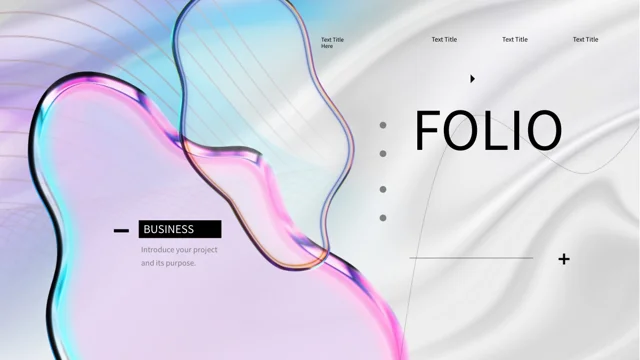
Pearlescent Glass Portfolio Presentation Template pairs silk-like backgrounds with glossy forms in pink, blue and silver. Pearlescent Glass Portfolio Presentation Template uses thin black lines, compact labels and generous open space around its content. Pearlescent Glass Portfolio Presentation Template begins with a cover and four-part contents page, followed by numbered dividers that repeat the translucent glass shapes. Inside, outlined icon cards, circular markers and short text groups help explain a project. A hat-wearing portrait sculpture and a pearlescent rabbit provide static visual accents. Three curved arrows, a winding sequence and paired hexagons offer different ways to organize related points. Manual percentage rings and overlapping circles contain sample figures that you can adapt to your own information. Replace the example copy with concise project explanations and verify any quantities you keep. The final page returns to the cover composition with a thank-you message.
Key Features of Pearlescent Glass Portfolio Presentation Template
Pearlescent images, fine outlines and structured project notes.
Silvery Folds and Glass Forms
Pearlescent Glass Portfolio Presentation Template pairs silk-like folds with pink-blue glass images. Keep headings short and check small text on pale backgrounds.
Four Numbered Sections
Pearlescent Glass Portfolio Presentation Template has four numbered dividers and a contents page. Rename sections and update the matching contents labels together.
Outlined Icon Cards
Pearlescent Glass Portfolio Presentation Template offers outlined cards and circular icons for notes. Give each point a clear purpose and balance the descriptions.
Curved Arrows and Sequences
Pearlescent Glass Portfolio Presentation Template uses three curved arrows and a winding sequence. Adjust their labels to explain related project points clearly.
Manual Rings and Figures
Pearlescent Glass Portfolio Presentation Template has percentage rings and overlapping circles made from shapes. Check labels and proportions when changing figures.
Sculptural Image Accents
Pearlescent Glass Portfolio Presentation Template pairs a portrait sculpture and pearlescent rabbit with text. Use these static images alongside short project notes.
How to Use Pearlescent Glass Portfolio Presentation Template
Choose your project structure, replace examples and review the details.
-
Choose a Project Structure
Preview all 20 pages of Pearlescent Glass Portfolio Presentation Template. Select icon cards, arrows and comparison layouts, then match the four contents entries to your portfolio sections.
-
Download and Replace Examples
Download Pearlescent Glass Portfolio Presentation Template with an active paid plan; daily and repeat downloads are unlimited. Save a copy, add project notes and replace the sample figures.
-
Review Text and Visuals
Check Pearlescent Glass Portfolio Presentation Template at full size. Review pale-background contrast, manual rings and small labels, then compare exported pages with the editable file before use.
Questions About Pearlescent Glass Portfolio Presentation Template
How do I download Pearlescent Glass Portfolio Presentation Template?
Sign in with an active paid plan to download Pearlescent Glass Portfolio Presentation Template. Daily and repeat downloads of Pearlescent Glass Portfolio Presentation Template are unlimited. Pearlescent Glass Portfolio Presentation Template is supplied as an editable PowerPoint file. Keep an untouched copy of Pearlescent Glass Portfolio Presentation Template before changing project notes, adjusting figures or replacing image accents.
What is included in Pearlescent Glass Portfolio Presentation Template?
Pearlescent Glass Portfolio Presentation Template contains 20 slides in a 16:9 format. Pearlescent Glass Portfolio Presentation Template includes a cover, four-part contents page, four numbered dividers and a matching thank-you page. The Pearlescent Glass Portfolio Presentation Template content layouts offer icon cards, circular notes, curved arrows, paired hexagons and manual numeric examples. Review every Pearlescent Glass Portfolio Presentation Template preview to choose the structures that suit the projects and explanations you want to present.
How are the sections in Pearlescent Glass Portfolio Presentation Template organized?
Pearlescent Glass Portfolio Presentation Template places numbered dividers on pages 3, 7, 12 and 16. Update the four Pearlescent Glass Portfolio Presentation Template contents entries when you rename or reorder the sections. The Pearlescent Glass Portfolio Presentation Template dividers repeat the glass-image composition to mark transitions between groups of pages. Give each Pearlescent Glass Portfolio Presentation Template section a clear theme, such as a project, process stage or aspect of your work, rather than leaving the sample headings as a finished portfolio narrative.
Does Pearlescent Glass Portfolio Presentation Template include editable 3D models?
Pearlescent Glass Portfolio Presentation Template uses static pictures for the glass forms, pearlescent bubbles, rabbit and portrait sculpture. These Pearlescent Glass Portfolio Presentation Template images are not editable 3D models or live material effects. You can move or replace a Pearlescent Glass Portfolio Presentation Template picture in your presentation software while checking its proportions and surrounding content. Use Pearlescent Glass Portfolio Presentation Template image accents to support your project discussion without implying that the pictured objects were created by you unless that is accurate.
Are the percentage rings in Pearlescent Glass Portfolio Presentation Template native charts?
Pearlescent Glass Portfolio Presentation Template uses manually arranged shapes and text rather than native data charts or embedded chart workbooks. The Pearlescent Glass Portfolio Presentation Template percentage rings and overlapping numeric circles are sample layouts, not verified results. When updating Pearlescent Glass Portfolio Presentation Template values, adjust related shapes where necessary so the visual matches the label. Check your calculations and explain what each Pearlescent Glass Portfolio Presentation Template percentage or quantity measures before using it as evidence in a presentation.
How can I use the arrows in Pearlescent Glass Portfolio Presentation Template?
Pearlescent Glass Portfolio Presentation Template includes three curved arrows leading to lettered points and a separate winding sequence with four note positions. Use these Pearlescent Glass Portfolio Presentation Template layouts to explain related ideas, alternatives or a process. The Pearlescent Glass Portfolio Presentation Template arrows do not automatically control navigation or calculate relationships. Rename labels and review their order manually, then keep Pearlescent Glass Portfolio Presentation Template descriptions concise enough to follow while you explain the connections.
Which fonts does Pearlescent Glass Portfolio Presentation Template use?
Pearlescent Glass Portfolio Presentation Template uses Source Han Sans SC Regular for its final text. The Pearlescent Glass Portfolio Presentation Template file retains some source font attachments, but the current Source Han font is not newly embedded. Install the matching font if your software substitutes a different typeface when editing Pearlescent Glass Portfolio Presentation Template. Check Pearlescent Glass Portfolio Presentation Template card text, small labels, divider headings and percentage captions after font changes, then compare exported pages with the supplied previews.
What should I write in the cards in Pearlescent Glass Portfolio Presentation Template?
Pearlescent Glass Portfolio Presentation Template offers outlined cards, circular icon groups and paired hexagon notes. Give each Pearlescent Glass Portfolio Presentation Template area a specific purpose, such as a project aim, design choice, responsibility or comparison point. Replace the Pearlescent Glass Portfolio Presentation Template example guidance with your own short explanation rather than treating generic copy as a completed case study. Review Pearlescent Glass Portfolio Presentation Template descriptions together to keep their length balanced and preserve the open space around the images.
What should I check before sharing Pearlescent Glass Portfolio Presentation Template?
Review Pearlescent Glass Portfolio Presentation Template section titles, project notes, percentages and other figures. Confirm that Pearlescent Glass Portfolio Presentation Template sample images and quantities are not being presented as evidence of work or results that are not yours. Check Pearlescent Glass Portfolio Presentation Template small labels, fine outlines and text contrast on the pale backgrounds. Compare exported Pearlescent Glass Portfolio Presentation Template pages with the editable file, including the closing page, before sharing your portfolio.