Cactus Lifestyle Portfolio Presentation Template: Plant Photography and Soft Pink Pages
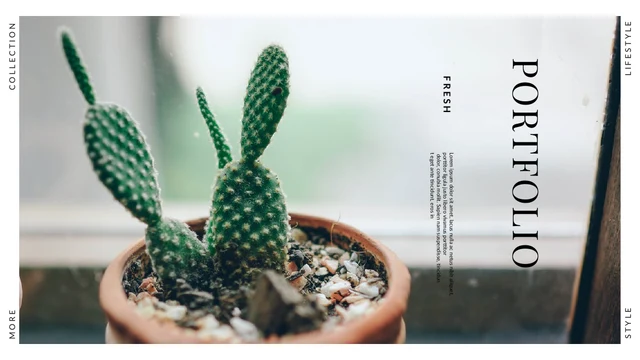
Cactus Lifestyle Portfolio Presentation Template opens with a close-up cactus photograph framed by narrow white margins. Across 20 widescreen pages, pale pink panels alternate with white layouts, giving plant photographs, portraits and everyday details room to stand out. Cactus Lifestyle Portfolio Presentation Template includes a four-part contents page, a personal introduction and three instant-photo-style cards for names and short titles. Other pages combine overlapping pictures, large single images and text beside smaller photographs. Coffee, a cat and hands tending a plant add variety to the cactus imagery. Cactus Lifestyle Portfolio Presentation Template also provides three layouts with a short quotation and a matching photograph. Choose a sequence that shows your own work clearly, then replace the sample introduction and captions. The closing page returns to the cactus cover image. Keep picture crops deliberate and leave the generous margins intact when adapting the deck.
Key Features of Cactus Lifestyle Portfolio Presentation Template
Plant photography, blush panels and generous white space in Cactus Lifestyle Portfolio Presentation Template.
Cactus Cover and Closing
Cactus Lifestyle Portfolio Presentation Template pairs a cactus cover with a matching closing page. White borders and vertical edge labels frame the two photographs.
Soft Pink Panels
Cactus Lifestyle Portfolio Presentation Template alternates white pages and pale pink panels. Quiet backgrounds leave room for photographs, captions and personal notes.
Four-Part Contents
Cactus Lifestyle Portfolio Presentation Template has a numbered contents page with four entries. Rename them to match your projects and the order of your chosen slides.
Instant-Photo-Style Cards
Cactus Lifestyle Portfolio Presentation Template includes three framed cards with name and title fields. Add your own pictures and keep each label short and readable.
Layered Photo Layouts
Cactus Lifestyle Portfolio Presentation Template mixes layered photos and side-by-side images. Check the crops when replacing pictures and choose a clear focal point.
Quotation Pages
Cactus Lifestyle Portfolio Presentation Template offers three quotation layouts with plant photos. Add a short statement that fits the space and supports your work.
How to Use Cactus Lifestyle Portfolio Presentation Template
Choose your photographs, add your story and review the finished sequence.
-
Choose a Visual Sequence
Preview all 20 pages of Cactus Lifestyle Portfolio Presentation Template. Choose the image, collage and profile layouts that suit your work, then plan four contents entries around the selected pages.
-
Download Your Working Copy
Get Cactus Lifestyle Portfolio Presentation Template with an active paid membership. Daily and repeat downloads are unlimited. Save the original PPTX and make a working copy before replacing pictures.
-
Personalize and Review
Edit Cactus Lifestyle Portfolio Presentation Template in PowerPoint. Add photos and captions, update name fields and inspect image crops. Check small text and quotations before presenting or exporting.
Questions About Cactus Lifestyle Portfolio Presentation Template
How do I download Cactus Lifestyle Portfolio Presentation Template?
Open the download panel for Cactus Lifestyle Portfolio Presentation Template and sign in to an account with an active paid membership. Paid members can download Cactus Lifestyle Portfolio Presentation Template without a daily limit, including repeat downloads. The file is an editable PPTX rather than a collection of preview images. Save Cactus Lifestyle Portfolio Presentation Template somewhere you can find it, and duplicate the file before beginning your edits. You can inspect all the pages of Cactus Lifestyle Portfolio Presentation Template in the public gallery before deciding whether the layouts fit your photographs.
How many pages are included in Cactus Lifestyle Portfolio Presentation Template?
Cactus Lifestyle Portfolio Presentation Template contains 20 slides in a 16:9 widescreen format. The cover and closing share a cactus photograph, while the middle pages contain a contents list, profile cards, image collages and quotation layouts. You do not need to use every page of Cactus Lifestyle Portfolio Presentation Template. Select the arrangements that give your work enough room and remove any you do not need. If you reorder Cactus Lifestyle Portfolio Presentation Template, revise the four contents labels so they describe the finished sequence. Keep an untouched Cactus Lifestyle Portfolio Presentation Template as a reference.
Can I change the photographs and colors in Cactus Lifestyle Portfolio Presentation Template?
Yes. Cactus Lifestyle Portfolio Presentation Template contains separate picture objects, text boxes and shapes that can be edited in PowerPoint. Replace pictures in Cactus Lifestyle Portfolio Presentation Template through the picture controls, then check each crop: a portrait, a tall plant and a wide photograph need different framing. The blush panels in Cactus Lifestyle Portfolio Presentation Template can be recolored to suit your own images. Keep enough contrast for small captions. Any lettering that is already part of a picture in Cactus Lifestyle Portfolio Presentation Template must be changed with that picture rather than edited as a separate text box.
Can I see every page of Cactus Lifestyle Portfolio Presentation Template before downloading?
The public gallery shows all 20 pages of Cactus Lifestyle Portfolio Presentation Template in order. Use the thumbnails to compare the layouts, then enlarge the preview to inspect the smaller captions and picture arrangements. In Cactus Lifestyle Portfolio Presentation Template, pay particular attention to the layered images and tall portrait crops when planning replacements. The preview helps you choose which pages of Cactus Lifestyle Portfolio Presentation Template to use, but your own photographs may have different proportions. Review the edited Cactus Lifestyle Portfolio Presentation Template at presentation size before showing it to an audience.
Does Cactus Lifestyle Portfolio Presentation Template work in other presentation software?
Cactus Lifestyle Portfolio Presentation Template is provided in PowerPoint PPTX format. An application that supports PPTX import may open the file, although fonts, picture crops and text spacing can change. Use PowerPoint as the main editing reference for Cactus Lifestyle Portfolio Presentation Template. If you import Cactus Lifestyle Portfolio Presentation Template elsewhere, compare the quotation pages, narrow edge labels and overlapping images against the preview. Export one sample page before committing to a different app. Retain the original Cactus Lifestyle Portfolio Presentation Template so you can return to it if the import alters the layout.
Which fonts are used in Cactus Lifestyle Portfolio Presentation Template?
Cactus Lifestyle Portfolio Presentation Template uses Lato, Source Sans Pro Regular, Light and Semibold, Playfair Display, and Montserrat Medium and Black. The fonts are not embedded. Matching weights matter: lighter body text and heavier labels play different roles in Cactus Lifestyle Portfolio Presentation Template. Check that the necessary fonts are available before editing Cactus Lifestyle Portfolio Presentation Template, or choose suitable replacements and review line breaks throughout the deck. The large cover wording, picture-card labels and quotation pages deserve special attention. Previewing Cactus Lifestyle Portfolio Presentation Template in a browser does not install its fonts on your computer.
Is the text inside Cactus Lifestyle Portfolio Presentation Template in English?
The supplied Cactus Lifestyle Portfolio Presentation Template has English editable headings, contents labels and introductory fields. Some body areas in Cactus Lifestyle Portfolio Presentation Template contain placeholder passages that should be replaced with your own writing. Website language versions describe this same English Cactus Lifestyle Portfolio Presentation Template; switching languages does not produce a translated slide file. Words visible inside original photographs remain part of those pictures. Before sharing Cactus Lifestyle Portfolio Presentation Template, replace sample names, titles and captions, and make sure the quotation text is suitable for the story you want to tell.
Can I use Cactus Lifestyle Portfolio Presentation Template for commercial work?
Check the terms relevant to Cactus Lifestyle Portfolio Presentation Template and to the photographs or fonts included in your finished deck. A paid download of Cactus Lifestyle Portfolio Presentation Template does not independently establish permissions for every pictured person, image or font. For client or public work, use photographs that you are authorized to include in Cactus Lifestyle Portfolio Presentation Template and retain any required credits. Confirm the permitted distribution of your finished Cactus Lifestyle Portfolio Presentation Template before selling it or offering an editable download. Replacing the sample pictures with your own work can also make the portfolio more personal.
What is the best way to share Cactus Lifestyle Portfolio Presentation Template?
Send the public page of Cactus Lifestyle Portfolio Presentation Template when you want someone to explore the original template. They can view the gallery and download Cactus Lifestyle Portfolio Presentation Template through their own eligible account. To share your finished work, export your edited Cactus Lifestyle Portfolio Presentation Template to PDF or present it in your chosen app after checking the result. Keep the editable file for later revisions. Confirm that names, contact details and image permissions are appropriate for the audience, and avoid redistributing the unedited Cactus Lifestyle Portfolio Presentation Template outside its applicable terms.