Pink Garden Report Presentation Template: a colourful frame for clear updates
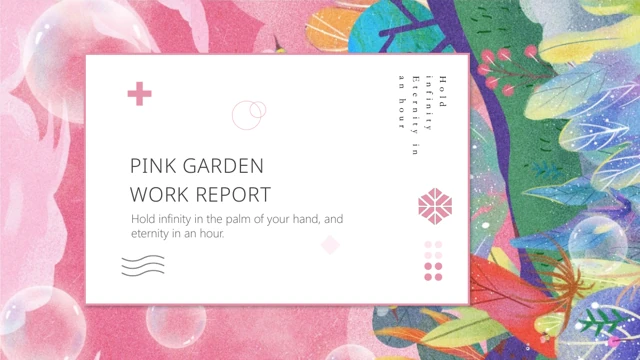
Pink Garden Report Presentation Template pairs a pink garden with white space across nineteen 16:9 slides. A contents page leads through overview, issues, actions and next steps, with four numbered dividers. Pink Garden Report Presentation Template places leafy artwork inside circles, mosaics and framed panels, connecting the sequence. Pink Garden Report Presentation Template includes a cat illustration, a flower-field photo inside a monitor and landmark and travel icons. Short English prompts help you replace the examples; genuine English literary lines remain decorative sample text. Pink Garden Report Presentation Template offers paired notes, four columns and a triangular icon arrangement, rather than native charts or linked spreadsheets. Choose pages that suit your outline, write concise headings and leave the garden visible. Pink Garden Report Presentation Template works best when each update has one clear point and enough room to read it.
Key Features of Pink Garden Report Presentation Template
Garden illustrations, four chapters and playful picture arrangements.
Illustrated Garden
Pink Garden Report Presentation Template surrounds white panels with pink flowers and leaves. Keep titles brief so the garden stays visible around your message.
Four Report Chapters
Pink Garden Report Presentation Template has four contents items and dividers for overview, issues, actions and next steps. Rename them to match your outline.
Circular and Tiled Pictures
Pink Garden Report Presentation Template uses circles and a four-tile arrangement. Keep subjects inside the crops and replace sample captions with useful context.
Cat and Flower-Field Panels
Pink Garden Report Presentation Template pairs a cat with text and a flower-field photo with a monitor frame. Use these pages for a short story or an observation.
Landmark and Travel Icons
Pink Garden Report Presentation Template has four landmark columns and opposing plane symbols. Add brief labels to explain their connection to your own report.
Triangular Icon Layout
Pink Garden Report Presentation Template groups coloured triangles and icons beside four notes. These are shapes and text; replace samples rather than expect data.
How to Use Pink Garden Report Presentation Template
Preview the sequence, replace examples and check the finished report.
-
Review All Nineteen Pages
Browse every page of Pink Garden Report Presentation Template with the thumbnails or arrows. Choose the four chapters and picture layouts that support your message before you start editing.
-
Download and Replace Samples
Sign in with an active paid plan to download Pink Garden Report Presentation Template. Open a working copy in PowerPoint, then replace the headings, prompts and captions with your own content.
-
Check Crops and Readability
Review Pink Garden Report Presentation Template after editing. Check circular crops, the monitor image and light text. Inspect line breaks, export a PDF and test it at your intended display size.
Questions About Pink Garden Report Presentation Template
How do I download Pink Garden Report Presentation Template?
Sign in with an active paid plan, then use this page’s download button to get Pink Garden Report Presentation Template. Paid members have unlimited daily downloads and may download the same file again. Pink Garden Report Presentation Template is a PowerPoint file; save a working copy before editing. Previewing Pink Garden Report Presentation Template does not require purchase. Download access does not establish commercial rights to every source asset.
How many slides are in Pink Garden Report Presentation Template?
Pink Garden Report Presentation Template has nineteen 16:9 slides: a cover, contents, four dividers, content pages and a closing page. Pink Garden Report Presentation Template has four report sections, but you may use fewer pages when your message needs less space. The gallery matches the downloadable sequence. Review Pink Garden Report Presentation Template before choosing layouts, and arrange the pages you keep in a clear order.
Can I edit Pink Garden Report Presentation Template?
Native text and shapes in Pink Garden Report Presentation Template can be edited in PowerPoint. The garden, cat and flower field are pictures, so their artwork is not individually editable. Pink Garden Report Presentation Template also uses crops and grouped icons; check those when replacing images. There are no native charts or linked spreadsheets in Pink Garden Report Presentation Template. Treat the triangle arrangement as a layout and replace its examples.
Can I preview all of Pink Garden Report Presentation Template?
Use the thumbnails, arrows and enlarged preview to inspect all nineteen pages of Pink Garden Report Presentation Template. The gallery matches the English download, including circular images, the four-tile arrangement and closing page. You do not need to purchase a plan to preview Pink Garden Report Presentation Template. Check space around longer headings and small captions. Preview Pink Garden Report Presentation Template at a useful size before choosing layouts for your material.
Will Pink Garden Report Presentation Template work in another editor?
Other editors may import Pink Garden Report Presentation Template, but matching appearance is not guaranteed. Fonts, line breaks, picture crops and grouped elements can change. Pink Garden Report Presentation Template has no native charts or linked workbooks; its picture and text arrangements still need checking. Compare imported pages with the gallery and inspect an exported PDF. Open Pink Garden Report Presentation Template in PowerPoint for the closest editing reference.
Which fonts does Pink Garden Report Presentation Template use?
Pink Garden Report Presentation Template uses Noto Sans Light and source references including Segoe UI Light, Century Gothic, 华文楷体, 方正书宋_GBK, Calibri, Calibri Light, Arial, 等线, 等线 Light and Hiragino Sans GB W3. Nine original embedded font parts remain in Pink Garden Report Presentation Template; other editors may substitute fonts, and subsets may not cover newly typed characters. Check line breaks in Pink Garden Report Presentation Template after editing. Embedding does not establish commercial rights to the whole design.
Is Pink Garden Report Presentation Template available in every language?
Website descriptions of Pink Garden Report Presentation Template are translated into fifteen languages. They all refer to one English PPTX; a website language does not create a translated deck. Pink Garden Report Presentation Template has short English prompts and decorative literary lines, not a finished report. Replace examples and any quotation you do not need. When adapting Pink Garden Report Presentation Template, review text direction, punctuation and spacing after changing the language.
Can I use Pink Garden Report Presentation Template commercially?
Commercial permission for the complete design and pictures in Pink Garden Report Presentation Template has not been verified. Paid access to Pink Garden Report Presentation Template does not grant rights to every illustration, photo or typeface. The original creator entry is retained; the artwork is not presented as a PPT AI creation. Check rights for your intended use, replace assets where necessary and retain genuine attribution when using Pink Garden Report Presentation Template.
How do I share the template or my finished report?
Use the page share controls or copy its link to share Pink Garden Report Presentation Template. Recipients can preview Pink Garden Report Presentation Template and download it with their own eligible account. The private PPTX is not an unrestricted public download. Before sharing your edited report, confirm permission to distribute its text and pictures. Check an exported PDF and keep an editable copy of Pink Garden Report Presentation Template with your project files.