Pink Report Presentation Template: Mountain photography and a quiet pink palette
Pink Report Presentation Template builds a short report around a recurring mountain photograph and pale pink rectangles. Its 10 slides use tall image crops, broad white margins, three numbered part dividers and a matching thanks page. The Pink Report Presentation Template contents has four numbered entries, while only Part 01, Part 02 and Part 03 appear as dividers. Align that outline with your final sections. A five-bar comparison is drawn from individual shapes rather than a native chart. Use Pink Report Presentation Template for a compact report, supplying your own findings and checking the sample numbers.
Key Features of Pink Report Presentation Template
Mountain photos, pink panels and a short sequence.
Pink panels
Pink Report Presentation Template uses pale pink panels and wide white margins.
Mountain photos
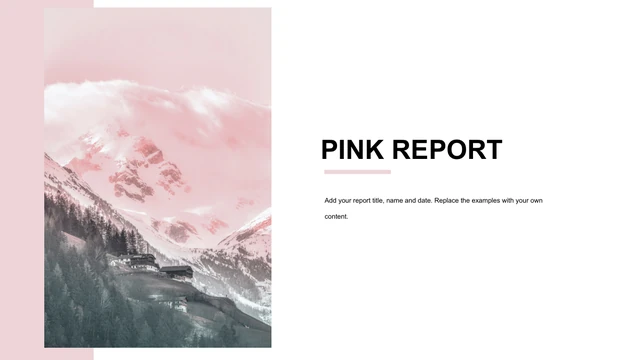
Pink Report Presentation Template repeats mountain imagery in three photo layouts.
Three parts
Pink Report Presentation Template includes Part 01–03; align the four-entry contents.
Drawn bars
Pink Report Presentation Template has five drawn bars; edit their shapes and labels.
Brief text
Pink Report Presentation Template offers bullets, short captions and photo pages.
Matching close
Pink Report Presentation Template ends with the same mountain photograph and thanks.
How to Use Pink Report Presentation Template
Choose pages, edit the examples and check the result.
-
Choose pages
Pink Report Presentation Template: check all 10 pages and set your outline.
-
Get the PPTX
Pink Report Presentation Template: active paid members can download without a daily limit.
-
Edit and check
Pink Report Presentation Template: replace examples, adjust bars and inspect a PDF.
Questions about Pink Report Presentation Template
How do I download Pink Report Presentation Template?
Sign in with an active paid plan and select the download button. Pink Report Presentation Template comes as an editable PowerPoint (.pptx) file; daily downloads and repeat downloads are unlimited. All 10 pages are included, from the mountain cover to the matching thanks page. Keep an original Pink Report Presentation Template copy before editing. The public Pink Report Presentation Template preview shows the layout, but its images do not replace the editable source file.
How many pages are in Pink Report Presentation Template?
Pink Report Presentation Template contains 10 widescreen 16:9 slides. There is a contents page with four entries, but the deck itself has three part dividers: Part 01, Part 02 and Part 03. Do not assume a fourth section page is included in Pink Report Presentation Template. Rename or remove the spare contents entry to match your final outline. You can also duplicate a suitable Pink Report Presentation Template page when your report needs another section.
Can I change the bars in Pink Report Presentation Template?
The five-bar comparison in Pink Report Presentation Template uses separate shapes and text labels. The sample labels are 20, 16, 18, 25 and 18, and the source contains no native chart or embedded data workbook. Changing a label in Pink Report Presentation Template does not resize its bar automatically. Check both bar heights and values when adding your results. Use consistent units and a stated scale so the finished Pink Report Presentation Template comparison is not misleading.
Can I preview every page of Pink Report Presentation Template?
The gallery shows the entire Pink Report Presentation Template in slide order. Compare the tall mountain-photo crops, pale pink chapter panels, centered picture page and sparse bullet layout before choosing. The same mountain image recurs through Pink Report Presentation Template, so one replacement can help establish a consistent visual subject. Check each crop separately after editing. Enlarge Pink Report Presentation Template to judge small labels and the amount of text that will fit beside a photo.
Can I edit Pink Report Presentation Template in another program?
PowerPoint is the reference editor for Pink Report Presentation Template. In another compatible application, test a copy and compare the mountain crops, pale pink panels and short underline beneath the cover title with the preview. Font substitutions or imported text spacing can change the quiet layout of Pink Report Presentation Template. The bar example remains a group of manually editable objects. Export the edited Pink Report Presentation Template to PDF and inspect each page on the screen you will use.
Which fonts does Pink Report Presentation Template use?
The prepared editable labels and body text in Pink Report Presentation Template use Arial. The source’s text style referred to 汉仪中圆简, so an unprepared copy may substitute a different font on systems without it. If you choose another font in Pink Report Presentation Template, check the large PINK headings, part numbers, narrow captions and five value labels. Keep your headings within their existing boxes. Review the Pink Report Presentation Template PDF after editing rather than relying on the font list alone.
Is the text in Pink Report Presentation Template already in English?
Pink Report Presentation Template is supplied with English editing prompts. The original repeated quotation used as filler has been replaced with concise instructions for adding report content, section summaries and closing details. Original photographs, shape positions and the five numeric labels are preserved in Pink Report Presentation Template. Author metadata and notes are cleaned, and the built-in thumbnail uses the final cover. The localized site pages describe the same English Pink Report Presentation Template file; replace its prompts with your own report.
Can I use Pink Report Presentation Template commercially?
Review the rights to the mountain photograph and other source elements in Pink Report Presentation Template before using them commercially. A paid download provides access to the file and does not prove unrestricted rights to redistribute its assets. Replace an image with unclear permissions in Pink Report Presentation Template with one you own or are licensed to use. Check confidential findings before sharing a completed report. Pink Report Presentation Template sample values are layout examples, not evidence for business or investment decisions.
How do I share Pink Report Presentation Template?
Share the public Pink Report Presentation Template page when someone needs to see the original design and download conditions. Send your completed report as an edited PPTX or a checked PDF after reviewing image permissions, claims and contact details. Keep a working Pink Report Presentation Template copy. Make the contents agree with the section pages, and confirm that each drawn bar matches its number. Finally, review the Pink Report Presentation Template export for changed photo crops, text spacing and leftover sample prompts. Keep the Pink Report Presentation Template outline consistent across the shared pages.