Stars Presentation Template: Illustrated Night Skies and Geometric Image Crops
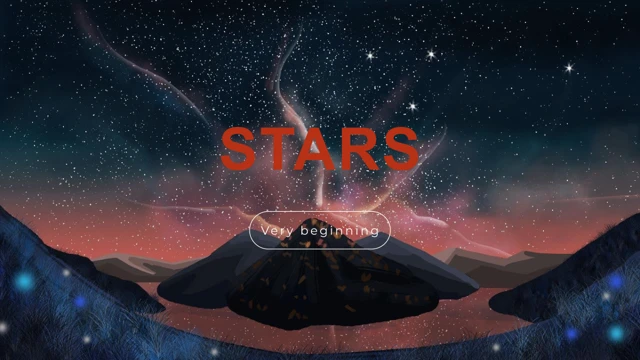
Stars Presentation Template begins with an illustrated star-filled sky, mountains and a lake at sunset. Deep blue, black and coral tones alternate with white layouts in Stars Presentation Template. The scenes are illustrations, including a person sitting in a paper boat, a moonlit lake and a dark tree beside water. They are not photographs of verified places. Four section pages divide Stars Presentation Template at positions 3, 9, 13 and 17. Each Stars Presentation Template divider pairs a translucent dark panel with the original illustrated sky. Short Overview and Part headings replace broken source text. Start Here appears in orange rounded shapes. Stars Presentation Template ends with Thank You above the same illustrated mountains and a coral lower panel. Stars Presentation Template uses the artwork at different scales: a double-outline rectangle, a broad lake inside a white border, triangular boat crops, opposed triangles and four narrow image tiles. A red diamond joins a night scene to a solid-color half. Other Stars Presentation Template layouts place three icon circles over the lake or five checklist icons on a pale panel. Three horizontal bars are native shapes, separate from the data chart. Page 14 of Stars Presentation Template has one native line chart with three series and four categories. Its original values and embedded Excel workbook are preserved; Series and Category labels are in English. Latin sample paragraphs in Stars Presentation Template are replaced by brief English prompts, source promotion and notes removed, and master prompts translated. Main headings are fitted with Arial in the original frames. Stars Presentation Template preserves image bytes, geometry, numeric text and animation. Inspect both the chart and its workbook before substituting your own data.
Key Features of Stars Presentation Template
Illustrated nights and geometric layouts.
Star-filled artwork
Stars Presentation Template opens with mountains, a lake and a glowing night sky.
Four section pages
Stars Presentation Template uses four dark dividers with short Part headings.
Boat and moon scenes
Stars Presentation Template keeps its illustrated paper boat and moonlit lake.
Geometric image crops
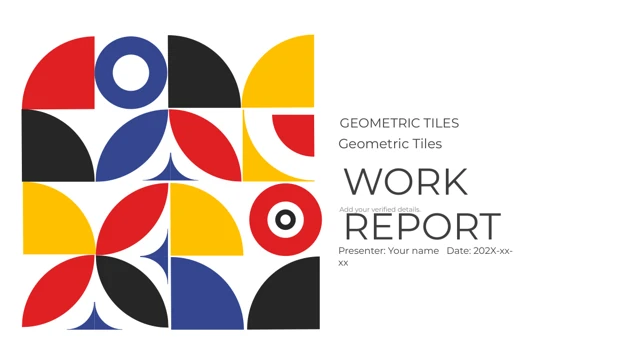
Stars Presentation Template includes triangles, a diamond and framed image tiles.
Icons and shape bars
Stars Presentation Template combines icon circles, checklists and three shape bars.
Native line chart
Stars Presentation Template retains a three-series chart and its Excel workbook.
How to Use Stars Presentation Template
Preview the art, then adapt the file.
-
See all 20 pages
Preview Stars Presentation Template and compare the dark and white layouts.
-
Download the file
Get Stars Presentation Template with an active paid membership.
-
Edit and test
Adapt Stars Presentation Template, verify chart data and review the exported slides.
Questions about Stars Presentation Template
How do I download Stars Presentation Template?
Use the download button after signing in with an active paid membership. You may download Stars Presentation Template repeatedly without a daily limit. The private link to Stars Presentation Template is temporary, so request a new one here if it has expired. The full page gallery remains available for reviewing the design before download.
How many pages are in Stars Presentation Template?
Stars Presentation Template contains 20 widescreen slides in their original order. The four dark section dividers appear on pages 3, 9, 13 and 17. Overview and Part headings sit beside the illustrated sky. Stars Presentation Template closes with Thank You over the mountains and a coral lower panel. Select the layouts that support your actual content.
Can I edit the chart in Stars Presentation Template?
Stars Presentation Template retains one native line chart on page 14 and its embedded Excel workbook. There are three series and four categories, with the source numeric values unchanged. English Series and Category labels replace the Chinese labels. The three horizontal bars elsewhere in Stars Presentation Template are shapes, not that chart. Check the workbook when replacing data.
Does the preview show all of Stars Presentation Template?
Yes. All 20 pages of the final English Stars Presentation Template file appear in the gallery. Enlarge Stars Presentation Template to inspect the triangle and diamond crops, the double-outline frames and the narrow image tiles. Compare the coral chart page with the dark artwork pages. Check small captions in Stars Presentation Template at your planned presentation size rather than relying on a reduced thumbnail.
Can another editor open Stars Presentation Template?
The download preserves native elements in a .pptx file. Different editors may change the appearance of Stars Presentation Template, especially fonts, picture crops and the line chart. Compare the file with this preview and inspect its embedded workbook. Keep an untouched copy of Stars Presentation Template before editing, and test your export to confirm that the illustrated scenes and data remain readable.
Which fonts does Stars Presentation Template use?
The source references Arial, DengXian and the custom Chinese title font Zihun No. 59, with theme font references retained. No font files are embedded in Stars Presentation Template. The main English headings use Arial and are fitted to their original frames to avoid broken words. Check font availability and line breaks in your own copy of Stars Presentation Template.
Is the text of Stars Presentation Template in English?
Latin filler paragraphs and malformed headings in Stars Presentation Template are replaced by concise English prompts. Master and layout prompts, chart labels and workbook strings are also in English. Source promotion and notes are cleared. Stars Presentation Template retains the original artwork, positions, numeric values, formulas and animation; these prompts and chart samples still need to be adapted to your own subject.
May I use Stars Presentation Template commercially?
An active paid account provides download access to Stars Presentation Template, not a separate grant of rights to each original illustration or font. Check the applicable permissions before selling or distributing your completed slides. The figures in Stars Presentation Template are sample data, not verified results, and the illustrated landscapes do not identify real locations. Use permitted material and your own checked information.
How should I share Stars Presentation Template?
Share this page address so others can inspect Stars Presentation Template and obtain their own file with an eligible account. Keep an editable working copy and share an export of your edited Stars Presentation Template. The private download address for Stars Presentation Template expires and should not be circulated. Review images, fonts, chart labels and numbers in the final export before sending it.