Sunrise Presentation Template: warm light and quiet geometric details
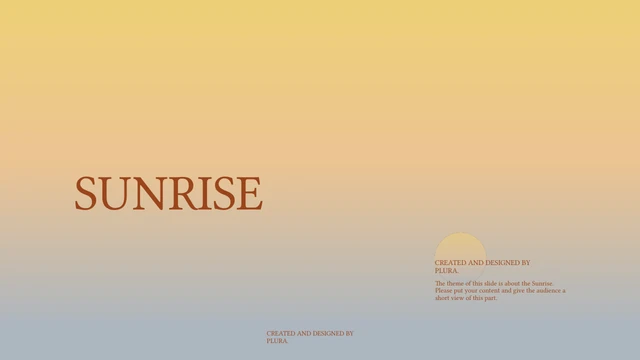
Sunrise Presentation Template brings a warm yellow-to-blue-grey gradient into a 15-page widescreen deck. Rust-coloured headings and fine outlines run through the design. The pages alternate full gradient backgrounds with quieter grey areas, leaving space around small blocks of English sample text. Sunrise Presentation Template has a four-part contents page and four matching dividers. Later pages offer numbered notes, five small circular accents and larger circles beside short explanations. A black-and-white coastal photograph appears in different crops on three pages. Sunrise Presentation Template keeps the original “CREATED AND DESIGNED BY PLURA.” credit. Replace the sample wording with your own subject, keep the author credit, and select the layouts that fit your outline. Review Sunrise Presentation Template in the full gallery before deciding how much text each page can comfortably hold.
Key Features of Sunrise Presentation Template
Warm gradients, circles and a four-part sequence.
A Warm Gradient
Sunrise Presentation Template moves from pale yellow through warm beige to blue-grey. The cover and four dividers repeat this background for a clear sequence.
Four Matching Parts
Sunrise Presentation Template opens with four numbered parts. Divider pages separate the sections, so you can keep the structure or reorder it for your topic.
Fine Circular Details
Sunrise Presentation Template pairs fine outlines with small half-lit circles. Larger circles balance short text blocks without requiring decorative pictures.
Numbered Text Layouts
Sunrise Presentation Template includes numbered notes and an outlined four-item panel. Use a statement for each item and leave enough room between the text blocks.
A Coastal Photograph
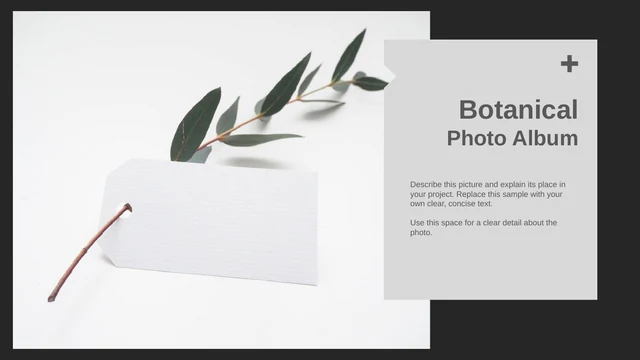
Sunrise Presentation Template repeats one monochrome coastal photograph in wide and rounded crops. Replace it with a permitted image and check each crop separately.
The Original Design Credit
Sunrise Presentation Template retains the PLURA author credit throughout the deck. Keep this attribution when editing the sample content or arranging a final version.
How to Use Sunrise Presentation Template
Choose a sequence, then replace the sample text.
-
Preview the Four Parts
Open the complete preview of Sunrise Presentation Template. Compare the four dividers with your outline, select the numbered or circular layouts you need, and plan concise text for each page.
-
Download a Working Copy
Sign in with an active paid plan to download Sunrise Presentation Template. Daily downloads are unlimited, including repeated downloads. Save a working copy and keep the original PLURA credit.
-
Edit and Check the Layout
Edit Sunrise Presentation Template in PowerPoint. Replace the English examples, inspect the large headings and photograph crops, then review the slide show and PDF before sharing your work.
Questions about Sunrise Presentation Template
How do I download Sunrise Presentation Template?
Sign in with an active paid plan and use the download button for Sunrise Presentation Template. You receive Sunrise Presentation Template as a PowerPoint (.pptx) file containing the complete 15-page sequence. Paid members can download Sunrise Presentation Template repeatedly without a daily limit. Save an initial copy before editing, so you can return to the four-part structure and original text layouts if your outline changes.
How many slides does Sunrise Presentation Template contain?
Sunrise Presentation Template contains 15 slides in 16:9. The sequence includes a cover, four-part contents page, matching chapter dividers, several text layouts and a closing page. You can keep only the pages you need from Sunrise Presentation Template or duplicate a useful layout. Choose a sequence that supports your subject, and check that the chapter names in Sunrise Presentation Template still agree with the contents page after reordering.
Can I edit the wording and colours in Sunrise Presentation Template?
The sample wording, circle shapes, outlines and background settings in Sunrise Presentation Template are native PowerPoint elements. Replace the repeated English examples in Sunrise Presentation Template with your own short text. Change accent colours carefully so the small captions remain readable against the gradient. Sunrise Presentation Template also contains a separate coastal photograph; replace its image object and inspect the crop on every page where it appears.
Can I preview every page of Sunrise Presentation Template?
The gallery shows the complete Sunrise Presentation Template before you download. Use its thumbnails or arrows to compare the dividers, five-circle arrangement, numbered notes and photo pages. Enlarge Sunrise Presentation Template when checking the small sample text and fine lines. The preview shows the supplied Sunrise Presentation Template file; your own wording, font availability and replacement image can alter the spacing in an edited copy.
Will Sunrise Presentation Template open in other presentation software?
Sunrise Presentation Template uses the PowerPoint .pptx format. Other presentation editors may import it, but gradients, text widths, circle outlines and photograph crops can differ. Test a copy of Sunrise Presentation Template against the full preview before relying on an imported version. Check the large one-line headings and the fine circular details in particular. Keep an editable PowerPoint copy of Sunrise Presentation Template for later changes.
Which fonts does Sunrise Presentation Template use?
The active source text in Sunrise Presentation Template references BRANIC, Graphik and Source Han Sans CN ExtraLight. The fonts in Sunrise Presentation Template are not embedded. An editor that lacks them can substitute another font, affecting heading width and small captions. Inspect Sunrise Presentation Template after any font replacement, especially its cover and closing title. Choose an available font that fits the original frames and confirm its permitted use.
Is the downloadable Sunrise Presentation Template in English?
Sunrise Presentation Template contains English headings and repeated English sample explanations. The website describes the deck in all site languages, while the downloadable Sunrise Presentation Template file remains English. It does not supply a separately translated deck for each language. Replace the examples in Sunrise Presentation Template with your own material and translate that finished wording for your audience. The original PLURA design credit remains in the file.
Can I use Sunrise Presentation Template in a commercial project?
Check the applicable rights before using Sunrise Presentation Template commercially. The original design credit identifies PLURA, and it remains throughout the deck. A paid download does not verify permission to redistribute the source design, photograph or fonts. Sunrise Presentation Template does not include a verified commercial licence here. Keep required attribution, use images and fonts you may distribute, and confirm any restrictions with the relevant rights holder.
How should I share Sunrise Presentation Template?
Share the public page URL for Sunrise Presentation Template when recommending the design. For your own project, share a PDF or edited copy containing material you may distribute, while keeping the original PLURA attribution. Review Sunrise Presentation Template for repeated sample text, missing credits and unexpected image crops before sending. Retain your editable Sunrise Presentation Template file separately and check redistribution rights before sharing the unmodified source template.