Crimson Artist Portfolio Presentation Template: deep red panels, blue skies and expressive picture layouts
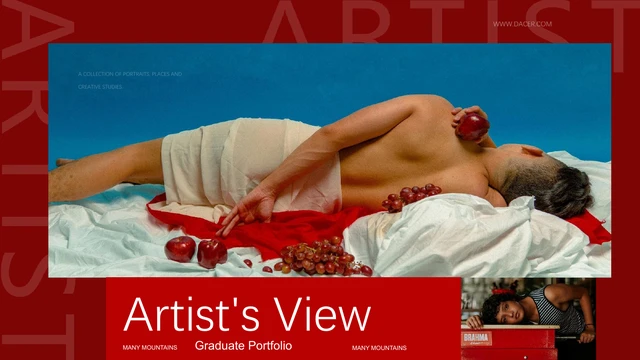
Crimson Artist Portfolio Presentation Template opens with a reclining portrait and a photo beside the Artist’s View title. Fifteen pages combine deep red panels, white captions and blue-sky photographs. Crimson Artist Portfolio Presentation Template has a four-item contents page, followed by About, Analysis and Gallery examples. A four-photo grid pairs buildings and autumn leaves with two sample percentage bars. Crimson Artist Portfolio Presentation Template mixes tall portraits, flowers, winter branches, a balloon and a pineapple close-up. Oversized ARTIST lettering sits behind pictures, and some captions read sideways. Crimson Artist Portfolio Presentation Template offers a sequence for discussing your creative choices. Replace prompts with your observations, select pictures you may use and connect each image to its caption. Keep panels uncluttered and inspect text over photos at display size. The source website credit remains; picture and design permissions need separate review.
Key Features of Crimson Artist Portfolio Presentation Template
Deep red panels, picture contrasts and short creative notes.
A Portrait-Led Opening
Crimson Artist Portfolio Presentation Template opens and closes with a reclining portrait and a smaller photo. Choose related work and keep the wide crops deliberate.
A Four-Picture Study
Crimson Artist Portfolio Presentation Template pairs four square photos with two sample percentage bars. Compare light and subject; the bars are shapes, not a chart.
Two Notes and Blue Pills
Crimson Artist Portfolio Presentation Template divides two short notes with a white rule and blue MORE pills. Keep each note focused and connect it to the picture.
A Sideways Photo Sequence
Crimson Artist Portfolio Presentation Template lines up three tall images beside a rotated caption. Read in its intended direction and choose crops that link the row.
A Pineapple Close-Up
Crimson Artist Portfolio Presentation Template centres a pineapple photo between red panels. The left note overlaps its edge; keep text short and check readability.
Large ARTIST Decoration
Crimson Artist Portfolio Presentation Template places faint ARTIST lettering around pictures and notes. This is image artwork; replace it as a picture if necessary.
How to Use Crimson Artist Portfolio Presentation Template
Choose pictures, replace the prompts and review the sequence.
-
Choose Pictures and Pages
Preview all 15 pages of Crimson Artist Portfolio Presentation Template. Compare contents, the square study and tall photo row; select permitted pictures and choose layouts that support your work.
-
Download and Add Your Notes
Download Crimson Artist Portfolio Presentation Template with an active paid plan; daily and repeat downloads are unlimited. Keep the original and edit a copy with short notes about your work.
-
Check Crops and Share
Review Crimson Artist Portfolio Presentation Template for sideways captions, text over photos and sample bars. Retain required credits, export a PDF and reopen each page before sharing.
Crimson Artist Portfolio Presentation Template FAQs
How do I download Crimson Artist Portfolio Presentation Template?
Sign in with an active paid plan and use the download button on Crimson Artist Portfolio Presentation Template. Eligible members have unlimited daily and repeat downloads. Preview Crimson Artist Portfolio Presentation Template before selecting it, keep an untouched copy and edit a working file. Downloading Crimson Artist Portfolio Presentation Template does not independently clear the rights to its pictures or design; check the relevant permissions for your intended use.
How many slides are in Crimson Artist Portfolio Presentation Template?
Crimson Artist Portfolio Presentation Template contains 15 slides in 16:9. Its opening portrait returns on the final Thank You page. The contents in Crimson Artist Portfolio Presentation Template list four topics, while the body uses About, Analysis and Gallery examples with numbered labels. There are no four matching chapter dividers. Choose and reorder Crimson Artist Portfolio Presentation Template pages to create a sequence suited to your own work.
What can I edit in Crimson Artist Portfolio Presentation Template?
Crimson Artist Portfolio Presentation Template contains native captions, titles, red panels, white rules and blue MORE pills. Replace the text and pictures in Crimson Artist Portfolio Presentation Template; the giant ARTIST decoration is picture artwork. The 60% and 40% examples are manually drawn bars and labels, not native charts or linked Excel data. Crimson Artist Portfolio Presentation Template keeps their original values for you to replace with verified information.
Can I preview the whole Crimson Artist Portfolio Presentation Template?
All 15 pages of Crimson Artist Portfolio Presentation Template are available in the gallery without buying a download. Use thumbnails or arrows and enlarge a page to inspect its captions. The previews match the English Crimson Artist Portfolio Presentation Template supplied in the PPTX. Compare the reclining portrait, flower study and sideways row before choosing Crimson Artist Portfolio Presentation Template; original picture grain and source contrast remain visible.
Can other editors open Crimson Artist Portfolio Presentation Template?
Crimson Artist Portfolio Presentation Template is a PowerPoint .pptx file. Other presentation applications may import Crimson Artist Portfolio Presentation Template, but font substitutions, line breaks and picture effects can differ. Open a copy and compare the About notes, narrow captions and large closing title with the previews. Crimson Artist Portfolio Presentation Template retains original text frames and layer order, so longer text needs careful review before exporting a PDF.
Which fonts does Crimson Artist Portfolio Presentation Template use?
Crimson Artist Portfolio Presentation Template references ZCOOL QingKe HuangYou, Alibaba PuHuiTi Heavy, DengXian, DengXian Light, Arial and theme fonts. No font files are embedded in Crimson Artist Portfolio Presentation Template. Your editor may substitute unavailable families. The preview renderer uses local alternatives for the two unavailable display families while their source references remain in the PPTX. Check headings and caption widths when opening Crimson Artist Portfolio Presentation Template on your device.
Are the slides in Crimson Artist Portfolio Presentation Template translated?
The website explains Crimson Artist Portfolio Presentation Template in 15 languages; every version supplies the same English PPTX. Chinese labels and repeated sample prose in Crimson Artist Portfolio Presentation Template become concise English editing prompts, rather than a word-for-word literary translation. Native picture lettering and the source website credit stay unchanged. To present Crimson Artist Portfolio Presentation Template in another language, replace editable text and check characters, spacing and reading direction.
Can I use Crimson Artist Portfolio Presentation Template commercially?
Commercial and redistribution permissions for the photographs and design in Crimson Artist Portfolio Presentation Template are unverified. Paid access to Crimson Artist Portfolio Presentation Template provides the file without granting extra image, font or brand rights. Confirm permissions and any required credits before publishing an adaptation. Use your own or appropriately licensed pictures in Crimson Artist Portfolio Presentation Template; retain necessary source credits and avoid suggesting that pictured people or brands endorse your work.
How should I share Crimson Artist Portfolio Presentation Template?
Share the public Crimson Artist Portfolio Presentation Template page link or use its share control so others can inspect the free gallery. Each recipient needs eligible paid access to download Crimson Artist Portfolio Presentation Template. For an edited portfolio, confirm image and design permissions, remove private notes and keep required credits. Export Crimson Artist Portfolio Presentation Template to PDF, reopen the file and inspect every caption, crop and percentage example before sending it.