Bomu Huika Presentation Template: Beige Frames, Script Titles and Dark Photography
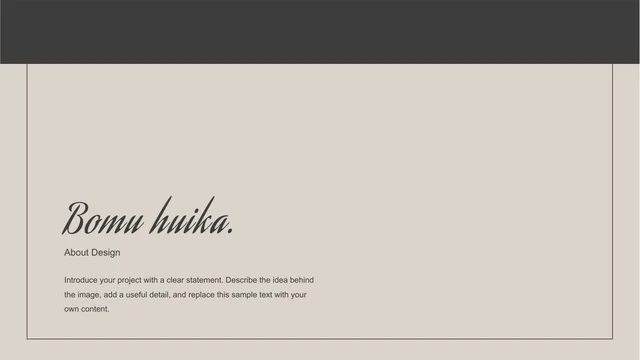
Bomu Huika Presentation Template pairs warm beige backgrounds with charcoal blocks, delicate outlines and expressive script headings. A restrained cover opens the sequence, followed by a four-item contents page. Bomu Huika Presentation Template marks its chapters with large ovals and numbers 01–04. Photographs of a rose, statues, architecture and silhouetted figures alternate with text columns, overlapping frames and wide dark panels. Bomu Huika Presentation Template includes 22 widescreen slides, with pictures, text and shapes kept as separate objects. The four-node diagram on page 14 offers a different way to arrange related ideas without a spreadsheet chart. Select images that remain legible against the dark palette and replace the English sample notes with your own observations. The original About Design credit remains visible. Bomu Huika Presentation Template ends with a matching See You page, returning to the fine border and quiet spacing of the opening.
Key Features of Bomu Huika Presentation Template
Explore the photographic contrasts, script headings and four chapters in Bomu Huika Presentation Template.
Beige and Charcoal Contrast
Bomu Huika Presentation Template contrasts pale beige space with charcoal blocks. Keep pictures and captions clear where dark panels cross light backgrounds.
Four Oval Chapter Dividers
Bomu Huika Presentation Template separates four chapters on pages 3, 8, 13 and 18. A thin ellipse, rectangular border and centered number repeat across each divider.
Flowing Script Headings
Bomu Huika Presentation Template uses Aguafina Script for flowing display text. Short titles leave room for its sweeping strokes beside the restrained body typography.
Layered Photo Frames
Bomu Huika Presentation Template layers thin frames over dark photos. Replace pictures carefully, leaving clear space around faces, flowers and sculptures.
Four-Node Shape Diagram
Bomu Huika Presentation Template has a circular diagram on page 14. Four outer nodes surround a center label; edit the separate labels without inventing numerical chart data.
Single and Grouped Pictures
Bomu Huika Presentation Template includes large single photos, paired images and a three-picture strip. Match the source proportions to keep the original crops practical.
How to Use Bomu Huika Presentation Template
Choose a sequence, add your photographs and refine the short notes.
-
Preview the Sequence
Review all 22 pages of Bomu Huika Presentation Template. Compare the oval dividers, dark photo panels and compact notes, then choose the layouts that support your intended sequence.
-
Download a Working Copy
Download Bomu Huika Presentation Template with an active paid membership. Daily and repeat downloads are unlimited. Keep the supplied file and edit a separate copy for your project.
-
Replace and Review
Add your pictures and notes to Bomu Huika Presentation Template. Check script headings, dark image details and chapter order. Review every slide and any exported PDF before sharing.
Questions About Bomu Huika Presentation Template
How do I download Bomu Huika Presentation Template?
Bomu Huika Presentation Template is available to members with an active paid plan. Sign in and use the download area to obtain the editable PPTX. Downloads of Bomu Huika Presentation Template have no daily limit, and repeat downloads are allowed. Review the gallery first, then save Bomu Huika Presentation Template separately from your working copy. All website language versions provide the same English template file.
How many slides does Bomu Huika Presentation Template contain?
Bomu Huika Presentation Template contains 22 pages in a 16:9 widescreen format. The cover leads into a four-item contents page and four numbered chapters. In Bomu Huika Presentation Template, the oval chapter dividers are on pages 3, 8, 13 and 18. A See You page closes Bomu Huika Presentation Template. You can shorten or reorder the template; update the contents and chapter numbering to match your final sequence.
Can I change the pictures in Bomu Huika Presentation Template?
Bomu Huika Presentation Template keeps the photos as separate picture objects alongside editable text and shapes. Replace images in a copy of Bomu Huika Presentation Template and inspect each crop. The dark photographs in Bomu Huika Presentation Template rely on subtle highlights, so choose replacements whose subject remains easy to recognize. In the template, check thin frames that overlap pictures and avoid covering faces or cutting important details at the edges.
Can I preview all of Bomu Huika Presentation Template before downloading?
The public gallery shows all 22 pages of Bomu Huika Presentation Template in the supplied order. Use thumbnails and arrows to compare the chapter dividers and picture arrangements. Enlarge pages of Bomu Huika Presentation Template with compact captions before planning your text. The previews match the downloadable Bomu Huika Presentation Template file. Viewing the sample photographs in the template does not provide a separate licence to reuse those images.
Which software can edit Bomu Huika Presentation Template?
Bomu Huika Presentation Template is supplied as a PowerPoint PPTX. Other presentation editors may change font rendering, picture crops or overlapping frames. Compare a working copy of Bomu Huika Presentation Template with the gallery before making broad edits. The page 14 diagram in Bomu Huika Presentation Template consists of shapes and labels, not a native chart linked to Excel. Review an exported version of the template as well as the editable slides.
Which fonts are used in Bomu Huika Presentation Template?
Bomu Huika Presentation Template uses Arial for much of its body text and Aguafina Script for the flowing headings. Source Han Sans CN is also retained in the original font resources of Bomu Huika Presentation Template. The source includes embedded font resources, but editing Bomu Huika Presentation Template on another computer may still require matching fonts for newly typed characters. After changing a heading in the template, inspect the wide script strokes, line wrapping and available space.
Is Bomu Huika Presentation Template in English?
The visible sample text in Bomu Huika Presentation Template is English, while Bomu Huika remains the design name. The source About Design credit is preserved in Bomu Huika Presentation Template. Replace the neutral sample instructions, generic titles and example date with information appropriate to your project. Website translations describe Bomu Huika Presentation Template in different languages; they do not supply separate translated slide decks. Each language page downloads the same English PPTX.
Can I use Bomu Huika Presentation Template commercially?
The permissions for the complete design and sample photographs in Bomu Huika Presentation Template have not been independently verified. Paid access to Bomu Huika Presentation Template does not transfer those rights. Before client or commercial use, confirm the permissions for the design and every image you include. Keep required credits when adapting Bomu Huika Presentation Template, including the source attribution and notices for added material. Replacing photos in the template does not itself authorize redistribution of the underlying template.
How should I share Bomu Huika Presentation Template?
Share the page link for Bomu Huika Presentation Template so others can inspect the gallery and download with their own eligible membership. Before sending a project made with Bomu Huika Presentation Template, check image permissions and retain required credits. A PDF exported from Bomu Huika Presentation Template fixes the viewing layout but does not remove copyright obligations. Sharing the complete editable template file requires appropriate redistribution permission. Keep your working copy for later corrections.