Monet Art Exhibition Presentation Template: Grey Galleries and Expressive Painting Layouts
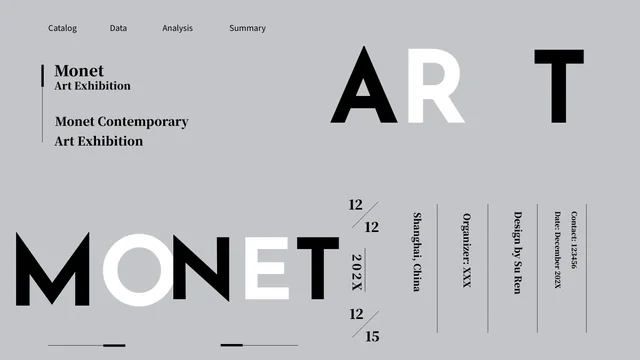
Monet Art Exhibition Presentation Template uses a grey canvas, bold black-and-white lettering and painting reproductions to build an exhibition sequence. Monet Art Exhibition Presentation Template contains 24 widescreen pages with four numbered chapter dividers. Portraits, coastal views, flowers, boats and water-lily scenes appear in tall panels, broad strips and multi-image galleries. White blocks and spaced headings guide the eye around the images. Monet Art Exhibition Presentation Template also includes large percentage examples beside selected paintings; these are separate text labels, not calculated charts. The opening and closing provide exhibition, date and contact fields. Replace those examples with your own verified details and write captions that distinguish the artwork from your interpretation. Keep the source design credits and painting signatures intact, and choose the pages that support the exhibition story you want to tell.
Key Features of Monet Art Exhibition Presentation Template
Grey gallery pages, strong lettering and varied painting panels.
Grey Editorial Canvas
Monet Art Exhibition Presentation Template sets paintings against grey and white fields. Keep captions clear and avoid adding competing colors around the artwork.
Four Numbered Chapters
Monet Art Exhibition Presentation Template has chapter dividers on pages 3, 8, 13 and 19. Match chapter titles and the four-item contents to your chosen sequence.
Portrait and Landscape Panels
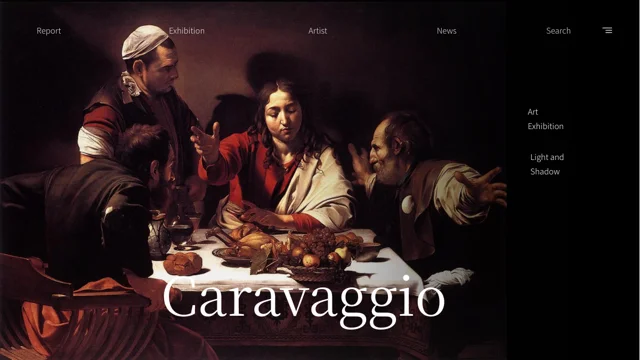
Monet Art Exhibition Presentation Template combines tall portraits with wide landscape panels. Check crops and keep the subject and any painting signature visible.
Multi-Painting Galleries
Monet Art Exhibition Presentation Template places large and small paintings together in gallery layouts. Give each image a concise caption with verified details.
Manual Percentage Examples
Monet Art Exhibition Presentation Template uses manual 70%, 20%, 50% and 56% labels. Replace them with supported figures; they are not linked to a chart workbook.
Source Credits and Lettering
Monet Art Exhibition Presentation Template retains source credit labels and painting signatures. Keep attribution separate from presenter names and event details.
How to Use Monet Art Exhibition Presentation Template
Choose the artwork sequence, write the notes and review each page.
-
Plan the Gallery Sequence
Review all 24 pages of Monet Art Exhibition Presentation Template. Select chapter dividers and painting layouts, then draft captions that explain the artwork and your reason for showing it.
-
Download and Write Your Notes
Download Monet Art Exhibition Presentation Template with an active paid plan; daily and repeat downloads are unlimited. Save a copy and replace the event fields, headings and sample explanations.
-
Check Artwork and Attribution
Inspect Monet Art Exhibition Presentation Template crops, signatures, chapter labels and text contrast. Verify names, dates and percentages, then compare exported pages with the editable file.
Questions About Monet Art Exhibition Presentation Template
How do I download Monet Art Exhibition Presentation Template?
Sign in with an active paid plan to download Monet Art Exhibition Presentation Template as a PowerPoint (.pptx) file. Paid members can download Monet Art Exhibition Presentation Template without a daily limit, including repeat downloads. Save a separate Monet Art Exhibition Presentation Template working copy before changing the exhibition fields and gallery notes. Keep the original Monet Art Exhibition Presentation Template sequence available while selecting chapter dividers and image panels. Use the Monet Art Exhibition Presentation Template preview to compare the opening, contents, painting pages and closing before assembling your own exhibition presentation.
How many slides are in Monet Art Exhibition Presentation Template?
Monet Art Exhibition Presentation Template contains 24 slides in the original 16:9 format. The Monet Art Exhibition Presentation Template contents page lists four parts, with numbered dividers on pages 3, 8, 13 and 19. Those Monet Art Exhibition Presentation Template sections offer a starting structure, rather than a verified classification of every painting. Rename or reorder the chapters if your outline needs a different arrangement, then update the contents and page references. Review the Monet Art Exhibition Presentation Template portrait, landscape and grouped-image pages to select the views that support your actual exhibition narrative.
Can I change the text, colors and artwork in Monet Art Exhibition Presentation Template?
Monet Art Exhibition Presentation Template includes editable notes, chapter labels and exhibition fields alongside painting images. Change Monet Art Exhibition Presentation Template text and shapes in your working copy, then inspect spacing around the artwork. If replacing a Monet Art Exhibition Presentation Template painting image, use a reproduction you may use and check its crop, orientation and caption. A signature inside the painting pixels is part of that image, rather than an independent text box. Keep Monet Art Exhibition Presentation Template source credits separate from claims about yourself, and confirm that changes to grey or white fields preserve readable contrast.
Can I preview the complete Monet Art Exhibition Presentation Template before downloading?
The gallery above shows all 24 pages of Monet Art Exhibition Presentation Template. Browse Monet Art Exhibition Presentation Template thumbnails or use the arrows to compare the four chapter dividers and different image layouts. Review Monet Art Exhibition Presentation Template pages with small captions, vertical lettering or text over paintings at a useful viewing size. Check whether each image frame suits the proportions of the artwork you want to present. The Monet Art Exhibition Presentation Template preview helps you choose a sequence before downloading; it is not evidence that the sample event dates, contact fields or percentage labels describe a real exhibition.
Will Monet Art Exhibition Presentation Template work in another presentation editor?
Monet Art Exhibition Presentation Template is supplied as a .pptx file. Another editor that supports PowerPoint files may open Monet Art Exhibition Presentation Template, but font handling, text spacing, picture effects and grouped objects can differ. Test a copy of Monet Art Exhibition Presentation Template before moving your entire project, especially broad painting crops and the bold opening and closing lettering. Compare the imported slides with the preview, then review an export from your chosen software. Monet Art Exhibition Presentation Template contains no native charts or linked Excel workbooks; the percentage examples are manually placed labels that must be changed individually.
Which fonts does Monet Art Exhibition Presentation Template use?
Monet Art Exhibition Presentation Template uses Josefin Sans Regular and Bold, Playfair Display Regular, Source Han Serif SC Heavy and Source Han Sans SC Regular for the final editable text. Monet Art Exhibition Presentation Template contains no embedded font files. If another editor substitutes a typeface in Monet Art Exhibition Presentation Template, install the matching face or choose a replacement and inspect the full deck. Check Monet Art Exhibition Presentation Template spaced headings, chapter numbers, small painting captions and vertical labels after changing fonts. Compare Monet Art Exhibition Presentation Template exports with the editable copy for altered line breaks, missing characters or text touching image frames.
Are the original slide notes in Monet Art Exhibition Presentation Template translated?
The downloadable Monet Art Exhibition Presentation Template is prepared in English, while the website describes the same file in different languages. Monet Art Exhibition Presentation Template painting reproductions and signatures remain source artwork, and source design credits such as SU REN, SEN REN, XU XU and Su Ren remain attribution. The Monet Art Exhibition Presentation Template notes are sample guidance, not verified art-history research or a record of a real event. Replace them with your own checked titles, dates and explanations. Do not assume every painting is by the same artist solely because Monet Art Exhibition Presentation Template uses a Monet-themed exhibition label.
Can I use Monet Art Exhibition Presentation Template commercially?
A paid download of Monet Art Exhibition Presentation Template does not establish permission for every painting reproduction or source design element. Check the applicable template and artwork terms before using Monet Art Exhibition Presentation Template in a commercial presentation or distributing an editable copy. Source credit labels and painting signatures in Monet Art Exhibition Presentation Template should not be treated as proof of a separate reuse grant. Obtain any permissions needed for the images and material you retain, and use accurate attribution. Confirm the intended use before publishing Monet Art Exhibition Presentation Template as part of a client deliverable, public exhibition or downloadable resource.
How should I share Monet Art Exhibition Presentation Template?
Share the language-specific Monet Art Exhibition Presentation Template page link so others can review the full gallery and access downloads with their own eligible account. Before sharing your adapted Monet Art Exhibition Presentation Template, replace the sample exhibition name, date, contact details and percentage labels. Check Monet Art Exhibition Presentation Template artwork captions against your sources and confirm that retained credits do not imply your identity or an endorsement. Review text over light and dark painting areas, then compare every exported page with the editable file. Keep a private working copy of Monet Art Exhibition Presentation Template and confirm the rights for the version you intend to distribute.