Botanical Still Life Portfolio Presentation Template: green panels and quiet botanical arrangements
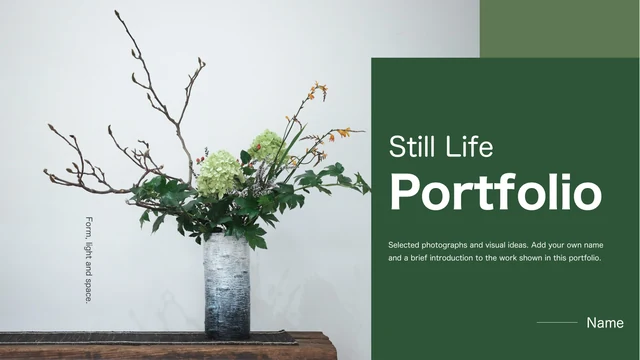
Botanical Still Life Portfolio Presentation Template combines branch arrangements and flowering plants with deep green panels. Across 15 widescreen pages, Botanical Still Life Portfolio Presentation Template adds sage rectangles and white text beside the photographs. A portrait introduces the maker before a four-item contents page. Four large 01–04 dividers repeat a slender vase image. Project pages in Botanical Still Life Portfolio Presentation Template include ivy on a wall, plants beside a cup, a lotus arrangement and leaves in metal containers. Full pictures, smaller crops and brief notes offer different ways to explain a visual choice. Botanical Still Life Portfolio Presentation Template keeps English filling guidance in editable text boxes beside separate pictures. Original photo lettering remains, including the characters on a vase. There are no data charts or linked spreadsheets. Replace the sample titles with your own work and use pictures you have permission to share.
Key Features of Botanical Still Life Portfolio Presentation Template
Green panels with room for images and observations.
Green Panels
Botanical Still Life Portfolio Presentation Template sets white text on deep green and sage panels. Keep clear contrast when adapting the colors to your own images.
Four Projects
Botanical Still Life Portfolio Presentation Template marks four projects with 01–04 dividers and a vase picture. Match each short title to the work that follows.
Botanical Photos
Botanical Still Life Portfolio Presentation Template includes branches, ivy and lotus arrangements. Compare the backgrounds before choosing pictures for your work.
Paired Views
Botanical Still Life Portfolio Presentation Template pairs a full arrangement with another crop of the photo. Explain the detail without repeating the main caption.
Circular Details
Botanical Still Life Portfolio Presentation Template adds two circular crops beside a wide ivy image. Choose close views that support your project explanation.
Separate Notes
Botanical Still Life Portfolio Presentation Template keeps titles and brief notes in native text boxes. Check the narrow panels when replacing the sample copy.
How to Use Botanical Still Life Portfolio Presentation Template
Choose a sequence and explain your own work.
-
Preview the Sequence
Preview all 15 pages of Botanical Still Life Portfolio Presentation Template. Compare the four dividers with full pictures and smaller crops, then select layouts that suit your projects.
-
Download the PPTX
Get Botanical Still Life Portfolio Presentation Template with an eligible active paid membership. Daily and repeat downloads are unlimited. Save an original copy before you edit the samples.
-
Edit and Share
Add your work to Botanical Still Life Portfolio Presentation Template and check text fit and crops. Export and reopen a PDF, then share the page URL. Keep the editable PPTX for further changes.
Botanical Still Life Portfolio Presentation Template FAQs
How do I download Botanical Still Life Portfolio Presentation Template?
Sign in and select Download with an eligible active paid membership. Botanical Still Life Portfolio Presentation Template supports unlimited daily and repeat downloads. Visitors must sign in. Save a clean Botanical Still Life Portfolio Presentation Template copy. Every website language downloads the same English Botanical Still Life Portfolio Presentation Template file.
How many pages are in Botanical Still Life Portfolio Presentation Template?
Botanical Still Life Portfolio Presentation Template has 15 original slides in a 16:9 format. A cover, introduction and contents lead into four projects. Botanical Still Life Portfolio Presentation Template uses divider pages 4, 7, 10 and 13 with 01–04 markers. The final page of Botanical Still Life Portfolio Presentation Template presents a leaf study rather than a dedicated thanks slide. Adapt the ending.
Can I edit the text and colors in Botanical Still Life Portfolio Presentation Template?
Titles, guidance and green panels in Botanical Still Life Portfolio Presentation Template are native PowerPoint objects. Edit a text box or a panel fill. Botanical Still Life Portfolio Presentation Template also retains separate picture objects, including circular crops. Words printed inside photographs in Botanical Still Life Portfolio Presentation Template are pixels, so edit or replace the image if those words need to change. Check crops, contrast and text.
Can I preview all of Botanical Still Life Portfolio Presentation Template before paying?
Yes. The public gallery shows all 15 pages of Botanical Still Life Portfolio Presentation Template, and viewing it does not require purchasing a membership. Enlarge a thumbnail to compare layouts. Botanical Still Life Portfolio Presentation Template includes different picture sizes and a repeated divider, so review each page. The gallery reflects the English Botanical Still Life Portfolio Presentation Template file available for download.
Will Botanical Still Life Portfolio Presentation Template work in another presentation editor?
PowerPoint is the intended editor for Botanical Still Life Portfolio Presentation Template. Other editors may change fonts, vertical text or picture effects. Inspect every Botanical Still Life Portfolio Presentation Template page in your editor. The previews for Botanical Still Life Portfolio Presentation Template use local font alternatives where necessary. Reopen an exported PDF before sharing.
Which fonts does Botanical Still Life Portfolio Presentation Template reference?
Botanical Still Life Portfolio Presentation Template retains 思源宋体 CN SemiBold, 思源宋体 CN ExtraLight, 思源宋体 CN Heavy, 思源宋体 CN Light, 华文中宋, 思源黑体 Light and Kozuka Gothic Pr6N R. Theme references include 微软雅黑 and Calibri Light. There are no embedded fonts in Botanical Still Life Portfolio Presentation Template. Your device and the previews may use different substitutes. Check cover labels and notes in Botanical Still Life Portfolio Presentation Template when fonts change. Obtain fonts from permitted sources.
Is the text in Botanical Still Life Portfolio Presentation Template English?
The editable content of Botanical Still Life Portfolio Presentation Template uses English project titles and short filling guidance. The source biography is replaced by photo observations. Botanical Still Life Portfolio Presentation Template is a portfolio starting point, not a researched artist biography. Original picture lettering stays inside the photographs in Botanical Still Life Portfolio Presentation Template, including the vase characters and a small product label. All 15 localized pages offer the same English PPTX.
Can I use Botanical Still Life Portfolio Presentation Template commercially?
Commercial and redistribution permissions for Botanical Still Life Portfolio Presentation Template and its photographs are unverified. Paid access does not grant image or design rights. An empty creator field in Botanical Still Life Portfolio Presentation Template does not make the material public domain. Confirm permission for your planned use of Botanical Still Life Portfolio Presentation Template, or replace pictures with authorized material. Keep required credits and verify image rights.
How do I share Botanical Still Life Portfolio Presentation Template?
Use the share controls on this page or copy its public URL to send Botanical Still Life Portfolio Presentation Template to someone else. Each recipient needs their own download eligibility. To share your edited work from Botanical Still Life Portfolio Presentation Template, export a PDF and reopen it before sending. Keep your editable PPTX. Before distributing Botanical Still Life Portfolio Presentation Template files or included pictures, check your redistribution permissions. A page link does not grant redistribution rights.