Morandi Presentation Template: soft greens and botanical details
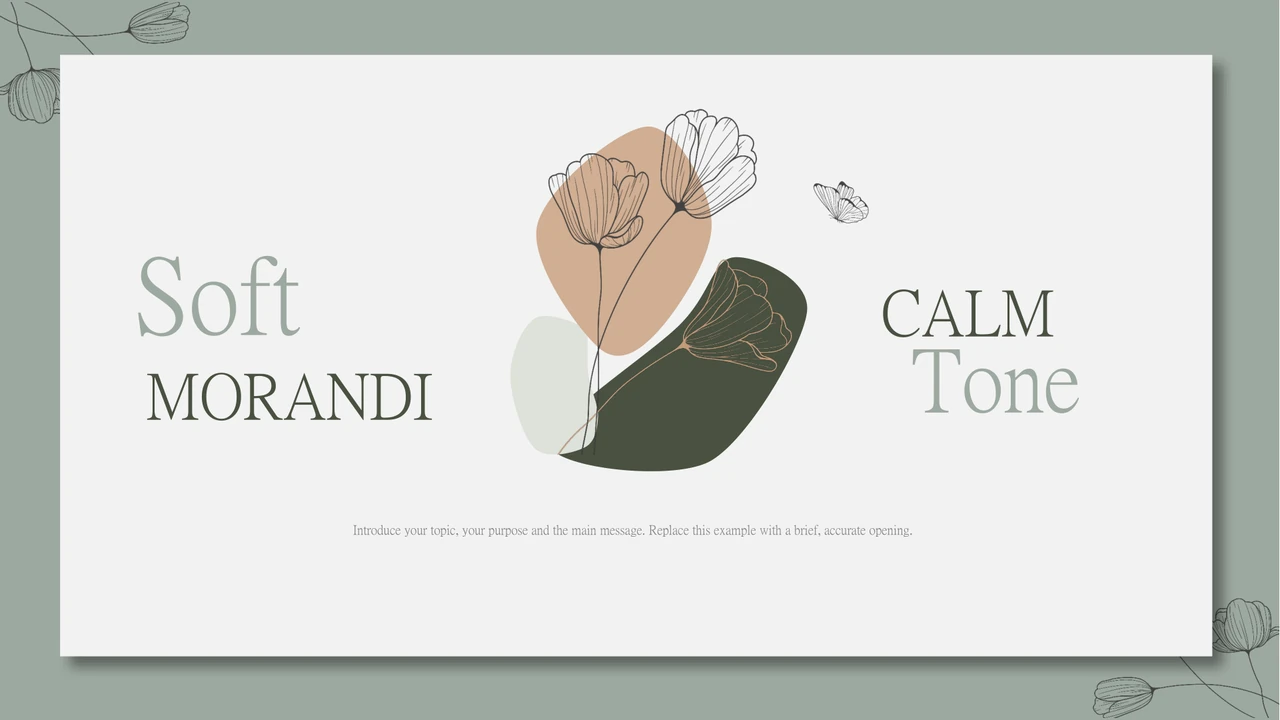
Morandi Presentation Template sets succulent photographs against grey-green fields, dark olive panels and white space. Fine flower outlines and a small butterfly bring the cover and closing page together. Across 24 widescreen slides, Morandi Presentation Template alternates large photos with paired views, three-column pictures and brief supporting notes. Four numbered dividers give Morandi Presentation Template a simple opening-to-closing structure. Later pages offer editable price examples and a photograph inside a white tablet frame. Use Morandi Presentation Template to introduce a project, explain selected work and outline the next action. Replace the sample headings and prices with your own verified details; the deck is a layout starting point. Plant pots, notebooks and coffee cups keep the visual tone consistent, so choose replacement photos with similarly quiet backgrounds. Review small captions, light text and the retained audio before presenting.
Key Features of Morandi Presentation Template
Muted greens, plant photos and clear sections.
Quiet Color Palette
Morandi Presentation Template pairs grey-green backgrounds with dark olive and white panels. Keep new accents restrained and test light text on your display.
Fine Floral Details
Morandi Presentation Template uses fine flower outlines and a butterfly around the cover and chapter pages. Leave enough space for these details beside your text.
Four Chapter Dividers
Morandi Presentation Template has four numbered chapter pages. Rename the sections to match your story and use the repeated picture layout to mark each change.
Paired Plant Photographs
Morandi Presentation Template combines plant views with white desks and ceramic pots. Choose related photos and check each crop before presenting.
Three Views and Notes
Morandi Presentation Template offers three-column photo pages and arrow-led notes. Give every picture a distinct purpose and keep the supporting captions brief.
Editable Price Examples
Morandi Presentation Template includes three price cards and a tablet picture frame. Update all example offers and prices; these are not PPT AI plan prices.
How to Use Morandi Presentation Template
Select your pages, replace examples and review.
-
Preview the Sequence
Review all 24 pages of Morandi Presentation Template, including the four chapters and price cards. Choose the layouts that support your outline before downloading Morandi Presentation Template.
-
Download a Working Copy
Download Morandi Presentation Template with an active paid plan; daily and repeat downloads are unlimited. Save an untouched copy of Morandi Presentation Template before replacing text, photos or audio.
-
Edit and Check the Deck
Adapt Morandi Presentation Template in PowerPoint, verify prices and test the audio on your intended device. Check fonts and photo crops, then export Morandi Presentation Template for review before sharing.
Questions about Morandi Presentation Template
How do I download Morandi Presentation Template?
Sign in with an active paid plan and use the download button for Morandi Presentation Template. Paid members have unlimited daily downloads and may download Morandi Presentation Template again. Save the PowerPoint (.pptx) file before opening it, then keep an untouched copy alongside your edited version. The Free, $50 and $150 cards inside Morandi Presentation Template are presentation examples, not the website membership options. Replace those labels and figures when describing your own offers.
How many slides are in Morandi Presentation Template?
Morandi Presentation Template contains 24 slides in a 16:9 widescreen format. The contents page lists four sections, and four matching dividers separate the sequence in Morandi Presentation Template. Between them are plant photographs, paired views, three-column pages, price examples and an about-us layout. Morandi Presentation Template has no native data charts or embedded Excel workbooks. Choose the pages you need rather than treating every example as a required part of your presentation.
Can I edit Morandi Presentation Template?
The text and native shapes in Morandi Presentation Template can be edited in PowerPoint. Photographs, floral artwork and the tablet border are pictures; details inside those images do not become individual editable objects. Replace the photos in Morandi Presentation Template with suitable licensed alternatives and check the framing. The price cards use editable text rather than a linked pricing system. Morandi Presentation Template also retains an audio file, which you can review or remove in your working copy according to your needs and rights.
Can I preview all of Morandi Presentation Template before downloading?
Yes. The gallery shows every page of Morandi Presentation Template, including the chapter dividers, photo columns and price cards. Use the thumbnails or arrow controls to inspect the full sequence of Morandi Presentation Template; enlarge a page when checking narrow captions. The previews are static pictures and do not play the audio retained in Morandi Presentation Template. Compare the light text and small labels with the conditions of your intended presentation, especially if it will be projected.
Will Morandi Presentation Template work in another presentation editor?
Morandi Presentation Template is supplied as a PowerPoint (.pptx) file. Another editor may open the deck, but font substitution, image layering and audio playback can differ. Open a copy of Morandi Presentation Template and compare it page by page with the gallery before committing to that editor. Check the white tablet frame and overlapping photo panels carefully. Test the sound in Morandi Presentation Template on the actual presentation device; a static PDF export will not preserve a playable soundtrack.
Which fonts does Morandi Presentation Template use?
Source font references in Morandi Presentation Template include 阿里巴巴普惠体, 阿里巴巴普惠体 Heavy and 三极砖隶简体, with theme references. Morandi Presentation Template retains two original embedded font parts associated with Microsoft YaHei and 三极砖隶简体. Embedding does not guarantee that every English character uses the intended face: the decorative subset has no Latin glyphs, and unavailable fonts may be substituted. The rendered previews of Morandi Presentation Template use PMingLiU, Meiryo-Bold and Arial Unicode MS fallbacks. Check the actual fonts and line breaks in your copy, and obtain appropriate font rights for your use.
Are the slides of Morandi Presentation Template translated into my language?
All language versions of this page describe the same English PowerPoint file for Morandi Presentation Template. Editable Chinese headings and the repeated source filler in Morandi Presentation Template have been replaced with concise English guidance. Original photo lettering and image credits remain part of the pictures. Download Morandi Presentation Template, then translate the editable text into your own language if needed. Keep new headings short, review every line break and retain attribution when changing or replacing an image.
Can I use Morandi Presentation Template commercially?
Commercial and redistribution permissions for Morandi Presentation Template have not been independently verified. Download access through a paid plan does not grant rights to the source photographs, artwork, audio or fonts. Check the applicable terms for Morandi Presentation Template and every retained asset before publishing, selling or redistributing an adapted deck. The source has no identified creator in its metadata; that does not place Morandi Presentation Template or its pictures in the public domain. Keep genuine image credits and seek permission where your intended use requires it.
How do I share my finished Morandi Presentation Template?
Finish your edits in PowerPoint and save a working copy of Morandi Presentation Template. Review every slide for remaining examples, especially the price cards, captions and closing page. Export your edited Morandi Presentation Template to PDF for a static review, open that PDF and check its layout before sending it. If the audience needs sound or editable slides, test the PPTX and confirm the relevant sharing rights first. Share the finished file or an approved storage link, and keep your editable Morandi Presentation Template safely for later changes.