Sage Floral Midyear Report Presentation Template: sage tones and a four-part review
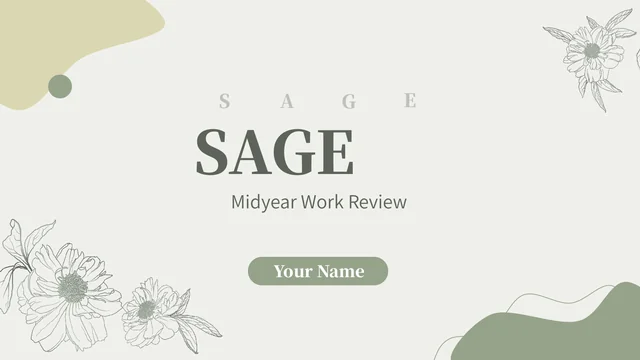
Sage Floral Midyear Report Presentation Template combines sage green, cream and floral line art across 19 widescreen slides. Large serif titles, curved colour areas and flowers frame its opening, closing and four numbered dividers. Sage Floral Midyear Report Presentation Template begins with an index covering work review, challenges, market review and next plan. The content layouts include diamond markers, icon circles, cards and arrows for organising points. Photo panels in Sage Floral Midyear Report Presentation Template pair a vase and books, a cactus, and toy dinosaurs with notes. Two Excel-linked charts sit together on the market page, while rings and typed percentages appear on separate cards. Sage Floral Midyear Report Presentation Template uses short English prompts that you can replace with your own report. Select the pages you need, add verified figures and check the pale background contrast, photo crops and fonts before sharing. Sample data is not verified business results.
Key Features of Sage Floral Midyear Report Presentation Template
Floral frames, comparisons and clear plans.
Floral frames
Sage Floral Midyear Report Presentation Template frames opening, dividers and closing with floral line art. Sage and cream areas leave room for short headings.
Four report parts
Sage Floral Midyear Report Presentation Template follows work review, challenges, market and next plan. Its index and four numbered dividers organise the report.
Still-life photos
Sage Floral Midyear Report Presentation Template pairs books, a vase, a cactus and toy dinosaurs with notes. Swap photos while keeping their crops and nearby text.
Two editable charts
Sage Floral Midyear Report Presentation Template has a quarterly column chart and a three-series line chart. Both link to Excel workbooks containing sample data.
Manual ring figures
Sage Floral Midyear Report Presentation Template has shaped rings with typed percentages. Edit both labels and segments; these examples do not link to a workbook.
Planning diagrams
Sage Floral Midyear Report Presentation Template uses circles and arrows for plans. Give each numbered point an action, owner and date, then check the reading order.
How to Use Sage Floral Midyear Report Presentation Template
Preview, replace and check your report.
-
Preview the complete deck
Browse all 19 pages of Sage Floral Midyear Report Presentation Template using thumbnails and arrows. Pick the sections, photo pages and chart layouts that match your reporting outline.
-
Download and replace examples
Sign in with an active paid plan and download Sage Floral Midyear Report Presentation Template. Edit a PowerPoint copy with verified results, your own photos and the correct reporting period.
-
Check and share your review
Check chart data, ring labels and spacing in Sage Floral Midyear Report Presentation Template. Review the sage and cream contrast on screen, then export a PDF and keep an editable copy.
Questions about Sage Floral Midyear Report Presentation Template
How do I download Sage Floral Midyear Report Presentation Template?
Sign in with an active paid plan and use this page’s download button to get Sage Floral Midyear Report Presentation Template. Eligible members can download Sage Floral Midyear Report Presentation Template without a daily limit and repeat downloads when needed. Public previews of Sage Floral Midyear Report Presentation Template remain available before purchase. Save a working copy of Sage Floral Midyear Report Presentation Template before replacing prompts, chart data or pictures. File access does not establish rights to source artwork, photographs or fonts.
How many slides are in Sage Floral Midyear Report Presentation Template?
Sage Floral Midyear Report Presentation Template has 19 slides in widescreen 16:9. Its index and four numbered dividers cover work review, challenges, market review and next plan. The sequence of Sage Floral Midyear Report Presentation Template includes an opening, report pages and a closing. Choose fewer pages of Sage Floral Midyear Report Presentation Template or change their order to suit your outline, keeping labels consistent. Check the gallery of Sage Floral Midyear Report Presentation Template before selecting the photo panels, comparison charts, ring cards or planning diagrams you need.
Can I edit Sage Floral Midyear Report Presentation Template?
You can edit native text, shapes and charts in Sage Floral Midyear Report Presentation Template in PowerPoint. Photographs and floral artwork remain images rather than separate objects within a picture. The two charts in Sage Floral Midyear Report Presentation Template use linked Excel workbooks; update their sample data, legends, categories and axes. Rings and typed percentages in Sage Floral Midyear Report Presentation Template need separate changes. Keep headings short in the narrow photo labels and cards of Sage Floral Midyear Report Presentation Template, and use your own verified figures.
Can I preview all of Sage Floral Midyear Report Presentation Template?
The gallery shows all 19 pages of Sage Floral Midyear Report Presentation Template in the order of the downloadable English file. Use thumbnails, arrows and the enlarged view to inspect the layouts. You can preview Sage Floral Midyear Report Presentation Template before buying a plan; the PPTX download requires paid access. Review the chart page, ring cards and small planning notes in Sage Floral Midyear Report Presentation Template as well as the cover. The gallery of Sage Floral Midyear Report Presentation Template helps you compare text density, photo proportions and space with your outline.
Will Sage Floral Midyear Report Presentation Template work in other editors?
Other editors may import the PPTX, but may display Sage Floral Midyear Report Presentation Template differently. Fonts, tracked captions, line breaks, photo crops and chart behaviour can change. The previews of Sage Floral Midyear Report Presentation Template are a reference, not a promise of identical rendering in every application. Inspect both charts in Sage Floral Midyear Report Presentation Template in your chosen editor and compare the result with the gallery. Check an exported PDF of Sage Floral Midyear Report Presentation Template on the intended screen, including pale backgrounds and narrow labels.
Which fonts does Sage Floral Midyear Report Presentation Template use?
Sage Floral Midyear Report Presentation Template retains source references including 思源宋体 CN Heavy, 思源黑体 CN Normal, 汉仪旗黑-50简, Calibri, Calibri Light, Arial and Times New Roman. Three original embedded font parts remain in Sage Floral Midyear Report Presentation Template. Previews use available original-family fonts, including official Source Han CN families. Embedded fonts do not ensure identical support everywhere. Use permitted fonts and check the cover, decorative captions, photo labels and chart legends throughout Sage Floral Midyear Report Presentation Template; replacements can change line breaks and spacing.
Are the slides in Sage Floral Midyear Report Presentation Template translated?
The downloadable Sage Floral Midyear Report Presentation Template has short English prompts, section titles and chart labels. The 15 website languages describe that same English PPTX, rather than 15 translated slide files. Replace prompts in Sage Floral Midyear Report Presentation Template with your own audience’s language, keeping headings concise and checking every page after choosing fonts. Pictures remain images in Sage Floral Midyear Report Presentation Template; any text combined inside a picture is not automatically editable or translated. Replace the sample figures with verified data.
Can I use Sage Floral Midyear Report Presentation Template commercially?
Commercial permission for Sage Floral Midyear Report Presentation Template is unverified. A paid download gives file access without establishing rights to every source photograph, illustration or font. Confirm permissions before using Sage Floral Midyear Report Presentation Template in client work, campaigns or products for sale. Keep genuine source credits and replace assets where suitable rights are unclear. If you adapt Sage Floral Midyear Report Presentation Template for your organisation, check both source assets and your additions; do not present sample figures as verified results.
How do I share Sage Floral Midyear Report Presentation Template?
Use this page’s share controls or copy its URL to share Sage Floral Midyear Report Presentation Template. Recipients can view the gallery and download under their own account eligibility. Before sharing a report based on Sage Floral Midyear Report Presentation Template, remove private information, confirm image and font rights, and replace sample figures. Check section labels and chart values in Sage Floral Midyear Report Presentation Template against your report. Inspect a PDF of Sage Floral Midyear Report Presentation Template on the intended screen and keep an editable copy for later reviews.