Company 3D Dashboard Presentation Template: A Company Story With Depth
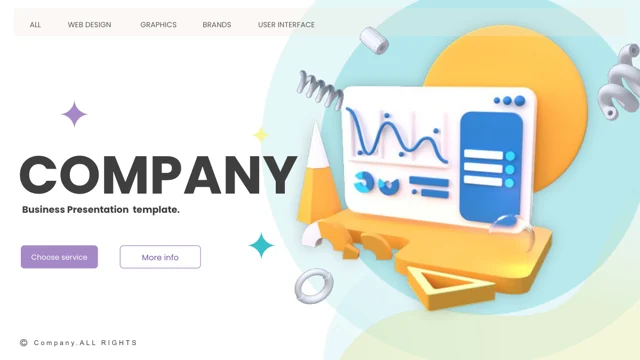
Company 3D Dashboard Presentation Template opens with a dimensional dashboard and five numbered parts. Company 3D Dashboard Presentation Template includes mission statements, team profiles, task dates, SWOT analysis and project diagrams. Connect company capabilities with current priorities using Company 3D Dashboard Presentation Template. Replace the prices, percentages and quotations in Company 3D Dashboard Presentation Template with verified facts; omit irrelevant pages.
Key Features of Company 3D Dashboard Presentation Template
Original layouts for your own facts.
Dashboard cover
Company 3D Dashboard Presentation Template opens with dimensional dashboard artwork.
Five parts
Organize Company 3D Dashboard Presentation Template with numbered section dividers.
SWOT pages
Compare four perspectives in Company 3D Dashboard Presentation Template.
Team profiles
Introduce real roles with Company 3D Dashboard Presentation Template.
Task dates
Update the dated assignments in Company 3D Dashboard Presentation Template.
Project diagrams
Explain relationships using diagrams in Company 3D Dashboard Presentation Template.
How to Use Company 3D Dashboard Presentation Template
Select, personalize and review.
-
Choose sections
Preview Company 3D Dashboard Presentation Template and select the chapters your company needs.
-
Get the file
Paid members can download Company 3D Dashboard Presentation Template without a daily limit.
-
Replace the examples
Edit Company 3D Dashboard Presentation Template, check diagrams and review your exported copy.
Questions About Company 3D Dashboard Presentation Template
How do I download Company 3D Dashboard Presentation Template?
Sign in with an active paid plan to download Company 3D Dashboard Presentation Template. Daily downloads are unlimited; edit a separate copy.
How many pages are in Company 3D Dashboard Presentation Template?
Company 3D Dashboard Presentation Template has 34 slides, including five sections and SWOT layouts. Keep only the pages your company needs.
Can I change the text and colors of Company 3D Dashboard Presentation Template?
Edit separate text and shapes in Company 3D Dashboard Presentation Template. Dashboard artwork may require image replacement; check alignment afterward.
Can I preview all of Company 3D Dashboard Presentation Template?
Every slide of Company 3D Dashboard Presentation Template has a preview. Enlarge task pages and diagrams to inspect their labels.
Will Company 3D Dashboard Presentation Template open in other presentation editors?
Try Company 3D Dashboard Presentation Template in a PPTX-compatible editor. Diagrams, symbol fonts and alignment can change; test a copy first.
Which fonts does Company 3D Dashboard Presentation Template use?
Company 3D Dashboard Presentation Template uses Advent Pro, Arial, Calibri, Caviar Dreams, Gill Sans, Lato Light, Lato Medium, Liberation Sans, Montserrat, Nexa Light, Open Sans, Open Sans Light, Playfair Display, Poppins Medium, Poppins SemiBold, Roboto, Roboto Condensed, Roboto Light, Roboto Medium, Roboto Thin, Segoe UI, Segoe UI Light, Times New Roman, Wingdings. After substituting fonts, inspect narrow headings, icon characters and paragraph wrapping.
Are the slides in Company 3D Dashboard Presentation Template translated?
Company 3D Dashboard Presentation Template keeps English examples and filler text. Translate your copy and check task-date labels and text space.
Can I use Company 3D Dashboard Presentation Template commercially?
Check source licensing and artwork permissions before commercial use of Company 3D Dashboard Presentation Template. Paid access does not expand usage rights.
How can I share Company 3D Dashboard Presentation Template?
Share the page link for Company 3D Dashboard Presentation Template’s original preview. Send an edited PPTX or PDF for your own company story.